The Picomite, Turtle Graphics & G-Code

The Picomite, Turtle Graphics & G-Code

Home Forums The Tea Room The Picomite, Turtle Graphics & G-Code

Viewing 25 posts - 1 through 25 (of 37 total)
  • Author
    Posts
  • #829146
    IanT
    Participant
      @iant

      For anyone here who might be interested – – Please feel free to ignore this if you are not!

      The latest version of the Picomite has just been released (6.01) and has a number of new features. Of particular interest to me (and very timely for Christmas) is the inclusion of Turtle Graphics – which I think my older Grandchildren will enjoy playing with.

      (Amongst the other changes are high speed buffered display drivers, additional HDMI/VGA modes, USB mouse sensitivity controls, additions to the Editor, upgrades to the PIO programming envoironment and new ‘LOAD JPG’ and ‘DRAW3D’ options – and a revised 253 page PDF manual – upto date documentation is a very big plus for me!)

      The MMB user community has also been busy playing with AI recently (as have I) but even so I was very suprised to see a G-Code interpreter that is fully integrated into MMBasic (via a C routine) which Peter (on his first attempt at this) describes as follows:

      “There are two versions of the GCODE. One is fully integrated into MMbasic and allows the user to use variables in the GCODE as in the video. The second allows the user to use straight GCODE e.g. G0 X100 Y100.  The axis setup (as on the screen) says I have 400 steps per millimeter and my maximum speed is 1600mm/minute and maximum acceleration is 100mm/sec squared. The acceleration for arc is calculated across the arc over the multiple arc steps. The acceleration for linear moves can be either trapezoid or s-curve at the user’s discretion”

      Picomite running G-Code..

      (Shown running a spiral drilling profile. Note no lost steps and running fast. It is slowed down at the end of the video, so that the actual x and y motion can be seen)

      I’m not tempted to give up my UGS/GRBL just yet but I am impressed with what’s being achieved using the new tools.

      Regards,


      IanT

      #829150
      Michael Gilligan
      Participant
        @michaelgilligan61133

        Thanks for sharing that, Ian

        … Yes, I might well be interested

        I had a fondness for Turtle Graphics, many years ago, and am particularly intrigued by the possibility of a minimalist G-Code controller for a microscope stage.

        MichaelG.

        #829151
        IanT
        Participant
          @iant

          The simplest thing to find out more is to download the PM manual Michael – which can be found at the bottom of this page:

          Picomite 6.01 Manual

          See Appendix H – Turtle Graphics  (page 226)

          Regards,


          Ian

          #829154
          Michael Gilligan
          Participant
            @michaelgilligan61133

            Thanks, Ian … will do.

            … For my ‘prep’ this seems like a good place to start:

            .

            .

            MichaelG.

            #829159
            Michael Gilligan
            Participant
              @michaelgilligan61133

              Bedtime now … but I have to ask:

              Has anyone yet implemented a hardware Turtle for this ?

              MichaelG.

              #829212
              IanT
              Participant
                @iant

                Has anyone yet implemented a hardware Turtle for this ?

                The latest software (with Turtles) was only released on the Tuesday Michael, so the broad PM community hasn’t had much time to use it yet. So, “Turtle hardware” not that I am aware of – yet.  🙂

                The EC YouTube was a good introduction to the basic Picomite at that time (3 years ago) although I do wish he had resisted using line numbers (no one else does with MMB). However, much progress has been made since then, most notably with the newer Pico 2. For the extra £1 or so, I won’t be buying any more Pico 1’s, just Pico 2s in future and I’d very much suggest that you do the same.

                Although some tend to draw a distincton between “Self Contained Computer” and “Embedded Computer” (as in the manual) – essentially being whether you choose the option of an LCD display or VGA/HDMI one, I find that distinction much more blurry in my ‘uses’.

                There are a number of ‘standard’ PCB designs that the Pico can plug into that makes it easy to choose more complicated set-ups without major expense. This is in addition to the numerous commercial offerings for the Pico. I use a ‘Quad’ expansion board with 2.5″ LCD display as a portable (e,g, when away from home) development system – all cheaply available off the shelf. Most of my other PM projects use the ‘standard’ PCB designs that I get made by JLCPCB at very little cost (my last order was for 10 PCBs at >£15 inc delivery!)

                I do have simple Picomite controllers (with no displays) in my models but I also use VGA versions for control purposes (for their versatile screen output and the fact I already have the screens). Whilst I’m not personally interested in “Retro” computing as such, the HDMI 10″ screen Picomite-based computers (that my older Grandchildren will be getting) are most definitely self-contained computers (full QUERTY keyboards, 32Gb mass storage, high quality audio DACS, RTC, Hi-Res graphics) and much more powerful than any 1980’s 8-bit console.

                The PIO programming abilites of the Pico are also extremely powerful and allow MMB applications to now be considered that would not be otherwise possible. I am currently working through a tutorial to better understand their inner workings and further expand my use of these very useful devices.

                If you do start working with the Picomite Michael, I would also recommend that you download MMEdit (it’s free too) for any larger MMB programme development. The combination of MMEdit and the Picomite is a powerful one and makes working with the Picomite (both when editing and de-bugging) a delight.

                Regards,


                IanT

                #829281
                Robert Atkinson 2
                Participant
                  @robertatkinson2

                  There were lots of hardware Turtles for the BBC B

                  https://classicacorn.computinghistory.org.uk/8bit_focus/logo/logo.html

                  Robert.

                  #829285
                  Michael Gilligan
                  Participant
                    @michaelgilligan61133
                    On IanT Said:

                    Has anyone yet implemented a hardware Turtle for this ?

                    The latest software (with Turtles) was only released on the Tuesday Michael, so the broad PM community hasn’t had much time to use it yet. So, “Turtle hardware” not that I am aware of – yet.  🙂


                    […]

                    Fair point, Ian  … I just wondered whether the software had been developed because some hardware was crying-out to be used.

                    It all looks very promising, and I suspect much of the ‘festive season’ will be spent  investigating further.

                    #829291
                    Michael Gilligan
                    Participant
                      @michaelgilligan61133

                      Just been looking at this page:

                      https://shop.pimoroni.com/products/raspberry-pi-pico-2-w?variant=54852253024635

                      … and am a little confused [already]
                      Does the PCB for the version with header pins actually differ from the one without?

                      … it certainly appears so.

                      MichaelG.

                      #829314
                      IanT
                      Participant
                        @iant

                        Hi Michael.

                        No, the only difference between a ‘Pico’ with headers (or without) is that the ‘with’ already has the ‘pins’ soldered on for you – which I would generally recommend. I see the price difference between ‘with’ and ‘without’ is £1 – and they will charge you £1.80 for a header set (which you will then have to solder on). Some do solder the ‘headerless’ Picos directly to their PCBs/Proto-boards but I wouldn’t recommend it unless you really don’t like or want sockets (for height reasons for instance). I swap my Picos in and out all the time.

                        The link you sent me was for the Pico 2 W – which is the Wireless/Bluetooth version.

                        I’d suggest buying the straight Pico 2 (with headers) – which is here on Pimoroni.

                        Pico 2 – Pimoroni

                        It’s £2 cheaper than the ‘W’ and unless you need Wireless/Bluetooth – is the better choice. The Pico 2 has some significant advantages (more memory, ARM Cortex M33s, 3 PIOs/12 State Machines, HSTX etc) over the Pico 1 and is the way to go now.  The Pico 1 ‘W’ version doesn’t have as much (available) memory as the straight Pico 1 and consumes four GP Pins too. I assume the Pico 2W will be similar, although I’ve not looked at it in any detail.

                        Robert, with regards the BBC Turtle, I assume the Beeb controls everything via an umbilical to the ‘dumb’ Turtle. If I was implementing one of these now, I think I’d have an intelligent Turtle (using MMB Servo/PWM drivers and serial comms features) with the ‘Controller’ just sending the high level commands. The Kitronics dual motor driver would be ideal for this I think…just drop a Picomite in, add two DC motors and a servo for the pen. There are spare GP pins brought out that could be used for IR, BT or Wireless. A Pico W might be useful in this instance..

                        Kitronics Pico dual driver

                        Regards,


                        IanT

                        #829315
                        IanT
                        Participant
                          @iant

                          PS – With any commercial ‘Pico’ board (such as the Kitronics mentioned) it is important to check/know what GP pins it is hardwired to use, as there may be pin conflicts with other H/W modules/MMB features if they are sharing the same Pico or you need specific pins (as with the Waveshare 10″ screens or if wanting to programme the PIO State Machines directly, which may sometimes require multiple pins with no ‘gaps’ in the pin order)

                          Regards,


                          IanT

                          #829333
                          Michael Gilligan
                          Participant
                            @michaelgilligan61133

                            Many thanks for all the helpful comments, Ian

                            I had looked at the 2W version because ultimately it might be useful to control a stepper-motored microscope stage [turtle?] wirelessly.

                            Hopefully, I will be placing an initial order of some sort today.

                            MichaelG.

                            #829356
                            John Haine
                            Participant
                              @johnhaine32865

                              Michael, you could do that very easily using an Arduino Nano running GRBL with GRBLController on your phone and a cheap Bluetooth adapter.  Exactly what I use for the table feed on my manual mill.  The phone app has jogging which is what you need. Only slightly difficult bit is configuring the Bluetooth adapter.

                              #829369
                              Michael Gilligan
                              Participant
                                @michaelgilligan61133

                                Thanks for the thought, John

                                I was interested by IanT’s announcement, and thought it worth exploring.

                                … Life’s Rich Tapestry, and all that.

                                He rarely seems gets any encouragement from the Arduino enthusiasts.

                                MichaelG.

                                #829374
                                Michael Gilligan
                                Participant
                                  @michaelgilligan61133

                                  I arrived home too late to confidently decide what to order, and from whom

                                  … a few days ‘research’ would probably be worthwhile.

                                  MichaelG.

                                  #829400
                                  IanT
                                  Participant
                                    @iant

                                    “He rarely seems gets any encouragement from the Arduino enthusiasts”

                                    Well that made me smile Michael.  🙂

                                    Of course, my CNC router has a 32-bit GRBL controller fitted to it – which has been developed from the original GRBL that ran on an Arduino Uno (I assume). It listens very happily to the UGS software that is running on the RPi 5 sitting alongside it. I have no desire (or need) to re-invent the wheel.

                                    The software Peter has demonstrated is limited in it’s functionality and will not be developed further but it might be a useful part of a larger MMB system – for applications other than CNC.

                                    “The STEPPER command provides a comprehensive system for controlling up to 3 stepper motor axes (X, Y, Z) with support for G-code execution, acceleration planning, and hardware limit switches. It uses a dedicated 100kHz interrupt timer for smooth pulse generation. It only supports limited G-codes: G0, G1, G2, G3, G28, G90, G91, G92, M3, M5″ 

                                    I assume Peter had a particular application in mind when deveoping his G-code software, although it may simply have been an interesting “AI” experiment for him. I know he (and others) are having fun playing with it.

                                    As an aside, MMB already includes PID/MATH command functions that allow up to 8 PID controllers to run simultaneously from within an MMB programme. I know that this is being used (commercially) to control servo motors in at least one automation application.

                                    As with so much we discuss here, these things are very much about personal choice and previous experience

                                    I tried both these systems and back then (2014’ish?) found that the Micromite suited my needs. The Arduino has a very much larger community and there are now more powerful platforms available to run it on. However, the PicoMite was also a huge step up from the original (PIC32) Micromite in terms of both performance and capabilty, as I hope you will see from the manual.

                                    I suggest that you treat yourself to that Pico2, load the Picomite software (just drag & drop it) and work with it (preferably using MMEdit). If you have a spare Arduino handy (Uno, Nano, Mega etc) then get that out and do the same things using the Arduino IDE. Write a few simple ‘tasks’ and see which one suits you the best.

                                    Regards (& Merry Christmas!)


                                    IanT

                                    #829409
                                    Michael Gilligan
                                    Participant
                                      @michaelgilligan61133

                                      Thanks for the advice, Ian

                                      … I’m still trying to work out why you said [yesterday] that the W version was only a pico 1, and should be avoided … the link I showed stated it to be 2W, which seems a real bargain for all that hardware.

                                      MichaelG.

                                      .

                                      P.S . __ this may [or may not] be of interest to your aforementioned grandchildren:

                                      https://turtle360.net/downloads.html


                                      #829416
                                      IanT
                                      Participant
                                        @iant

                                        No, your link was to a Pico2W Michael. I’m sorry if I confused you.

                                        “The Pico 1 ‘W’ version doesn’t have as much (available) memory as the straight Pico 1 and consumes four GP Pins too”

                                        I was talking about the Pico 1W because I have a Pico 1W but I’ve not yet used (or looked at) the Pico 2W.

                                        I’m sure it’s been upgraded but I don’t know in which way, or if it differs from the ‘straight’ Pico 2 in the same ways. I assume it will have most of the attributes of the Pico 2 but may also still have less availalbe GP pins & memory etc – but I don’t know.

                                        I’m not sure how much Internet access my Daughter-in-Law allows the chidren now but I will show them the tutorials and get them going. Thank You.

                                        Fortunately, they are much brighter than their Grandad and keep me on my toes!  🙂

                                        Regards,


                                        IanT

                                        #829424
                                        SillyOldDuffer
                                        Moderator
                                          @sillyoldduffer
                                          On IanT Said:

                                          “He rarely seems gets any encouragement from the Arduino enthusiasts”

                                          And for good reason!  MMBASIC is a tool, with many technical pros and cons, not a matter of personal preference.  I advise anyonee interested to check the small print.   Ask a search engine “whats wrong with mmbasic“.    And then “what’s wrong with Arduino!”   These tools are all flawed, but the success of Arduino and C/C++ speak for themselves.

                                          Write a few simple ‘tasks’ and see which one suits you the best.

                                          Or, much better, try a few difficult tasks to find out which suits you the best!

                                          🙂

                                          Dave


                                          #829425
                                          IanT
                                          Participant
                                            @iant

                                            A quick note about the Webmite (Pico1/2 W) Michael – from the PM manual (Page 80):

                                            “These functions are complex and as a result, a few points should be noted: Implementing the Internet protocols uses a lot of the resources of the processor (particularly RAM) so the WebMite firmware should only be used where WiFi and Internet connectivity are important and some performance impact can be tolerated compared to the standard Raspberry Pi Pico”

                                            The main differences between the Pico 1 vs 2 seem to be faster CPUs, 2x the Memory & upgraded Bluetooth (5.2)

                                            See here:  Pioco1W vs Pico2W

                                            From memory, I think it was stated that there wasn’t enough memory to do both BT and Wi-Fi within MMB on the original Picomite W (aka the Webmite). So only Wi-Fi is currently supported, although with the increased Pico2 memory this may change one day for the 2W version. However, I have connected a PicoMite to my phone (via BT) using an HC-05 module (or HC-06?) using both ‘Serial Bluetooth Terminal’ and ‘MIT A12 Companion’. I’m pretty sure I also got a ‘Serial WiFi Terminal’ going too but it was quite a while ago. These are free ‘Android’ Apps btw.

                                            Regards,


                                            IanT

                                            #829426
                                            Michael Gilligan
                                            Participant
                                              @michaelgilligan61133

                                              Thanks for the further information Ian

                                              A slap on the wrist for me, for reading the hype instead of the documentation !

                                              Suitably self-chastised, I will probably order the non-W version and “try walking before attempting to run”

                                              MichaelG.

                                              .

                                              Edit: __ having followed Dave’s search advice, I found this:

                                              https://gr33nonline.wordpress.com/2025/05/30/is-mmbasic-the-worst-

                                              implementation-of-basic-out-there/

                                              The preamble of which is rather discouraging.

                                              #829432
                                              IanT
                                              Participant
                                                @iant

                                                No need to apologise Michael but I do think that’s a good idea. A Pico 2 (with headers)  🙂

                                                If you’d like a PCB to plug it in to – I’ll send you one – although one of these might be useful for experimenting

                                                Pico Breadboard

                                                Or a bit larger (with wires) on eBay:  803 Point BB

                                                I’ve had my head buried in the Raspberry-Pico-C-SDK trying to get it around the PIO Assembler Mnemonics (and took a welcome break to check on Pico Ws).

                                                At first look the PIO/State Machines are quite simple but then I stupidly took a second look!   🙂

                                                However, I think it will be a very useful investment. The PIOs can run independently of the CPUs and are therefore not limited by the speed of the main programme (in this case MMB). You set up the State Machines, say “Go Boys!” and off they go at whatever speed you’ve told them. As the SDK says, there’s no need to “bit-bang” anything now…

                                                Actually, I may have gone past my ability to absorb any more tonight, so I will call it a day.

                                                Good Night


                                                IanT

                                                #829447
                                                Michael Gilligan
                                                Participant
                                                  @michaelgilligan61133

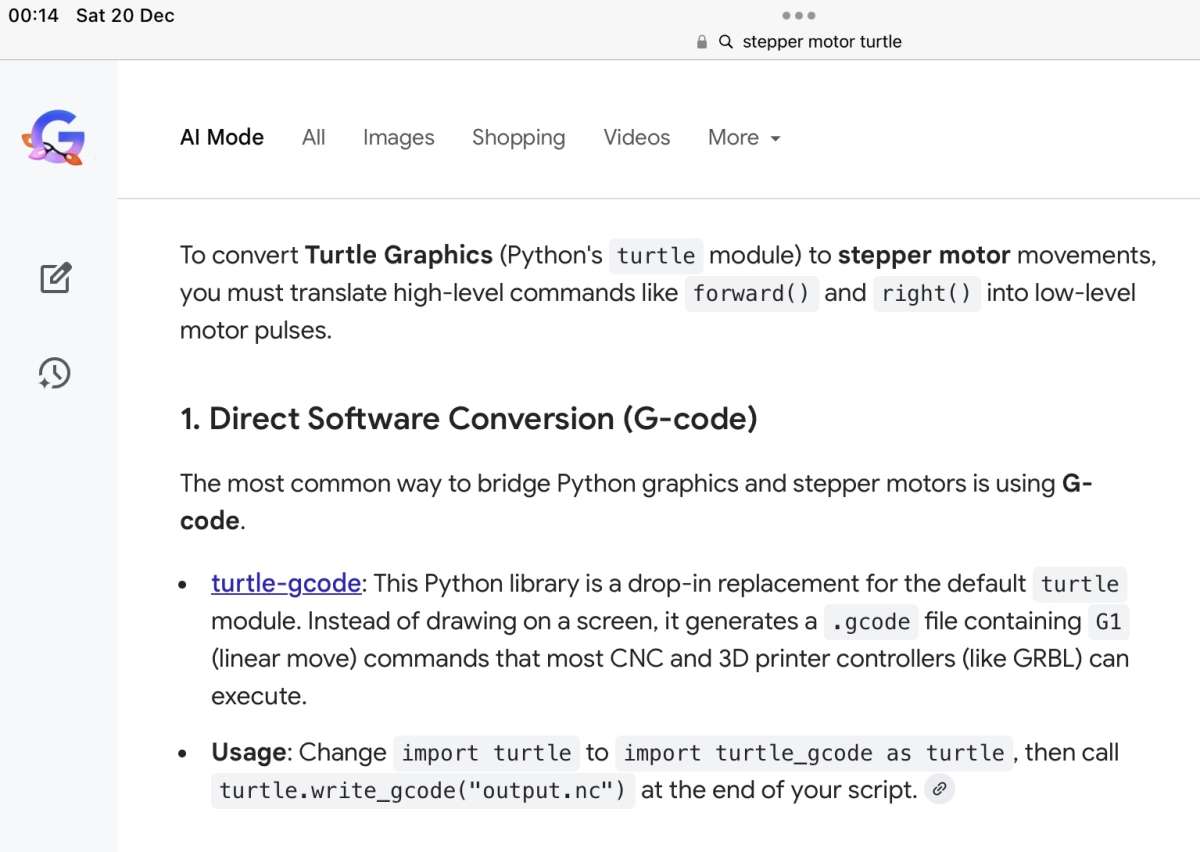
                                                  Thanks to an AI-assisted search … This looks encouraging:

                                                  .

                                                  IMG_1308

                                                  .

                                                  MichaelG.

                                                  .

                                                  Ref. __ https://pypi.org/project/turtle-gcode/


                                                  #829473
                                                  IanT
                                                  Participant
                                                    @iant

                                                    Good Morning Michael, I was a bit wacked last night and didn’t notice your ‘Edit’.

                                                    I wrote an (overly) long response first thing this morning but somehow hit the wrong key and lost it all! My manager is busy wrapping parcels atm and I’m trying to put off painting the utility, so I’ll have another go…

                                                    I’m not going to go through this guys gripes line by line but will cover some of the main points.

                                                    Let’s look at his code snippet first.

                                                    10 NUM$=”99″

                                                    20 NUM=VAL(NUM$)

                                                    30 PRINT NUM

                                                    His objection seems to be that you cannot use different variable ‘types’ with the same variable name.

                                                    Well, no you can’t and that’s a good thing. It’s one of the reasons “Basic” has a poor reputation. Every computer language has a ‘syntax’ (rules if you will) and MMB’s clearly state:

                                                     “Note: that it is illegal to use the same variable name with different types. Eg, using nbr! and nbr% in the same program would cause an error. Most programs use floating point variables for arithmetic as these can deal with the numbers used in typical situations and are more intuitive than integers when dealing with division and fractions. So, if you are not bothered with the details, always use floating point.”  (Page 27)

                                                    There are good reasons for doing this, as it is very poor practice.

                                                    Here is how I would write this in MMB.

                                                    NUM$ = “99”

                                                    PRINT VAL(NUM$)   ‘Which simply prints the string ($) as the number 99.

                                                    —————————

                                                    So I don’t really see the problem but if I did want to copy his code line-by-line, then it would look this in MMB:

                                                    NUM$ = “99”              ‘ Define string variable

                                                    PRN% = VAL(NUM$)   Convert string variable to number variable

                                                    PRINT PRN%               ‘ Print number variable (Integer)

                                                    —————————

                                                    MMB isn’t “Open Source” – Not correct. It is, just not under GNU/GPL. These are plenty of people on the BSF who have access to the source. Indeed, whilst Geoff still maintains the ‘source’ MMB language ‘model’, others support the various ‘platforms’ it runs on (Win/Dos, Linux, Android, STM, Pico & PIC32). Others also provide specialist support in areas such as graphics, documentation etc.

                                                    Geoff explains the reasons (and history behind it) here:  MMB & Open Source

                                                    MS-Basic isn’t as good as BBC Basic etc –  There are many variants of Basic, as there are with other languages. BBC Basic is excellent and very popular. Sinclair Basic (mentioned by this guy) was technically very clever to pack so much in but very much an ‘acquired’ taste (and again possibly aother reason people throw their hands up in horror when “Basic” is mentioned. I imagine there were far more users of MS-Basic than BBC though…

                                                    My first experience with MMB was running it on the PIC32. An embedded programme could be installed on a 28pin DIL package that needed only one external capacitor to run it. There wasn’t anything else like that that I knew of. The Pico 1 (now2) has simply opened up a lot more capability in a very convenient & inexpensive package.

                                                    Geoff explains how the original ‘Maximite’ came to be here:  MMB – a brief

                                                    OK, I can’t put off the decorating off any longer. Have a great weekend.

                                                    Regards,


                                                    IanT

                                                    #829477
                                                    Michael Gilligan
                                                    Participant
                                                      @michaelgilligan61133

                                                      Thanks again, Ian

                                                      Rest assured that I will be reading the documentation thoroughly over the next few days.

                                                      … I have no reason to put-up decorations, and it should be very quiet here.

                                                      Enjoy your family Christmas

                                                      MichaelG.

                                                    Viewing 25 posts - 1 through 25 (of 37 total)
                                                    • Please log in to reply to this topic. Registering is free and easy using the links on the menu at the top of this page.

                                                    Latest Replies

                                                    Home Forums The Tea Room Topics

                                                    Viewing 25 topics - 1 through 25 (of 25 total)
                                                    Viewing 25 topics - 1 through 25 (of 25 total)

                                                    View full reply list.