programming Arduino Nano

programming Arduino Nano

Home Forums Electronics in the Workshop programming Arduino Nano

Viewing 25 posts - 1 through 25 (of 31 total)
  • Author
    Posts
  • #829083
    duncan webster 1
    Participant
      @duncanwebster1

      I’m trying to modify the program on an existing project. I had a memory of difficulty in downloading the software from when I made it 12 years ago, and sure enough, the USB connector seems to be very iffy. I’ve got the little whizbang one uses to program Arduino Mini, which has 5V, gnd, TX, RX pins. Can I use this to program the Nano?

      The particular Nano has to have ‘old bootloader’ selected just to make things even more complicated. Fishing the Nano off the board is not easy, lots of pins.

      #829085
      john fletcher 1
      Participant
        @johnfletcher1

        I would like to know how to program an Arduino to enable me to make things, powered by a stepper motor. Can a reader recommend a basic book or what ever to get me started. Ted

        #829095
        John Haine
        Participant
          @johnhaine32865

          I found most of the answers at https://www.arduino.cc/

          Also if you look at the user forum there are textbook recommendations aplenty.

          #829101
          SillyOldDuffer
          Moderator
            @sillyoldduffer

            I prefer books for learning rather than a screen.

            Most Arduino books are aimed at beginners and provide a good introduction and example programs.  My kids obviously have no idea what I did for a living because I got “30 Arduino Projects for the Evil Genius, 2edn” for xmas a few years ago.  Though nothing new in it for me, it’s quite good!

            This website has many older examples of the introductory type, which you can explore for free.   Might be ‘good enough’, but there’s much to be said for buying an up-to-date edition, because of many improvements and simplifications over the years.  My book doesn’t cover how to compile and install projects on the web rather than setting up locally.

            The Arduino platform is unusually beginner friendly.  It comes with many examples that can be installed with a few mouse clicks.  The source code is available to study, so it is very common to develop programs by modifying examples and cut and paste.  Not from first principles.

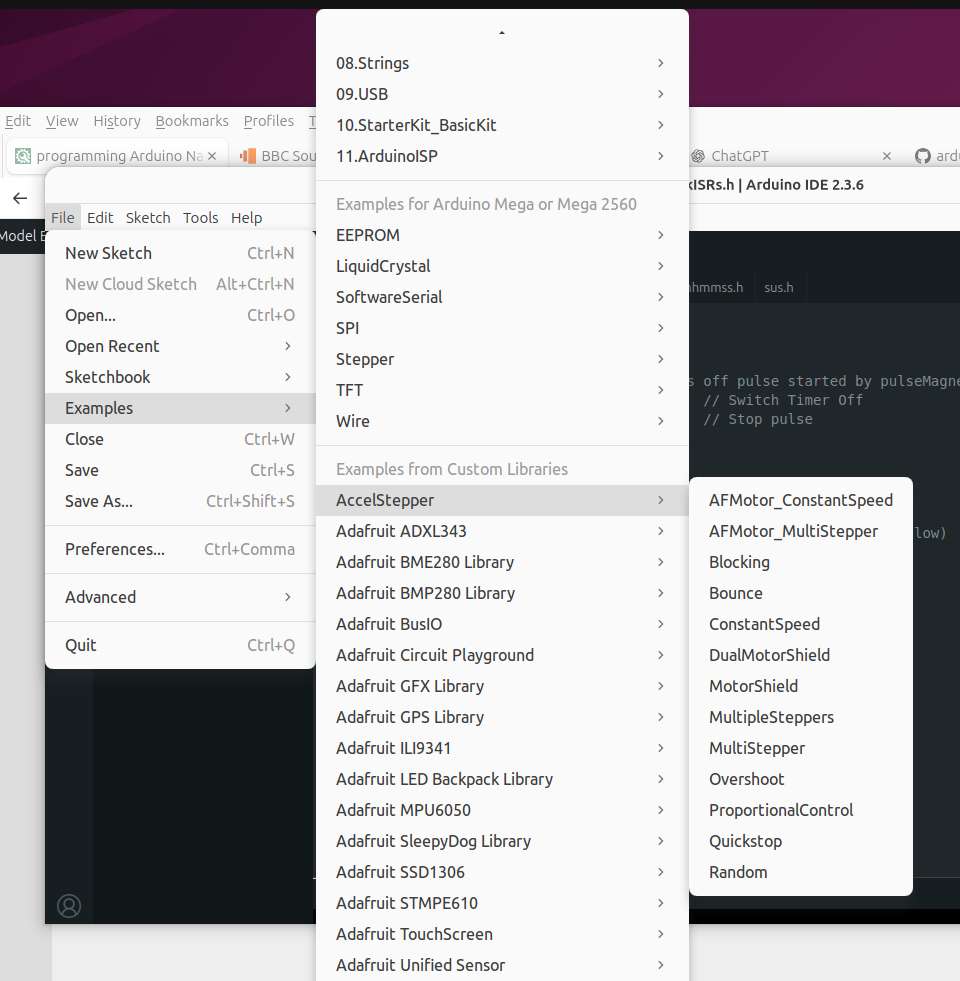
            The AccellStepper library comes with these:

            Screenshot From 2025-12-17 16-32-04


            Although the examples are mostly simply written and backstage complexities are hidden, the compiler is almost full function C++, making expert techniques available if needed.   Most code I guess is written in C-dialect, for which Kernighan and Ritchie is the classic primer.   C++ is considerably more developed, not always in a good way, and it’s ongoing.  I’m not sure what a good C++ starter book in 2025 is, particularly as the compiler version lags behind.   For most beginner purposes having C++ is under the bonnet doesn’t matter – KISS!

            If anyone wants a play without downloading anything, it can all be done on the web.  (With the usual privacy intrusions associated with the cloud.)

            Dave


            #829106
            John Haine
            Participant
              @johnhaine32865

              And just to add that there are simulator programs that allow you to design your hardware and write your code and run it all on your PC!

              #829152
              peter1972
              Participant
                @peter1972
                On john fletcher 1 Said:

                I would like to know how to program an Arduino to enable me to make things, powered by a stepper motor. Can a reader recommend a basic book or what ever to get me started. Ted

                You do not need to purchase a book to find out how to program an Arduino for a stepper motor.

                To give you an indication of how little code may be needed, here is code that makes a small geared stepper motor rotate backwards and forwards through 90°:

                #include <Stepper.h>

                #define motorSteps 2048  // steps per revolution
                #define motorPin1 8         // IN1 (ULN2003A driver)
                #define motorPin2 9         // IN2
                #define motorPin3 10       // IN3
                #define motorPin4 11       // IN4


                // Initialise Stepper library (changed pin order for unipolar motor):
                Stepper myStepper(motorSteps, motorPin1,motorPin3,motorPin2,motorPin4);


                void setup()
                {
                myStepper.setSpeed(10);  // set motor speed to 10rpm
                }


                void loop()
                {
                myStepper.step(512);   // Step forward
                myStepper.step(-512);  // Step backward
                }

                More challenging is deciding:

                • stepper motor to buy
                • driver to buy
                • acceleration and deceleration (if any)
                • mechanical arrangements such as shaft coupling.
                #829251
                Nick Wheeler
                Participant
                  @nickwheeler

                  Peter, you might think that’s self explanatory but to me it just looks like instructions to nail a jelly to the ceiling written in Norwegian.

                  A book is most definitely required!

                  #829253
                  john fletcher 1
                  Participant
                    @johnfletcher1

                    Many thanks to all who responded to my request, for help with teaching myself programming an Arduino. Ted

                    #829280
                    peter1972
                    Participant
                      @peter1972
                      On Nick Wheeler Said:

                      Peter, you might think that’s self explanatory but to me it just looks like instructions to nail a jelly to the ceiling written in Norwegian.

                      A book is most definitely required!

                      Nick, in my view you would make very much faster progress if you use online resources instead of ploughing through a book.

                      For the Arduino Nano, there is a short tutorial here to get the Arduino IDE (integrated development environment) software up and running for a Nano:

                      https://docs.arduino.cc/tutorials/nano/nano-getting-started/

                      I would suggest then starting by getting the ‘Blink’ example to work; you don’t even need a power supply or any external circuit:

                      https://docs.arduino.cc/built-in-examples/basics/Blink/

                      If you do not understand what a line of code does, there is an excellent language reference with links to more detailed information on each language element:

                      https://docs.arduino.cc/language-reference/

                      For more in-depth information, you could try reading ‘Getting Started with Arduino’ although it does cover things you are unlikely to ever need:

                      https://docs.arduino.cc/learn/starting-guide/getting-started-arduino/

                      Of course you can always google for more information and view YouTube tutorials. If you get stuck, ask on this forum or on the Arduino forum.

                      When you are ready to try driving a stepper motor, take a look at:

                      https://docs.arduino.cc/learn/electronics/stepper-motors/


                      #829312
                      duncan webster 1
                      Participant
                        @duncanwebster1

                        I’m with Nick, working from a book is much better at first, you can go at your own speed turn backwards, and forwards and in my case failing hearing can’t cope with some accents

                        The Evil Genius book SOD suggested is where I started, but I already had a grasp of C

                        #829387
                        Nick Wheeler
                        Participant
                          @nickwheeler

                          Peter, online resources are good once  I have correctly understood the absolute basics. But there are so many supposed tutorials presented by people that have no business(either because they don’t understand the material or don’t know how to teach) publishing that a proper book that had at least some editing is the way forward.

                          Poor teaching/learning/understanding of the fundamentals of any subject usually, and very quickly, leads to all sorts of problems – just look at some of the CAD threads!

                          #829401
                          peter1972
                          Participant
                            @peter1972

                            Nick, the links I gave in my previous post are all links to official Arduino tutorials (and the official language reference).

                            There is nothing wrong with learning from a book.

                            When I first started with an Arduino, I first downloaded the Arduino IDE software and then followed the Blink tutorial. It was good to get something working within about 20 minutes. For the project I was working on, I wanted to read an analogue voltage so immediately looked at the analogRead official reference (here). I only picked out what I needed for my project and made sure everything was working as I added extra functionality step-by-step. In contrast, when reading a book you are liable to slowly plough through information that you will never need, feeling that you have to understand and learn the language in detail. That may be your preferred learning style: it’s not mine when it come to coding.

                            #829544
                            SillyOldDuffer
                            Moderator
                              @sillyoldduffer

                              Ted and I are trying to sort out his actual problem which is a failed Stepper Motor Driven Rotary Table.  He’d prefer to do this without learning Arduino at all (very sensible!).

                              Not clear what’s wrong: could be the microcontroller, the keypad, the stepper driver, the motor, or a wiring fault.

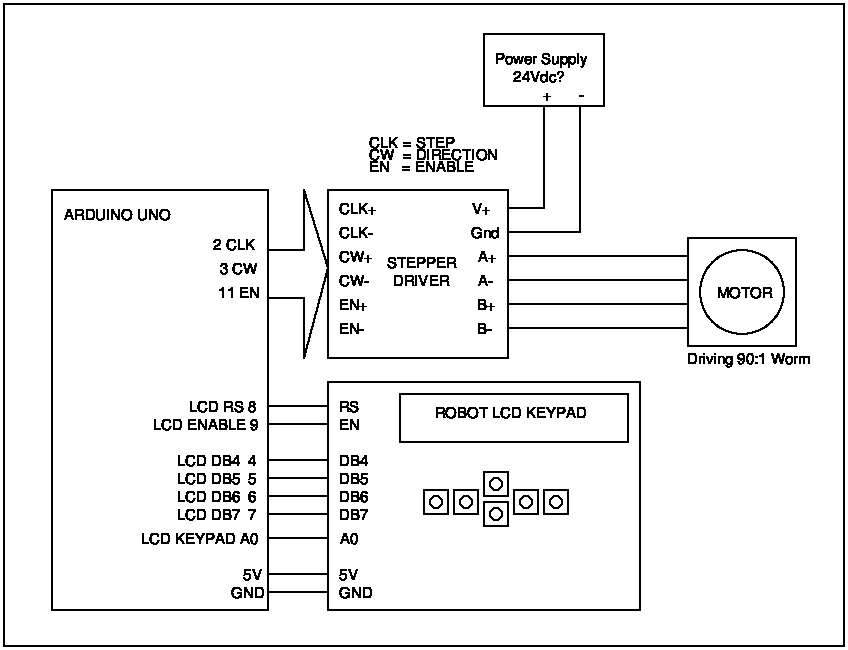
                              My mission is to provide a working microcontroller.  This post is to confirm I’ve understood Ted’s set-up.  It’s described in MEW 249 “An Arduino Indexer”. which I don’t have.  Joining the dots:

                              • microcontroller is an Arduino Uno
                              • Software is Gary Liming’s 2014 Step Indexer.
                              • Display is a DF Robot / Sainsmart 1602 Keypad Shield.
                              • Stepper Driver is a TB6065
                              • Motor is 200 steps/revolution, microstepped × 8 for 1600 steps / revolution.
                              • Rotary Table has a 90:1 worm
                              • No temperature sensors fitted
                              • The stepper driver supports either positive or negative logic.  Assuming the MEW 249 article wired it to match Gary’s software, which looks to be positive.

                              tedsrotary

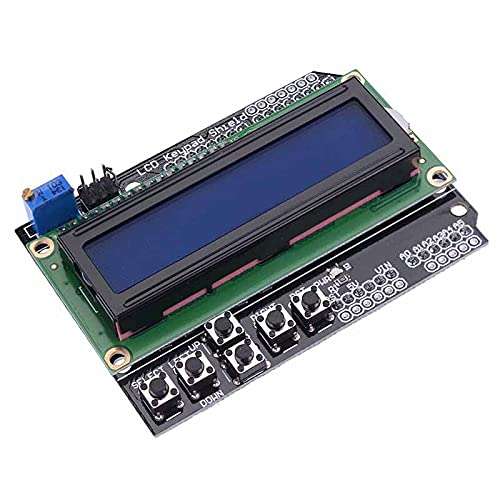
                              With this Keypad:

                              lcd1602keypad


                              Anyway, will Ted please confirm the LCD Keypad pictured matches his.  Also, if there’s a diagram in MEW249, that it’s like mine.

                              Grateful if anyone who has MEW249 will point out any misunderstandings.

                              Cheers,
                              Dave


                              #829551
                              John Haine
                              Participant
                                @johnhaine32865

                                The TB60xx drivers don’t have a great reputation.  There are much better modern drivers around at low cost.

                                #829569
                                john fletcher 1
                                Participant
                                  @johnfletcher1

                                  Yes Dave that is what I have, and more recently when re – reading MEW issue 250 Jan 2017 where you were using an Arduino, I noticed you used screw type terminal as apposed to miniature soldering, I will do the same in future. I was talking to a friend about my problem and he also remarked about TB6960 drivers, apparently some have incorrect marking. If John Haine above, knows of a better type of driver, please let me know. I have issue 249 and many more from issue 1 onwards, just a few missing not returned after being on loan. Your diagram Dave isn’t quite the same as Carl Wilson, he used 12 volts and 4 X 4 key pad, fewer connection to the display. Many thanks for your help.  Ted

                                  #829573
                                  john fletcher 1
                                  Participant
                                    @johnfletcher1

                                    Yes Dave that is what I have, and more recently when re – reading MEW issue 250 Jan 2017 where you were using an Arduino, I noticed you used screw type terminal as apposed to miniature soldering, I will do the same in future. I was talking to a friend about my problem and he also remarked about TB6960 drivers, apparently some have incorrect marking. If John Haine above, knows of a better type of driver, please let me know. I have issue 249 and many more from issue 1 onwards, just a few missing not returned after being on loan. Your diagram Dave isn’t quite the same as Carl Wilson, he used 12 volts and 4 X 4 key pad, fewer connection to the display. Many thanks for your help.  Ted

                                    #829579
                                    John Haine
                                    Participant
                                      @johnhaine32865

                                      What is the driver form factor? Is it a black plastic box with a row of screw terminals? Is so there are many more modern devices available, I’ll check what I last used when I upgraded my lathe.

                                      #829590
                                      John Haine
                                      Participant
                                        @johnhaine32865
                                        #829594
                                        peter1972
                                        Participant
                                          @peter1972

                                          Are you able to check whether there are pulses on the CLK+ input when the stepper should be rotating? (That assumes active high logic with CLK- connected to Arduino’s GND).

                                          #829623
                                          duncan webster 1
                                          Participant
                                            @duncanwebster1

                                            Well this has drifted well off the original. As it worked out, getting connections to thr required pins would havd been a right mess, so I carefully unsoldered the defective nano and replaced it with my final spare, then had to order another batch.

                                            #829626
                                            peter1972
                                            Participant
                                              @peter1972
                                              On duncan webster 1 Said:

                                              Well this has drifted well off the original.

                                              Hijacking forum topics seems to be acceptable in this forum.

                                              #829640
                                              SillyOldDuffer
                                              Moderator
                                                @sillyoldduffer
                                                On john fletcher 1 Said:

                                                Your diagram Dave isn’t quite the same as Carl Wilson, he used 12 volts and 4 X 4 key pad, fewer connection to the display. Many thanks for your help.  Ted

                                                Getting there Ted, I hope!

                                                12Vdc supply is fine, that’s as per MEW249.

                                                I’m a bit concerned about mention of a 4×4 keypad and fewer connections to the display because that suggests you don’t have Gary Liming’s software.  Could be one of the others, not the build described by Carl Wilson!

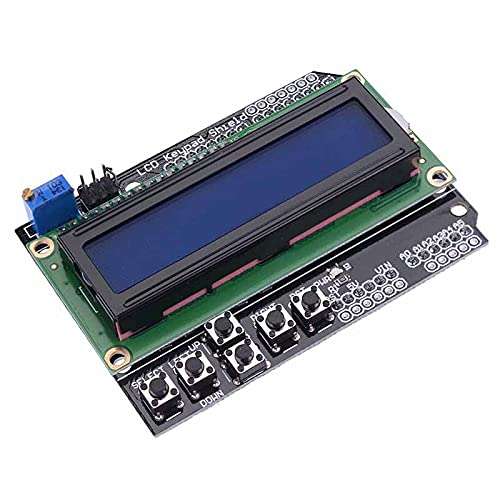
                                                Carl used a combined Display/Keypad exactly like this:

                                                lcd1602keypad

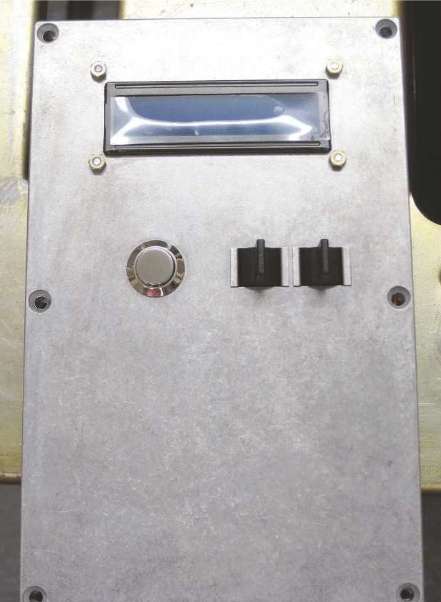
                                                The important feature is the buttons, bottom left, marked SELECT, LEFT, UP, DOWN, and RIGHT (RST isn’t used.)  Carl wired them to paddle switches on his front panel:

                                                Screenshot From 2025-12-22 10-53-15

                                                The MEW249 Step Indexer is incompatible with a 4×4 keypad like this:

                                                Keypad-4x4-E

                                                Be good to confirm exactly what you have.  Can you post a photo?

                                                Cheers,
                                                Dave


                                                Can


                                                ,

                                                #829647
                                                John Haine
                                                Participant
                                                  @johnhaine32865

                                                  I think I’ve read somewhere that the Arduino recommended max Vin if 9V especially if it is driving much current, because of regulator power dissipation?

                                                  #829706
                                                  duncan webster 1
                                                  Participant
                                                    @duncanwebster1

                                                    For driving anything requiring significant current the ULN2003 chip is very useful, 7 darlington transistors with built in freewheel diodes, will switch up to 50V at 0.5A, and the input pins can be lined up with Arduino outputs, so easy board layout

                                                    #829710
                                                    Robert Atkinson 2
                                                    Participant
                                                      @robertatkinson2

                                                      The comment on 9V input and “driving” current refers to powering circuits from the on-board 5 V or 3.3 V regulators. For the 5V supply it mainly applies to the earlier models that used linear (LDO) regulators.

                                                      Robert.

                                                    Viewing 25 posts - 1 through 25 (of 31 total)
                                                    • Please log in to reply to this topic. Registering is free and easy using the links on the menu at the top of this page.

                                                    Latest Replies

                                                    Viewing 25 topics - 1 through 25 (of 25 total)
                                                    Viewing 25 topics - 1 through 25 (of 25 total)

                                                    View full reply list.