Alibre Atom 3D Article and Training Course

Alibre Atom 3D Article and Training Course

Home Forums CAD – Technical drawing & design Alibre Atom 3D Article and Training Course

Viewing 10 posts - 26 through 35 (of 35 total)
  • Author
    Posts
  • #835130
    SillyOldDuffer
    Moderator
      @sillyoldduffer
      On JasonB Said:

      Thanks for that Roger, good to know I’m not a learner driver but maybe Dave has not traveled far himself just sticking to simple journeys.

      No need to fret, I’ve been round the block a few times!

      But Jason, you misled our gentle reader when you typed: “I was not too impressed with Freecad, it could only manage upto a 5 spoke pattern and then failed when I entered six spokes“.   An unfortunate turn of phrase because “it could only manage” implies FreeCAD is fundamentally broken, which it isn’t.

      Had you explained FreeCAD apparently failed doing something a tad usual, I wouldn’t have commented.  Unfortunately, you didn’t say the problem occurred when modelling more than 5 “elliptical section spokes with some taper“, a sin of omission.

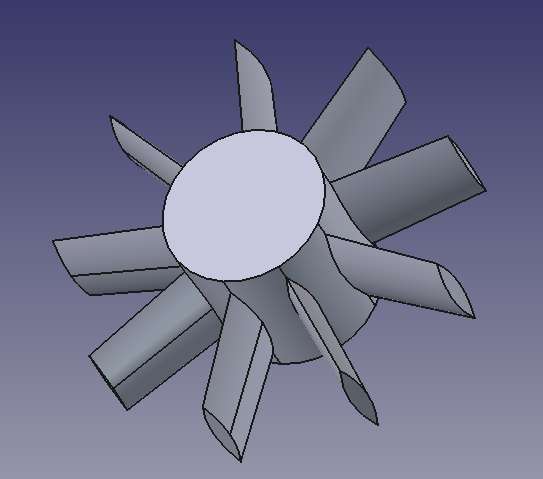
      Might be a bug or operator error, so “sticking to simple journeys” as I much prefer, I fired up FreeCAD to see for myself. Took me a few minutes to model 9 tapered elliptical spokes on a hub. No fuss, FreeCAD just worked. Surely if an inexperienced silly old duffer can get FreeCAD to do fancy polar patterns, an advanced motorist like Jason should never fail?  Alas, even Homer nods.

      Screenshot From 2026-01-31 20-47-31

      One explanation for Jason’s misadventure may be that CAD software does not all work in the same way.  Entirely possible that the workflow I use to create spokes with FreeCAD and SolidEdge wouldn’t work on Alibre.  Not because Alibre is broken, but because Alibre is different.   Jason may be driving FreeCAD as if it were Alibre, or Fusion360, and FreeCAD don’t like it.

      Another possibility is Jason and Roger are using an earlier version of FreeCAD, and this is a fixed bug.  I have 1.1.0rc1

      Though not always appreciated I always try to post balanced views, the good, the bad, and the ugly.  For what it’s worth, none of the CAD packages I’ve used in anger are perfect.

      Dave


      #835139
      blowlamp
      Participant
        @blowlamp

        “Took me a few minutes to model 9 tapered elliptical spokes on a hub”

        Dave.

        Your spokes don’t appear to ellipses. They look like they’re constructed from two semi-elliptical curves to me.


        Martin.

        #835159
        JasonB
        Moderator
          @jasonb

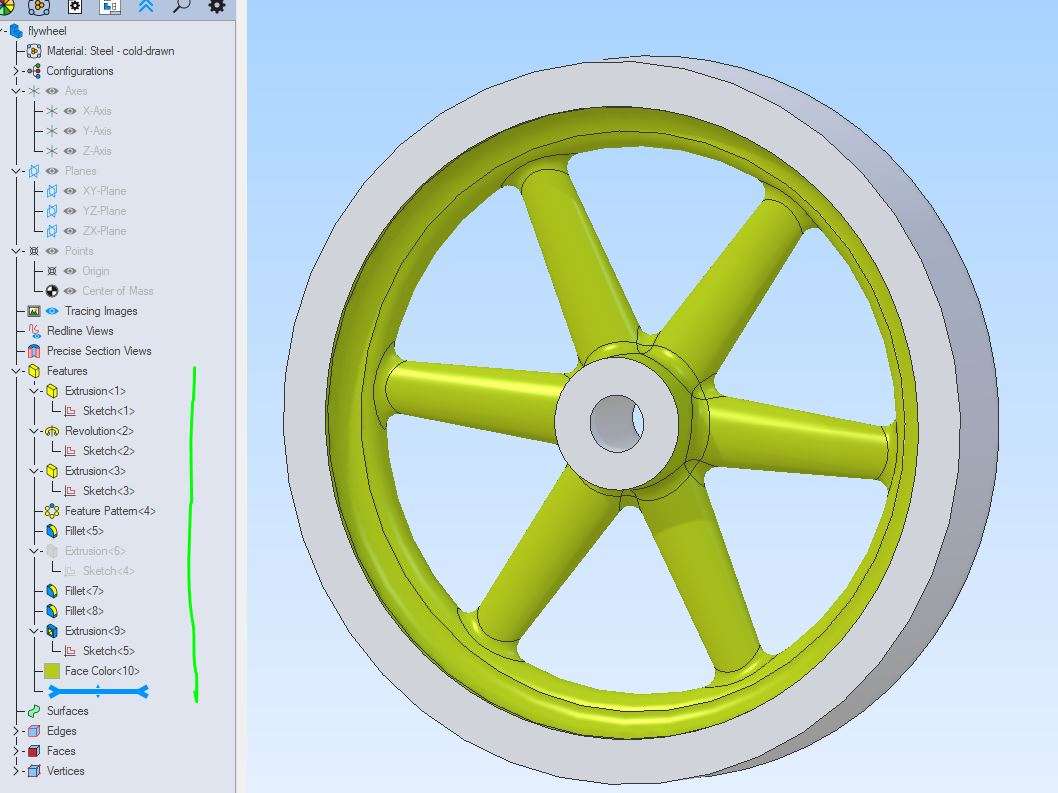
          Unfortunately Dave and Roger must have missed the requirement for the spokes to overlap, Charles got it right.

          Roger and Dave have also got the spokes the wrong way round and ended up with something more lile a loco wheel than a flywheel this probably reduced the chance of them overlapping

          Neither have they any fillets which needed to be a substantial size blending into one another at the hub.

          Link to the details for those that missed it.

          It also seems from the net that like Roger says there IS a problem with certain polar patterns but he found a workaround that may not suit all cases.

          Roger, if I shift the position of the sketch does it remain the same size or reduce proportionally due to the taper? Will the spokes be the same length or does the far end stay 30mm from the ctr of the flywheel which may then be too long? If I reduce the hub diameter do I have to go back and move the base of the spokes inwards again so they don’t start in mid air?

          Like Julie my approach is much the same, build it up feature at a time, add fillets, cut the hole. The hub was extruded from the midplane and taper added, the rim a revolve with some mirroring used for its sketch, one spoke drawn on a central plain so no need to add others or move things, feature pattern the spoke. 3 separate fillets and then the hole in the middle.

          This flywheel has been scaled to several different diameters and used on various engiens so having each feature easily editable allows for easy changes as the hole may not scale the same as the OD.

          atom flywheel


          #835163
          JasonB
          Moderator
            @jasonb

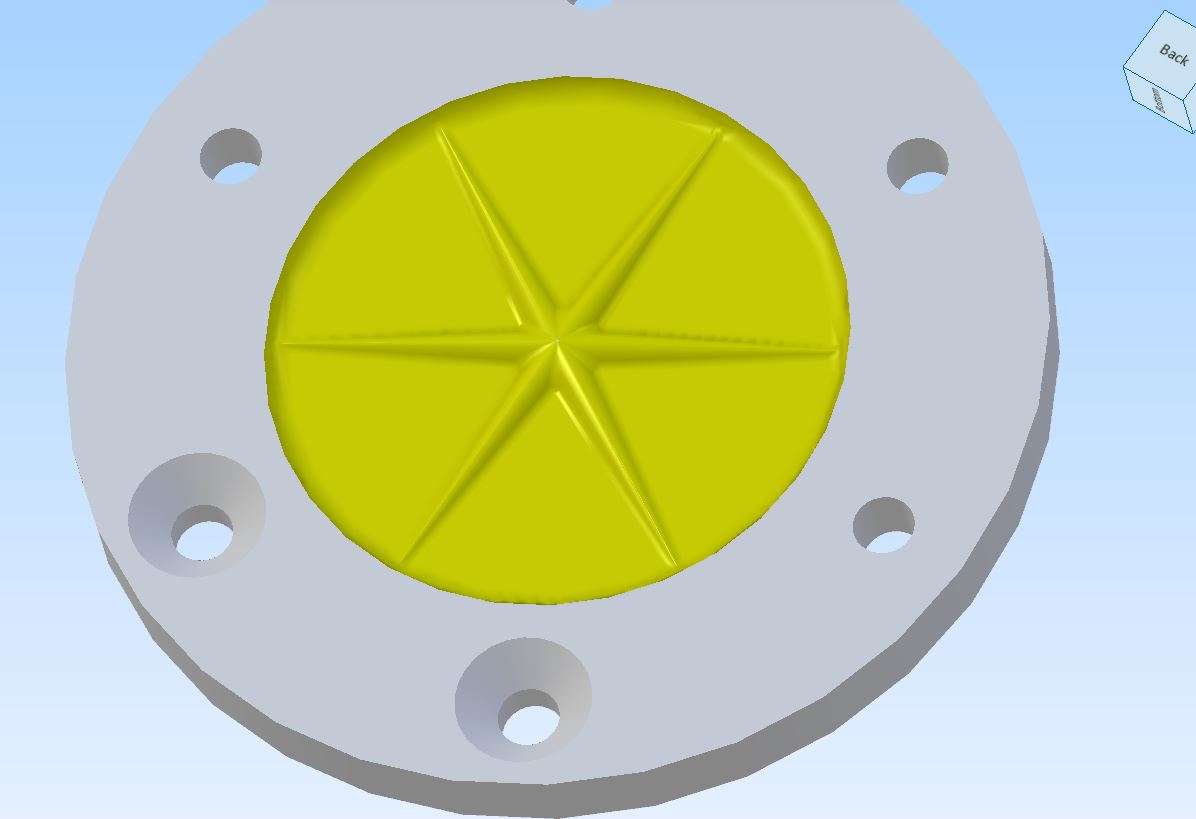
            Then there will be situations where Rogers workaround won’t work, What do you do whan you want to print some Star decorations for Xmas or in this case some stiffening ribs to a cylinder end cover. Both need the patterned part to meet in the middle.

            star

            #835173
            Roger Woollett
            Participant
              @rogerwoollett53105

              Roger, if I shift the position of the sketch does it remain the same size or reduce proportionally due to the taper? Will the spokes be the same length or does the far end stay 30mm from the ctr of the flywheel which may then be too long? If I reduce the hub diameter do I have to go back and move the base of the spokes inwards again so they don’t start in mid air?

              Moving the sketch just changes the position of the pad in the body so the pad length does not change. The body must be all in one piece so the base of the spoke has to be within the hub.

              As far as I can tell it is having the spoke touch that triggers the bug.I use 1.1.0rc2 and the bug is still there in the most recent weekly build so I think we will just have to wait for a fix.


              #835182
              Charles Lamont
              Participant
                @charleslamont71117
                On JasonB Said:


                This flywheel has been scaled to several different diameters and used on various engiens so having each feature easily editable allows for easy changes as the hole may not scale the same as the OD.

                In Onshape (banging on about it again) you could do that by making some of the sketch dimensions variables and defining multiple values of those variables in a ‘configuration’ table. You can then have all your flywheel models in one part studio at the same time. You just select which configuration you want today. Configuration also provides for features to be present or ‘suppressed’. This means you could, for example, have both curved and straight spokes available for selection as required.

                #835188
                David Jupp
                Participant
                  @davidjupp51506

                  If Jason had Alibre Design Expert, he might have used configurations for his multiple sizes.

                  This emphasises that there’s usually more than one approach that can work for any design task.  There isn’t any single ‘correct’ or ‘best’ solution.

                  Atom3D is deliberately simplified, and does not have all the fancier tools available.  This is partly to keep the price down, but more importantly it is to make it easier to learn (less tools / options to distract and confuse the beginner).

                  #835250
                  blowlamp
                  Participant
                    @blowlamp

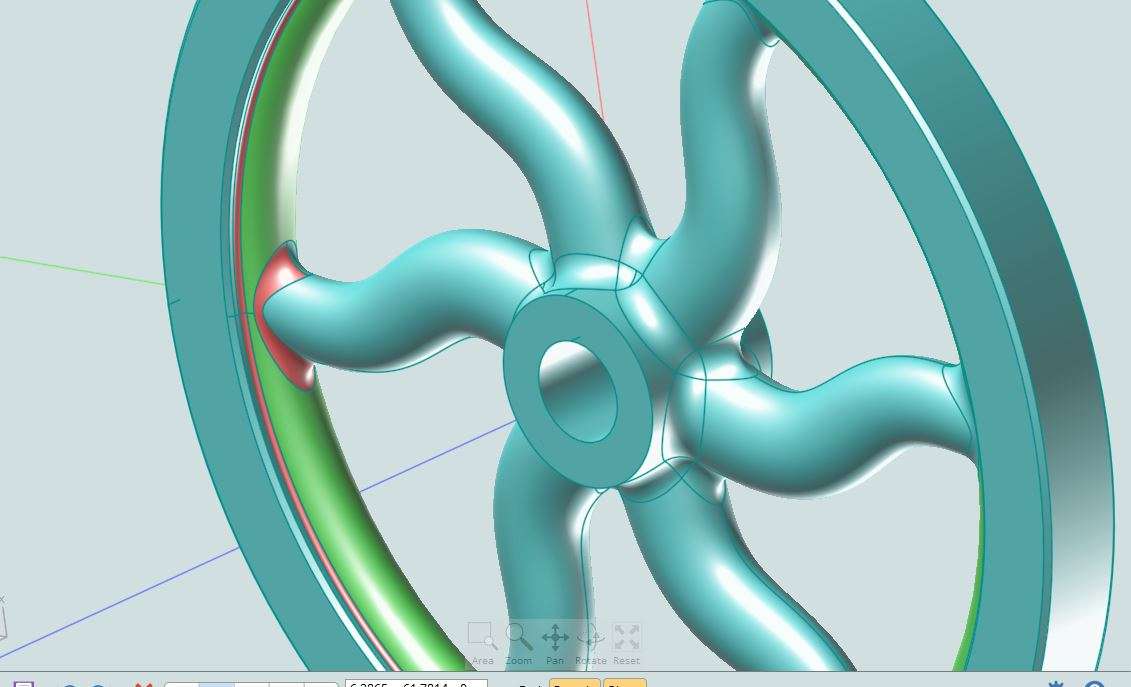
                    Another thing to consider when designing and drawing these things is the proportions of each feature in relation to those around it.

                    In this picture, the blends highlighted in red would run into one another if either the spoke had been thicker or the surface highlighted in green had been narrower. If something like that happens, it gives the filleting engine a much harder job to do and can cause the process to fail.

                    For instance, where the spokes join the hub, either make the spokes beefy enough that they overlap each other, or leave a good space between them. If you overlap them, you get a nice clear edge junction for the fillet engine to follow, whereas leaving a small sliver of the hub surface between the spokes means two fillets will be formed instead of one, which will clash and maybe cause problems.


                    Martin.

                    Capture


                    #835296
                    Russell Eberhardt
                    Participant
                      @russelleberhardt48058
                      On Roger Woollett Said:


                      As far as I can tell it is having the spoke touch that triggers the bug.I use 1.1.0rc2 and the bug is still there in the most recent weekly build so I think we will just have to wait for a fix.


                      It’s being worked on.  It only happens if the spokes have a negative taper:

                      https://github.com/FreeCAD/FreeCAD/issues/27252#event-4576328644

                      Russell

                      #835324
                      JasonB
                      Moderator
                        @jasonb
                        On blowlamp Said:

                        Another thing to consider when designing and drawing these things is the proportions of each feature in relation to those around it.

                        In this picture, the blends highlighted in red would run into one another if either the spoke had been thicker or the surface highlighted in green had been narrower. If something like that happens, it gives the filleting engine a much harder job to do and can cause the process to fail.

                        For instance, where the spokes join the hub, either make the spokes beefy enough that they overlap each other, or leave a good space between them. If you overlap them, you get a nice clear edge junction for the fillet engine to follow, whereas leaving a small sliver of the hub surface between the spokes means two fillets will be formed instead of one, which will clash and maybe cause problems.


                        Martin.


                        Martin,

                        It was actually the problem of adding fillets that started the whole discussion over on MEM. As you say they can trip up various CAD packages. David and the Backroom Boys at Alibre helped to solve some fillets I was having problems with though not completely, at least now I know a couple of tricks to get a fillet to run if at first it won’t.

                        I think Robert will do a follow up article in a couple of issues time to cover the latest filleting options in Alibre as well as the new feature of realistic screw threads.

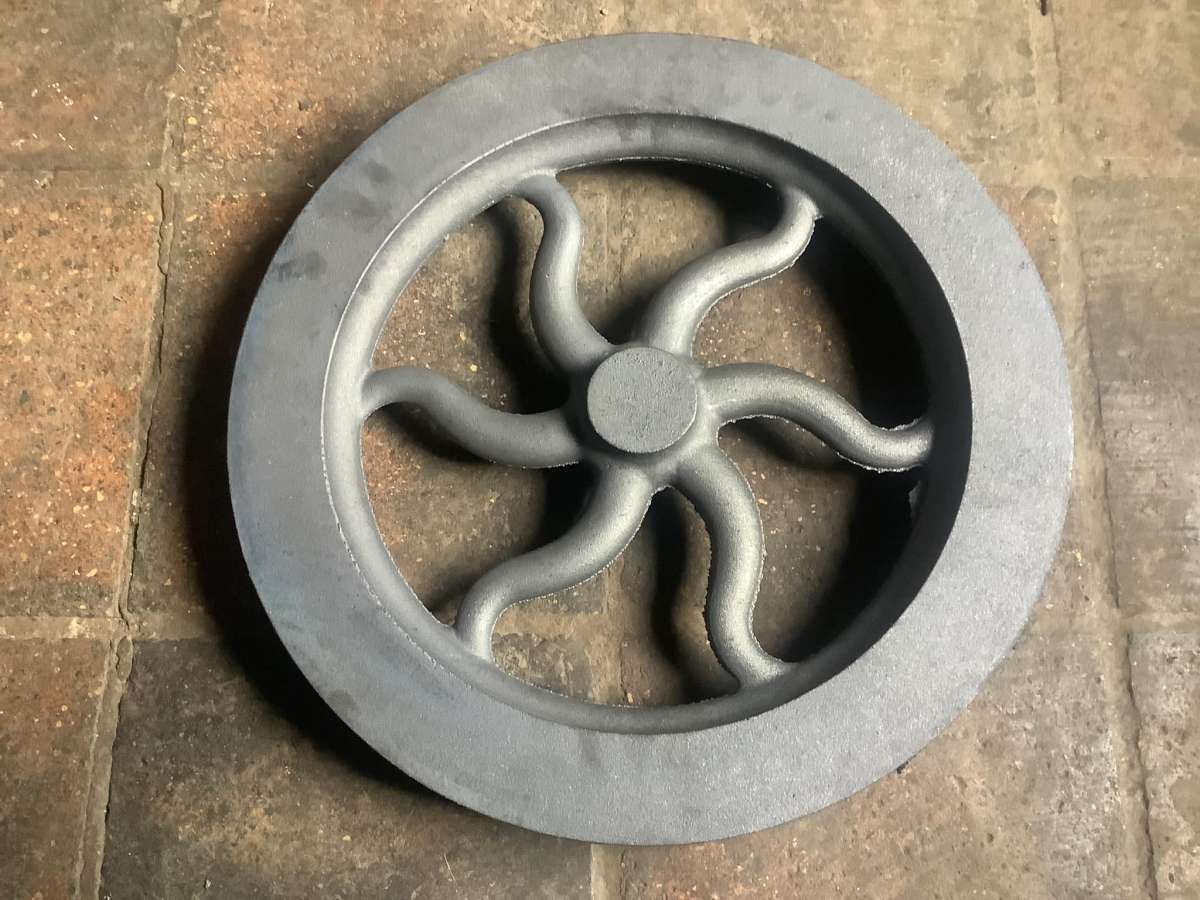
                        Now all you need to is get that flywheel you have drawn into iron, all 20kg of it!

                        casting

                      Viewing 10 posts - 26 through 35 (of 35 total)
                      • The topic ‘Alibre Atom 3D Article and Training Course’ is closed to new replies.

                      Latest Replies

                      Viewing 25 topics - 1 through 25 (of 25 total)
                      Viewing 25 topics - 1 through 25 (of 25 total)

                      View full reply list.