Home › Forums › CAD – Technical drawing & design › Had Another Go
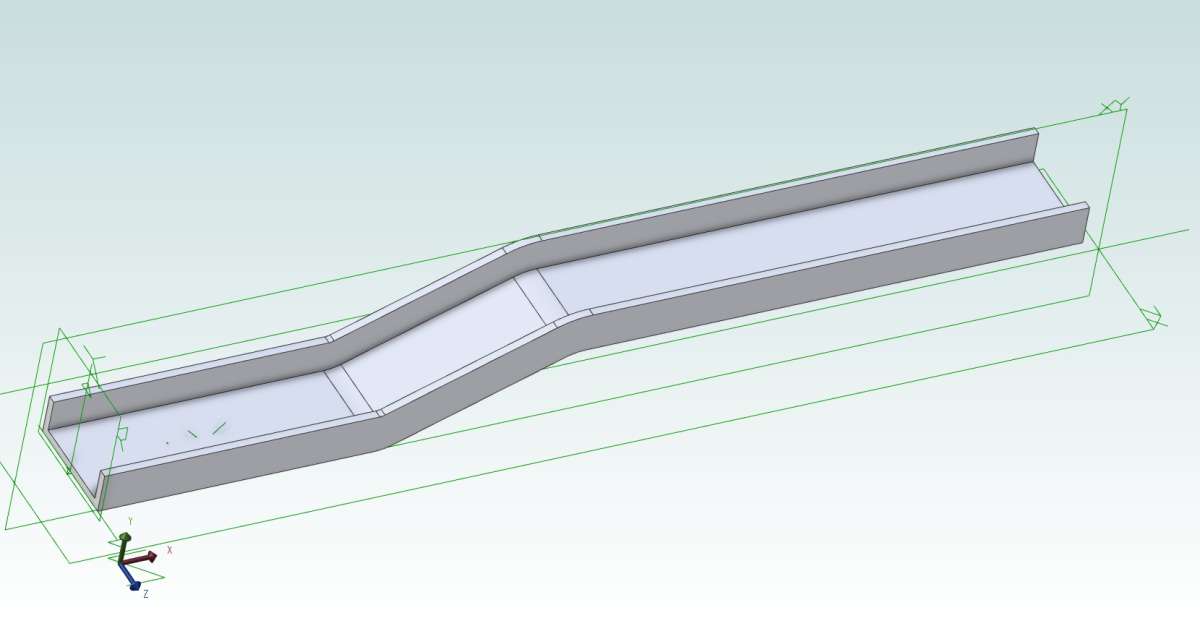
Out of idle curiosity I thought I’d create a sweep, although it is not a function I use particularly often. Once I’d got the sketches in the correct orientation to each other it seemed fairly straightforward:

The sketch to be swept was an L shape; the final channel was created by a mirror as the last operation. I did learn one thing though. When creating a fillet on the path sketch the fillet radius for an inward bend needs to be larger than the width of the flange. This applies to the fillet/bend on the left. Note that the radius on the outer edge of the flange is smaller than the dimensioned radius on the vertical. If the specified radius is less that the width of the flange the software gets confused as the radius value goes negative before the outer edge of the flange is reached.
Some other general points, learnt after nearly 20 years of using Alibre, are:

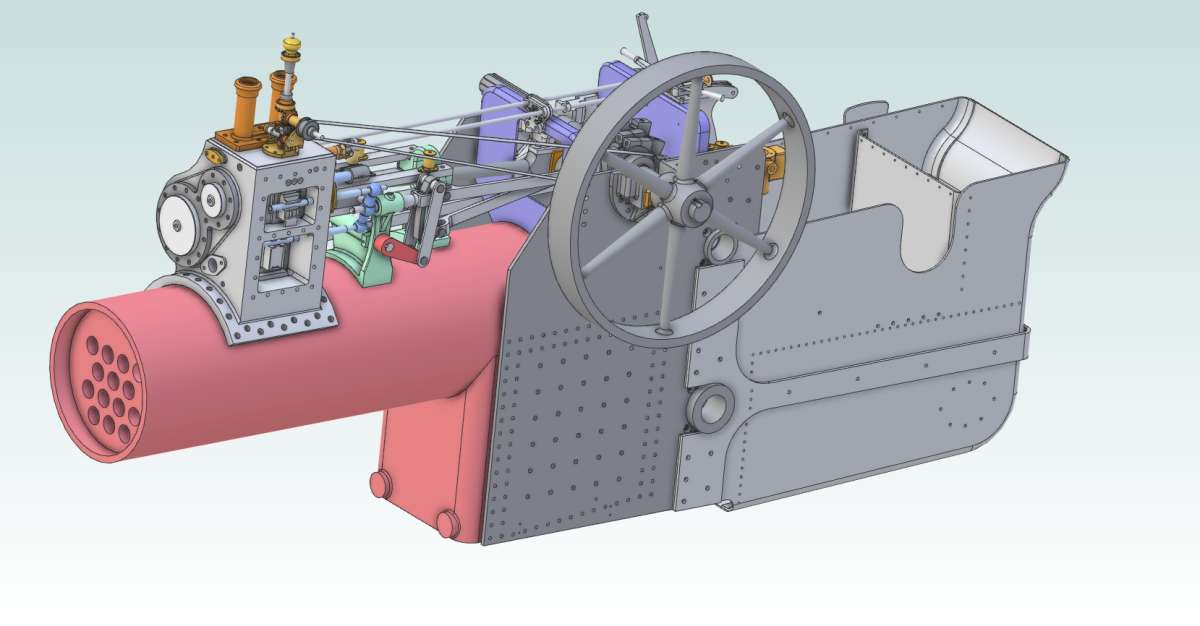
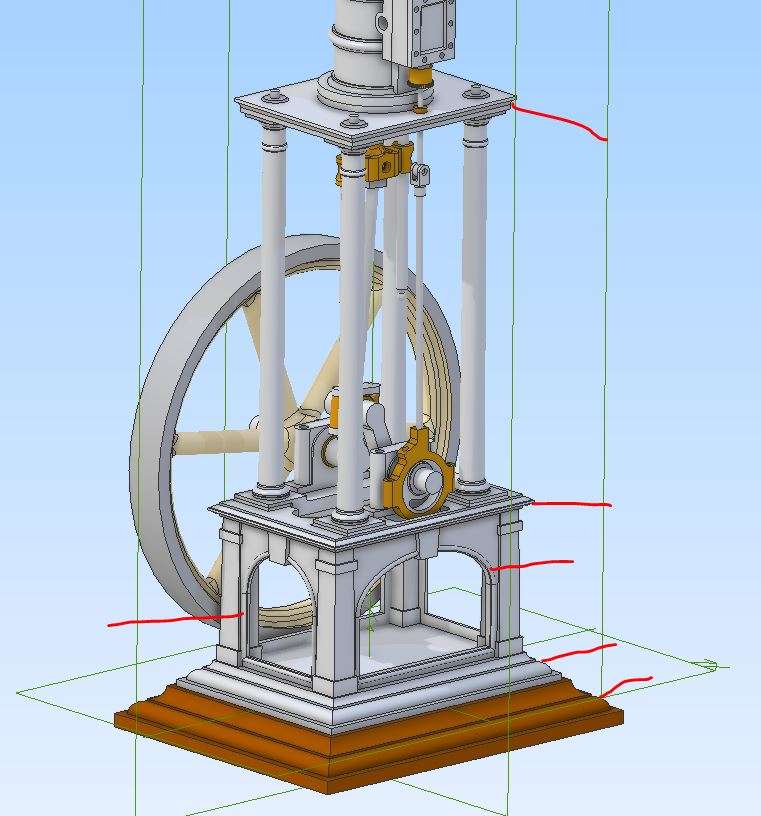
I had initially planned to create a complete 3D CAD model of my engine, but have abandoned the idea. The resulting model would have been too large and unwieldy. Instead I create assemblies of specific areas like this for the motion work and tender:

I am happy to provide a step by step picture book of how I created the sweep.
Julie
Assemblies are very much like putting things together in real life, but assembly constraints can be rather fussy.
The main thing is to fix or delete any constraint errors as soon as they occur.
I’m happy to look at any problems.
The tool icons along the top are a bit like the tools in your workshop, some you may not use very often but they are nice to have there for when you do. We also all have our preferred ways of doing things, some may not be the most efficient but often hard to change once the practice has set in.
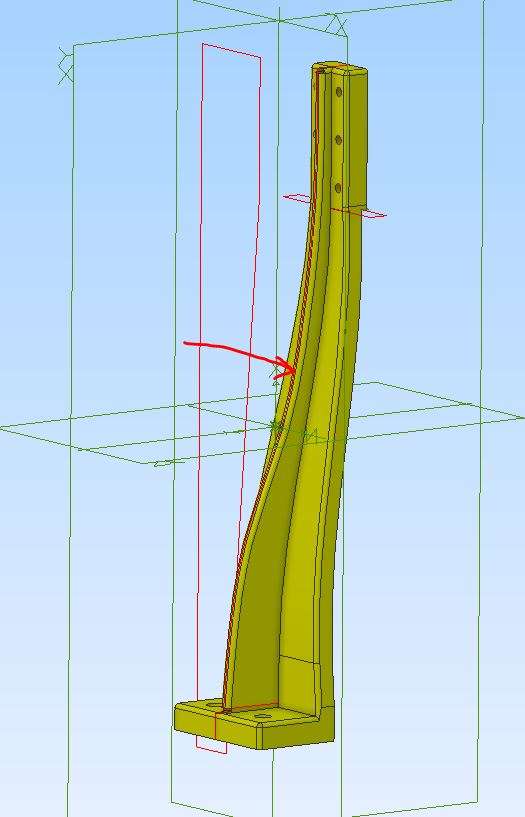
It also depends on what you use your CAD for, designing may mean you make more changes than for example Nigel’s chassis where he is just drawing what he already has. The type of job also determines what tools to use, for example I only tend to use Boolean when doing patterns, spline does not get much use but did use it recently to get this web to look right as it tapers to follow the lofted flanges.

The Vickers engine I’m posting the build of at the moment had a lot of sweeps both solid and cuts.

Three attempts to reach the point at which this Reply panel opens: two to sign in, the third to open the Replies. What the Hell is wrong?
………
Those example of Alibre’s power in the hands of experts only stress how limited my CAD skills can ever be.
For my own steam-wagon project I need now draw “only” the engine and transmission, but those as properly as I can. The only other project in hand, best designed properly, is the drive for an ancient milling-machine.
However, I could never use Alibre to anything like Julie’s and Jason’s levels.
.
I’ve been trying to use CAD for ten or twelve years, maybe a bit longer, but cannot create useful 3D CAD Assemblies in either TurboCAD or Alibre: very different in character but similar in difficulty. TC allows two-dimensional drawings directly, useful for general-arrangements of any mechanical complexity without the formidable added difficulty Alibre imposes, of making an intermediate 3D Assembly. On the other hand TurboCAD’s 3D methods are harder than Alibre’s even for single components.
Besides, that 3D-first approach for representing a complete machine needs all the individual parts designing first – a circle having no convincing square if you need design the whole lot. At least a 2D general-arrangement can use much simplifying: it doesn’t need much detail, often not even fully-finished shapes.
I wonder that for a mechanically fairly simple assembly, I could drive Alibre in a rather rough reverse gear. That section of frame is a single “Part” model but holds nearly a dozen separate extrusions to represent just five bits of metal. So… draw the “assembly” as a Part model of several components, then to complete each component’s own drawings, take a copy of the entirety saved by the part name, and remove all the other bits? I know it won’t work for all cases, and it is not the approved 3D CAD way, but perhaps an option….
Unless translating existing drawings into CAD, I can’t see how you can model a part without knowing its place in the complete machine. An Assembly as advanced as those two engines needs a directory full of complete Parts models – so which comes first?
With no existing drawings to copy, I must design as I go. So far I have made three different ash-pans and umpteen boiler mountings, replaced the rear-axle sprocket, still need make new cylinders and connecting-rods, but am trying to avoid needing make a new crankshaft.
I don’t like staggering along like that, so should design and make the engine from proper (ish) drawings. So a GA first, only possible as 2D elevations so in TurboCAD, then each component’s own drawings via Alibre, slightly easier for single parts. And both are quicker than manual drawing, even though I probably use Alibre very inefficiently.
The drawback of this aproach is that of having to draw many parts twice, partly due to file-type incompatibility. There are theoretically perhaps two in common of the file types both systems offer, but I don’t think such transference works properly anyway.
Though 3D assemblies are beyond me, at least an Alibre 3D part model generates its manufacturing drawing, and has the easier printing routine than TurboCAD’s.
Inability to understand Alibre’s ‘Sweep’ tool may not matter, but if I can’t create Assemblies, I have to use what is possible!
Nigel,
You can ‘sketch out’ an assembly without having all the details – more than one way to do it.
As you suggest you could model some simplified ‘dummy parts’ to use as the basis of your assembly.
OR
You could place (say) some reference planes / axes in an assembly to indicate positions of key functional items – then attach part models to the reference geometry. You can add in over time as much or as little detail as is needed in the form of other parts.
You can model a new part ‘in context’ within the assembly, so that it will fit with the parts already present.
In concept this isn’t so far removed from your GA approach.
I tend to work from photos quite a lot much like you are doing with the Wagon so that is really my general assembly, other things are just in my head and I know roughly what goes where.
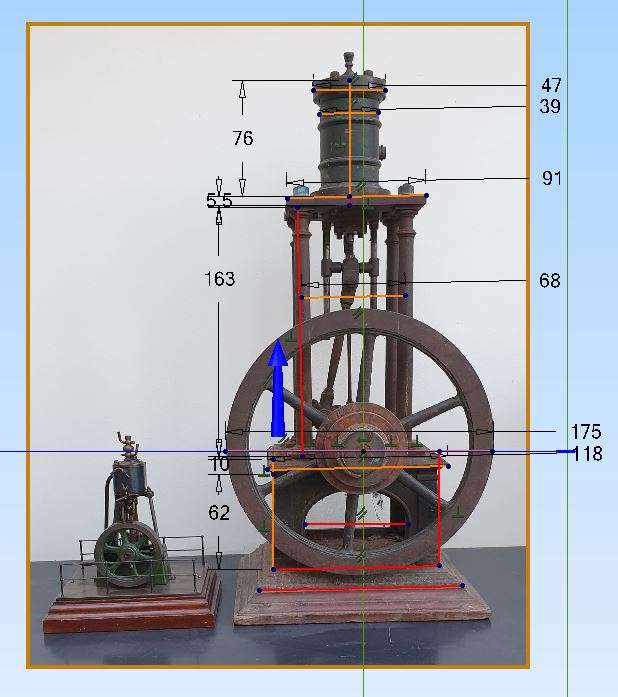
Sometimes I will import a photo and pull a few dimensions off of that, not just individual part sbut also how far one part may be from another and then start modeling the main parts often not in full detail so that I can at least get a good idea of what teh engine will be like and that teh basic geometry of teh moving bit swork. I’ll then come back and ad dthe details.
Example of the Vickers which I took Measurements from, these were the only measurements used the rest I just built up to suit what I saw in the photos and what nominal material thicknesses suited

As you will see in the build thread I’m well on my way this it but last night did the final details of teh steam passages for the cylinder as I’m ready to make those.

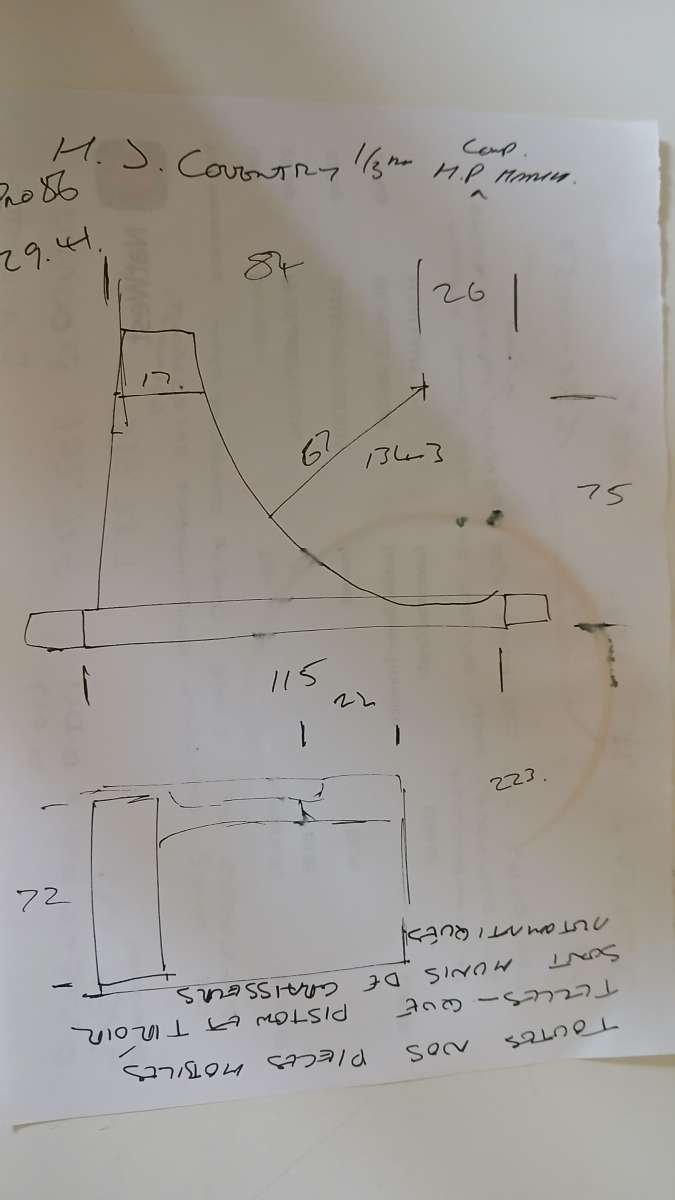
Other engines where I don’t have a good square on photo I may just do a rough fag packet sketch and put a couple of sizes to that and then start the 3D. Yes I’ll probably change some bits as the design unfolds but easy on the screen.
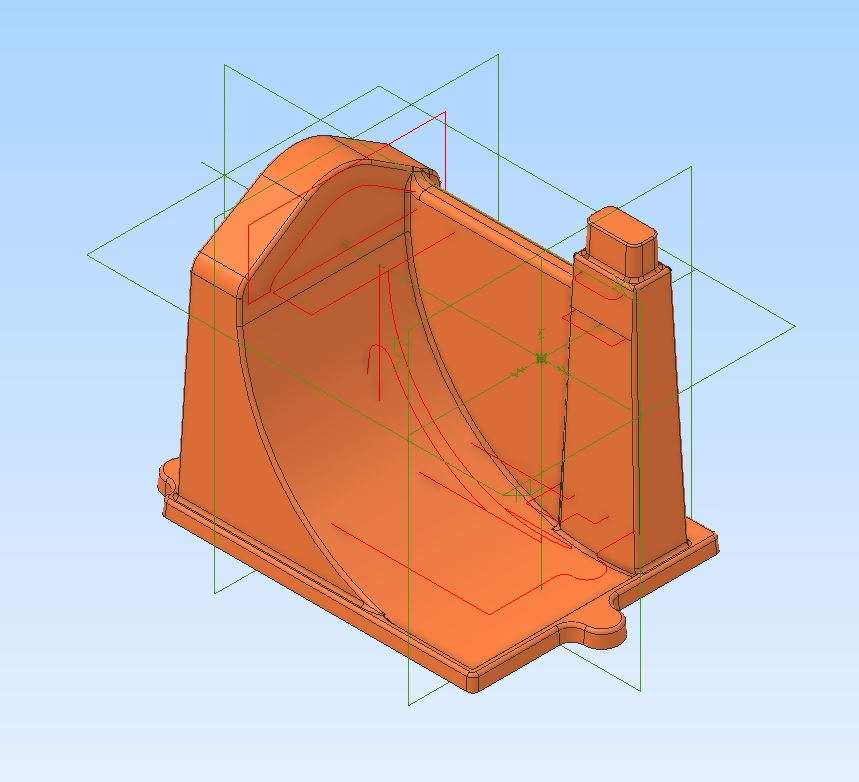
This one I had to base it on using a particular flywheel casting so did the rough sketch

refined it as other parts were added to the assembly


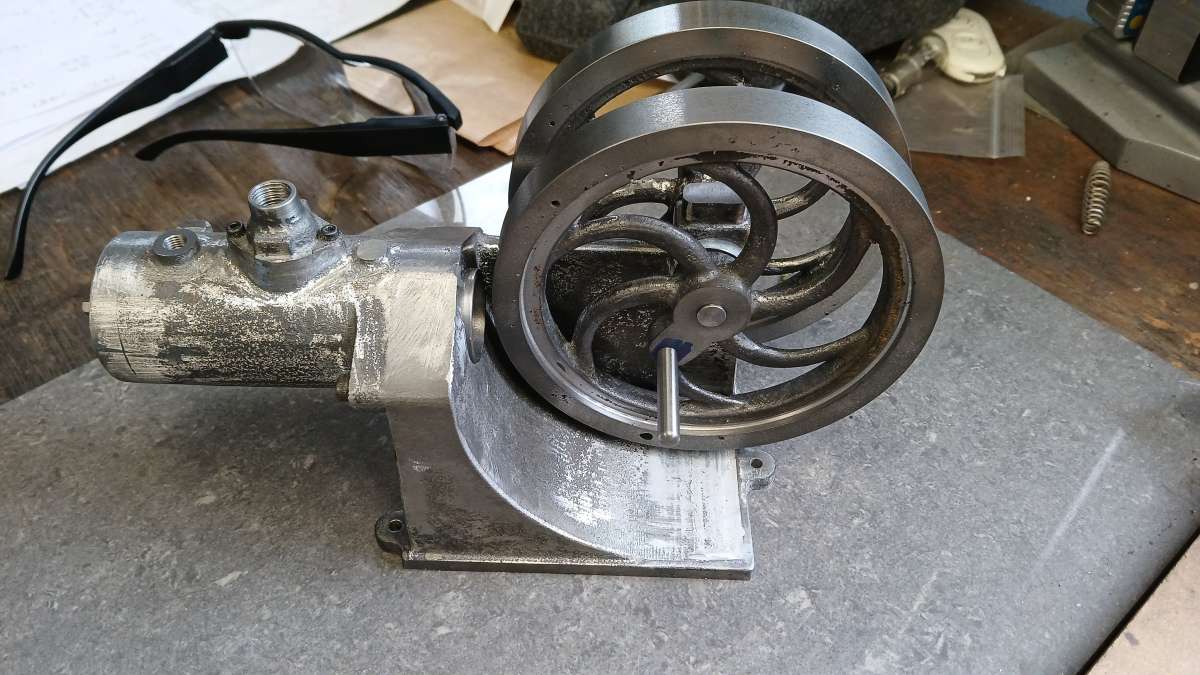
It was then modified to enable a 3D pattern to be printed

And then the casting machined

Rare occasion for tis one I actually printed a 2D drawing

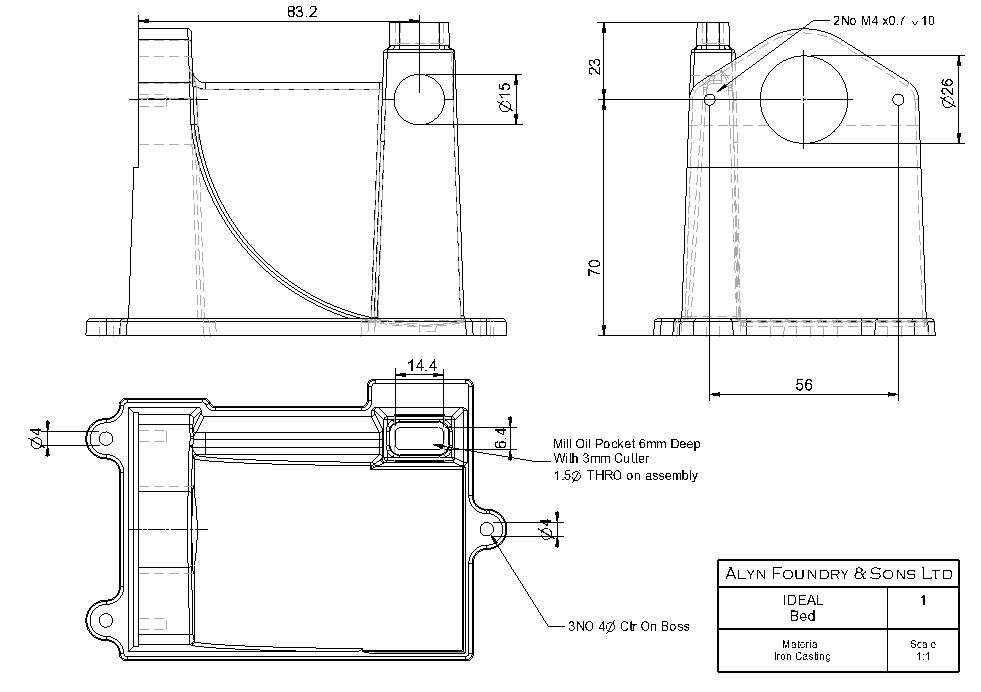
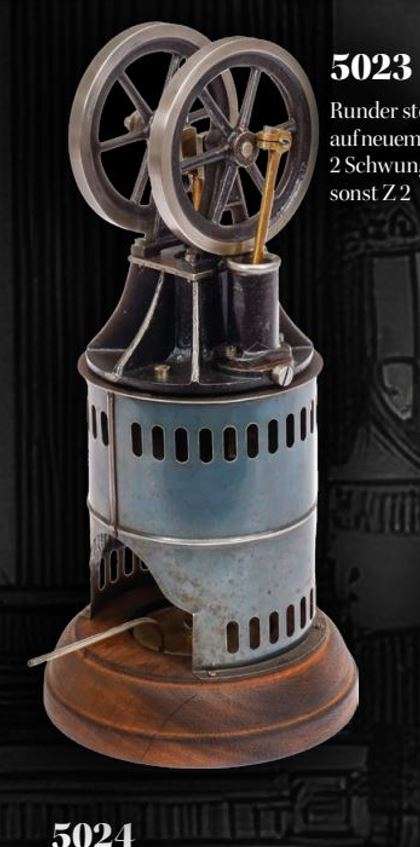
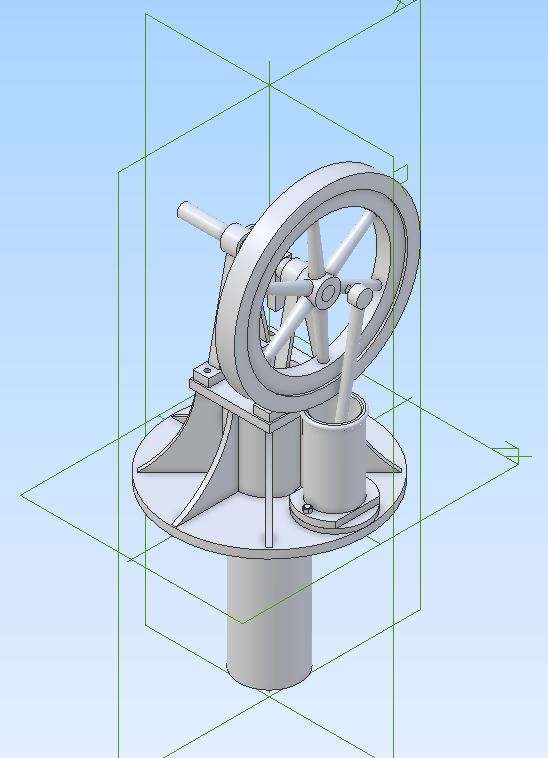
On the go at the moment is a Raab hot air engine

fag packet sketch

And where I’m at

So no need to start with a detailed GA. Position the major parts as per any references you have to start with then flesh it out and don’t worry if you need to go back and move say the crankshaft height when you find the flywheel rim clashes with the top of the power cylinder.
Thats enough for now, I need to add a few bits to this

If you don’t understand assemblies, how did you manage to attach your dozen extrusions to resemble what could be physically made from a single piece of channel? Not to mention that modelling it that way is far, far harder than doing it with two simple sketches…
Your chicken and egg ‘problem’ with 3D CAD is dealt with the same way you would with a drawing board; various iterations of basic sketches(back of envelope is traditional) through dimensioned sketches, adding details of parts that you can’t change like motors, wheels, bearings, the external shape of bodywork, whatever, and then building on those until you have a part or assembly that does what you need. The difference, and improvement, is that you can build new parts directly off and onto existing ones – like motor mounts in the space where they actually fit using the bolt holes of both the engine and chassis. This is so much easier, that it makes me wonder if the design process is your struggle more than CAD.
There’s often more than one way to model parts, and it can help to try more than one approach especially if one better matches the way you’re going to make the physical object.
Nigel – Instead of declaring that you ‘can’t do assemblies’ – let’s try to work out what aspect of assemblies is so tricky for you and why.
Did you try the (partial) V8 engine model that I sent over the parts for? How far did you get, what did you get stuck on?
I’m happy to do another screen share session to go through any issues you had with that.
Or maybe something Nigel can relate to like a representation of the boiler assembled into his Wagon Chassis rails or the covers into the bottom of his cylinder block.

Any assembly will do – the thinking behind the V8 (a very old Alibre example) is that I know there aren’t any issues there of parts not matching up. It’s only a partial model, so its fairly clear where parts should go. Also as there are 8 cylinders, there’s scope for repetition and to look at alternate approaches to constraining. If things go well it even lends itself to the use of sub-assemblies.
If Nigel struggles to assemble a set of known ‘good’ parts – we probably need to work on his understanding of constraints and how to apply them.
If he gets on fairly well with the ‘good’ parts – perhaps we need to help him with analysing why parts might not fit together. What tools can help to find the sort of very minor mismatches that CAD can get so fussy about, that you might not even notice in real life.
I think my main difficulty is being unable to think in abstract but very tightly-ordered ways, and to think like that many steps ahead. Although CAD is not so abstract because you can see the image you are building, and the tools do have useful little labels to help you, it still needs the type of intellect shared with chess players and professional mathematicians.
David –
I’m not sure I saw that engine, or if I did I mis-read its purpose, perhaps thinking someone else’s own project. Was it on this thread or an e-mail?
I vaguely recollect seeing an engine in V-form, but it was an air-cooled one with masses of cooling-fins, complicated pipework and so on, but not where or when. Light-grey and viewed a bit obliquely. It looked more like a CAD publisher’s packaging sample than a CAD exercise. It certainly looked on the level of difficulty as Julie’s traction-engine.
I tried looking back up-thread as far as “page” 8 and saw lots of very high-grade Alibre models and even assorted versions of my bits of bent steel, but not a V8 engine.
Mind you I do sometimes miss messages, and I have the impression they sometimes arrive out of kilter with others so are not there ar first sight.
Sorry about that. Not being well in the last few days hasn’t helped either.
.
Nick –
I didn’t create that frame as an Alibre Assembly of Parts. I created it as a Part, i.e. one model.
The primary shape was an inverted, unsymmetrical T that I extruded to the right depth to represent the webs of the long sides and the cross-member made from the same channel. That first stage made them look like two strips welded together. The real ones bolted together.
The rest – their flanges, and the L-section of the other cross-member – are all separate, by sketching rectangles of appropriate lengths and widths and extruding them to thickness.
So nothing was extruded to length, only to height or thickness. No “assembling” in the Alibre sense of importing Part images and sticking them to the growing model. All one Part image, and I placed some of the rectangles by eye, not constraints or calculated measurements.
Consequently no problems with sweeping profiles at odd angles to the axis. No individual Parts on planes all different to each other. No parts facing in all sorts of irretrievably wrong ways. No baffling constraint / over-constrained problems and their incomprehensible error messages.
Jason –
Whether the subject relates to my project is not really important. In the end building any 3D CAD assembly is still generating geometrical shapes and digitally gluing them together. It is seeing how to make them stick together even when they are all correct, correctly-aligned and so one that I find hard.
I cannot solve more arcane problems like making Part B fit Part A at a set distance, rather than against a surface or edge. I don’t know if that’s even possible. A case for designing Part A to have positive locations.
It’s even worse when the screen is full of glaring mis-matches like totally wrong orientations, or none of the contraints work for me, or every part is “over-constrained” for reasons I can’t understand. I can’t see how to avoid such problems, why it always goes so wrong, or how to put it right. That’s when I find it impossible.
……
Really it seems that I am very slowly becoming slightly better at modelling fairly simple components, provided I avoid anyhting too hard for me, like compound angles and swept entities; but that building 3D assemblies is a more advanced skill moving further and further from reach. The more elaborate the examples I see, the more remote I realise it is.
I cannot solve more arcane problems like making Part B fit Part A at a set distance, rather than against a surface or edge. I don’t know if that’s even possible. A case for designing Part A to have positive locations.
Yes quite possible, I think Atom may do it slightly differently so won’t cloud the waters. David can show you how to offset one face from another. For example I offset the ctr of the vertical part of your boiler a set distance from one end of the chassis.
Nigel,
I sent you the V8 files via e-mail. I’ll re-send.
If a part is oriented wrongly it needs to be re-oriented – there are ways to do that using the mouse, or with ‘precise placement’ tools. Once you get the hang of it, you can usually use assembly constraints to do the re-orientation for you. It’s really no different to tipping a collection of parts onto the bench, and having to move things around so they can be joined together.
As I’ve said before – if any assembly constraints show an error, they need to be fixed, suppressed or deleted immediately. The constraint solver will still try to solve failed/conflicting constraints in the background, which is likely to make any new constraints fail too.
In Atom3D there aren’t many assembly constraints to master. Much of the time the software will help, but there are reasons why sometimes it’ll offer the opposite arrangement of parts to what you were hoping for – hence the provision of a ‘flip’ button in the constraint dialogue. If your first attempt at a constraint is obviously wrong, or gives an error / over-constrained message, try the flip button.
I can go through things in more detail if we do another screen share session.
Have a go at the V8 if you fancy it, but don’t get hung up. As soon as you hit an error, save the assembly and send it to me.
We can do one or two screen shares to go through this – I can make some free time most days.
I think my main difficulty is …
Really it seems that I am very slowly becoming slightly better at modelling fairly simple components, provided I avoid anyhting too hard for me, like compound angles and swept entities; but that building 3D assemblies is a more advanced skill moving further and further from reach. The more elaborate the examples I see, the more remote I realise it is.
A word of encouragement if I may! Nigel has made considerable progress since I last read the topic . Well done Nigel! Don’t be discouraged because total victory hasn’t happened yet. This is hard work. Please stop fretting about assemblies, their time will come.
Nigel’s morale would have got a considerable boost had he spent this afternoon watching me struggling with Solidedge! He is not alone.
I’m fairly fluent in SE, able to do assemblies and most parts without bother. But modelling an aluminium ring with the letters A-Z indented around the periphery has defeated me three times now. Jason showed how Alibre does it, and SE is similar. Except I can’t get SE to do the job efficiently, almost certainly because I’m missing summat. As my model is broken, I’ve had planes jumping about, strange error messages, and the extrude tool randomly jambing or producing incorrect results. 3D-CAD software behaving irrationally usually means the model isn’t right. There are operator errors that I need to fix. Naturally, there isn’t a friendly button that produces a to do list. My experience is very like Nigel’s!
Wasting an afternoon on what I think should be simple is extremely disheartening. Hours wasted on an allegedly simple part. Thing is, what humans think is ‘simple’ may not be for a computer. They are very stupid and chaos ensues if the human feeds them mistakes.
So back to basics for me until I’ve gripped this bad boy. Plenty of painful effort today and no coconut. And this is a hobby, done for fun! Aargh!
🙂
Dave
I thought I’d replied but then my PC threw a very strange wobbly when I tried to save a compressed folder – unfortunately I know nothing about .zip files as I have never had to send any them and don’t (as far as I know) have any means to use ones sent to me. Presumably those carrying programme files include their own umpacking tool in the “Installation” bit. I have no idea what I did to upset it, but it left this forum still open but made my main e-post page totally blank. I had to close and re-open BT Internet to solve that flummoxation.
So if the following magically appears twice, that’s why..
……
David –
Thank you.
I found your repeat but can’t use zipped folders, as far as I know. Certainly nothing called “extract”. I tried to download it and open it but…. see above!
I have been having some very unhappy times lately with my computer, I think from trying to make Firefox my default browser in the teeth of Mickeysoft trying to enforce Edge and Copilot, neither of which I want. One effect was a load of surplus notifications from another forum that’s gone totally to rats on me. In getting shot of those I may well have accidentally deleted your first message.
Or it didn’t arrive at all – I have known that happen sometimes.
I’ll go back and look again. I still don’t recall where and when I saw that image of an engine, nor what it was.
Dave (SOD) –
I take it you mean for your Enigma rotors. I have replied on that thread asking if the difficulty stems from trying to engrave or emboss a smooth cylinder. I thought that after reading Julie describing how to persuade Alibre to model a hole in a sphere – would her method, or facetting the cylinder, work?
I’ve also added to the Kahn book reference.
Nigel,
Windows 10 or 11 has built in ability to extract zip file content – save the file, right click on it -> Extract All.
Found it eventually, thank you.
Finding where Windoze was hiding the file was part of the battle!
Only, my edition of Alibre seems unable to use two of the files, by them having features it does not support.
Have sent revised versions of files to Nigel – should now open.
They do, after a few attempts!
I’m part way through this exercise with some struggles, and what happens in the middle? BT obligingly warned me of unspecified “issues” (what’s wrong with the word “problems” ?) that led to, or were more likely caused by, Mickeysoft trying to barge in yet again, with its blasted Bing / MSN link!
These models are parts of a V8 engine, and consist of the cylinder-block, crankshaft (4-throw), a main bearing-cap, piston and connecting-rod. So far I’ve managed to fit the rod and piston together, and the shaft and block together, saving these as two sub-Assemblies so I made a right mess of it I would not have to go right back to the start.
The difficult bit now is making these sub-assemblies fit together…..
Now to see if the Seattle Shower has installed anything I don’t want, and if it has, see if I can delete it.
Nigel – as per my e-mail, to get the piston/rod sub-assembly to constrain to the crankshaft, you’ll have to make it ‘flexible’ to allow the rod to swing when in the higher level assembly.
When first inserted, sub-assemblies are rigid – this reduces the work the constraint solver has to do.
The engine model has some design defects, but the parts will assemble.
Yes – I did do that.
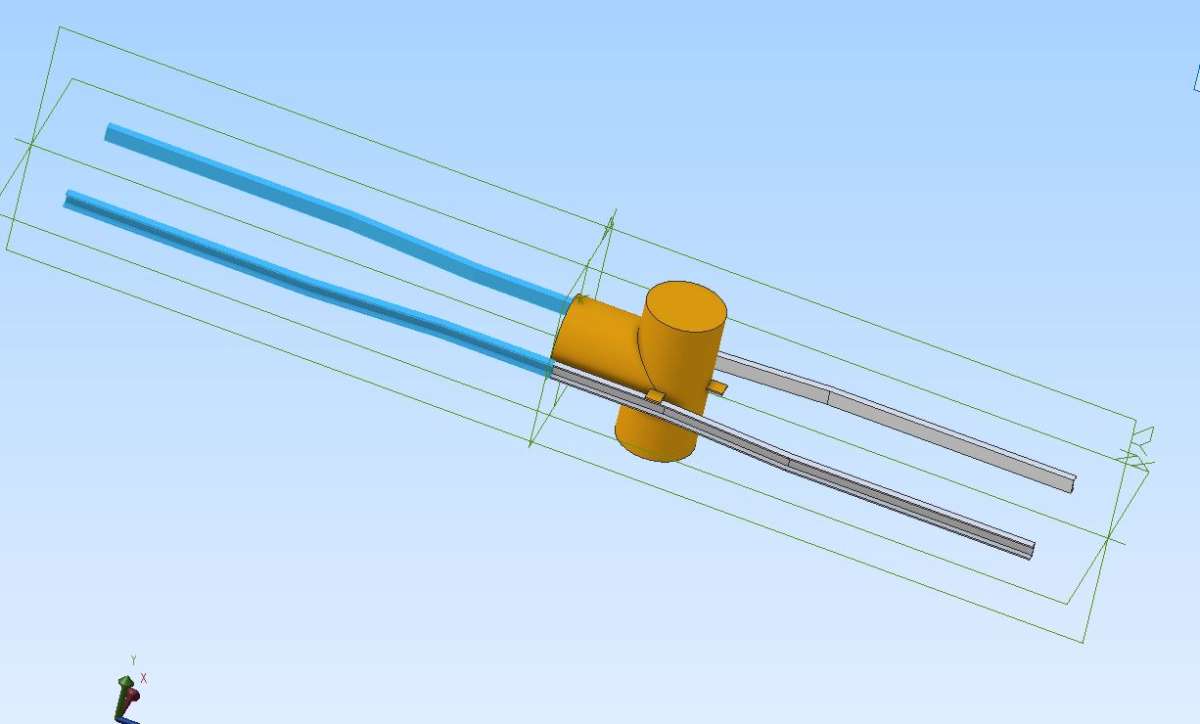
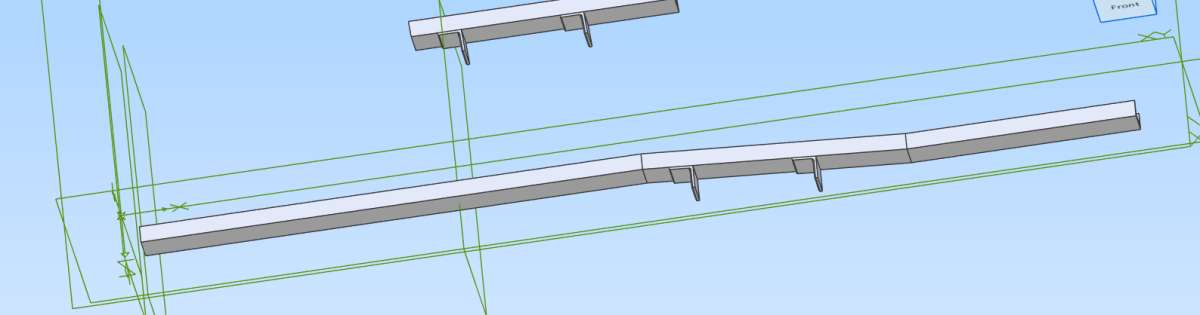
More prosiacally later I re-tried that chassis frame. It is very hard due to its odd angles and parts joined on the tapered section, but eventually I managed to model a long half-assembly, though of the three cross-member stubs I think two are slightly short. They look like it, anyway. Ah well.
Only… am I right you can mirror a sketch or a part, but not an assembly? I looked in the manual but it was not very clear on that, not to me anyway.
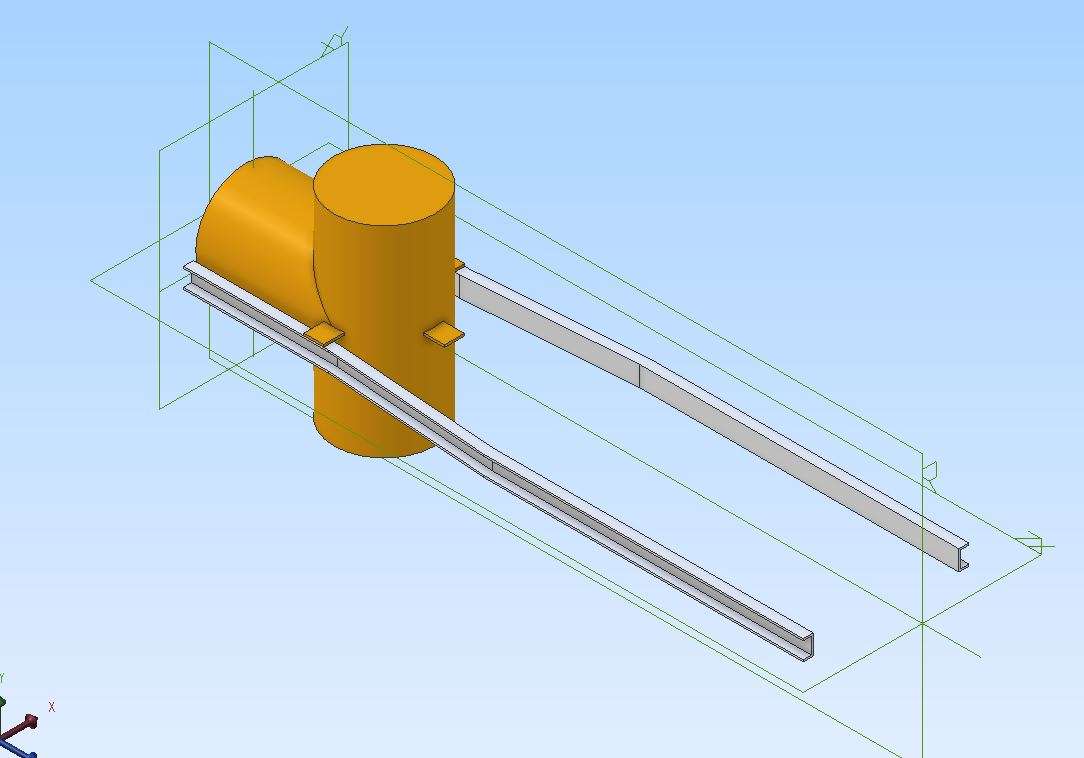
You can mirror parts in an assembly, here I have mirrored the pair of rails

But Atom3D doesn’t have Assembly Mirror – so other options need to be used.
You can make ‘other handed’ versions of a part using scale/mirror. Then add these to the assembly (which is what the assembly mirror tool does basically).
You can use (feature) mirror in parts to add the mirror image of existing geometry to the file (so you have two (or more) bodies in the same part file.
Nigel – if some portions of your rail look short – go back and check the dimensions. You can use the measurement tool that I showed in our assemblies session yesterday. If sizes are wrong, edit the features/sketches to correct them.
By default the 3D workspace display is in orthographic mode – the brain isn’t expecting that, so can mis-interpret and make things look wrong when they are actually OK. On the View tab of the Ribbon at top of screen, there is an option to switch to perspective display. Might be worth trying to see if things ‘look better’.
A really simple equivalent to ‘mirror’ for basic geometry like those chassis rails is to insert another instance but constrain so it is the other way up.
So if making a chassis rail from 3 parts – make that as a sub-assembly. In a new assembly, insert 2 instances of the rail sub-assembly, constraining one instance one way up and the other instance ‘upside down’.
In which case….
Jason – what version of Alibre do you use? Is it not Atom?
The parts of my assembly that seemed too short, were when viewed them against what was intended as a mirror plane but which did not extend to the front end. Visibly, the shortness may have come from cutting slightly into the mating parts, due to the intervening angle being not 90º.
I’d managed (with considerable difficulty) to add two angled brackets at fairly close to their real locations (I think) to give constraint surfaces or edges, but not something to control the ends of the added parts.
I had tried to measure something already built but very difficult to measure accurately, and then model it in CAD – but that is even more difficult. So making something difficult, even harder.
It looks as if I’d not bothered to save the result and I’ve not tried to do it again because I had taken most of the evening to create something that was not even right.
I’ve just measured the image and found the front bracket is an inch out of place: dimensions awkward to calculate from the measurements I’d taken, even harder to apply in the CAD assembly.
I’d intended the model below to collect three half-length cross-pieces so I could mirror the lot about the central plane, and it was those half-pieces that did not fit properly. The left-hand one had no bracket because it fits the longest piece at a right-angle. It’s supposed to be on that plane… if that’s in the right place.
The two brackets’s front faces are tapered at about 4.3º to correct for the frame’s taper. Putting those brackets there took many attempts, then when I stuck the other bits to them (another struggle) they did not look right.
The “spare” piece is unintentional and I cannot delete it.
Making such things physically is far easier than trying to model them in CAD. Clamp the main members to temporary cross-pieces on the floor, set to their intended dimensions then make the cross-members to fit! I machined the tapered brackets; everyhting else was by rule, scriber, square and hacksaw.
I must have made it from a general-arrangement drawing on paper, but don’t know if I still have that. It probably showed only the two side-rails and rearmost two cross-pieces, in defined places. Those made the frame parallel and rigid. All chassis components forwards of the rear axle depended on later developments such as the boiler and its mounting method.

Home › Forums › CAD – Technical drawing & design › Topics
Started by: greenhills
in: Workshop Tools and Tooling
Mark Rand
Started by:
duncan webster 1
in: Electronics in the Workshop
Mark Rand
Started by: Nigel Graham 2
in: Manual machine tools
Nigel Graham 2
Started by: Dr_GMJN
in: General Questions
Dr_GMJN
Started by: Bill Phinn
in: Workshop Tools and Tooling
JasonB
Started by:
JasonB
in: The Tea Room
Wade Beatty
Started by: Andrew Skinner
in: Electronics in the Workshop
Robert Atkinson 2
Started by: anoddcog
in: Introduce Yourself – New members start here!
JasonB
Started by: jimalm
in: Electronics in the Workshop
Robert Atkinson 2
Started by:
Blue Heeler
in: Beginners questions
David George 1
Started by: Colin Heseltine
in: 3D Printers and 3D Printing
David George 1
Started by: troy h
in: CNC machines, Home builds, Conversions, ELS, automation, software, etc tools
troy h
Started by:
JasonB
in: Workshop Tools and Tooling
Baz
Started by: berwick
in: Beginners questions
Steve101
Started by: Tris Summers
in: The Tea Room
anoddcog
Started by: Dalboy
in: Locomotives
Kevan Shaw
Started by:
Neil Wyatt
in: 3D Printers and 3D Printing
Pete Rimmer
Started by:
Gary Wooding
in: The Tea Room
JasonB
Started by: ksw
in: General Questions
Howard Lewis
Started by:
Michael Gilligan
in: The Tea Room
Michael Gilligan
Started by: rikt
in: Manual machine tools
Pete
Started by: homecat88
in: Introduce Yourself – New members start here!
Clive Foster
Started by:
Gary Wooding
in: The Tea Room
Oily Rag
Started by: Dr_GMJN
in: Workshop Techniques
ega
Started by:
Neil Wyatt
in: 3D Printers and 3D Printing
Neil Wyatt