3d-print chaos – suggestions please!

3d-print chaos – suggestions please!

Home Forums 3D Printers and 3D Printing 3d-print chaos – suggestions please!

Viewing 24 posts - 1 through 24 (of 24 total)
  • Author
    Posts
  • #817415
    SillyOldDuffer
    Moderator
      @sillyoldduffer

      Back to 3D-Printing after a long break and it’s not going well.   First the nozzle was gummed up solid, then I found the PLA filament on hand has become brittle and reluctant to melt.  Despite being dried in an oven.  Second, the bed was way off level, reason unknown.

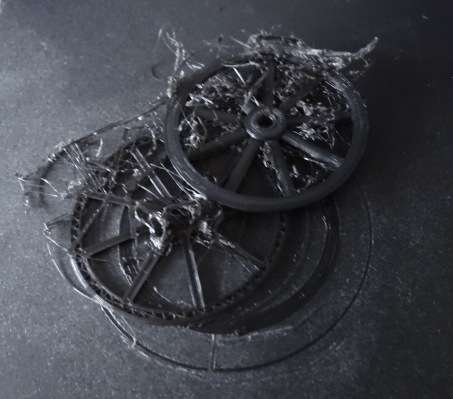
      Nozzle and bed fixed, I got this result from new PLA:

      DSC06919

      The item is a cartwheel, 100mm diameter.  The printer has split the wheel into 3 or 4, presumably due to losing the centre reference and jumping sideways.  Also lots of cotton wool filaments.   Happened when I was busy elsewhere.

      Printer is a Creality3-Pro; CAD SolidEdge2024 exporting STL;  Slicer is the latest version of Cura.  The g-code file is on a memory stick, not networked.

      Any ideas what might cause the print to jump or lose the centre point?   I normally 3D print with FreeCAD, but don’t see why SE would be wrong.   Not checked the STL or g-code yet, but could this be mechanical?  As I’ve been unwell, the printer hasn’t been used for over a year…

      Dave


      #817417
      Bazyle
      Participant
        @bazyle

        The jump perhaps was caused by it missing a load of steps. The cause might be electrical interference, a loose connection, or mechanical jamming by tight belts or jumping the gears by loose belts. Try a dry run with no filament while watching it, and TV? A power cut, mains or loose connection, would most likely cause it to stop.

        We have a weekly zoom call on Thursdays for helping with and generally discussing 3Dprinting as part of the Gaugeone3dCircle which anyone is welcome to join. https://gaugeone3dcircle.groups.io/g/home/topic/welcome_and_zoom_meeting/32484082


        #817422
        Journeyman
        Participant
          @journeyman

          Layer shift can be caused by many things, badly sliced stl file, slipping/jumping belts, broken wire to one of the stepper motors. Best to go back to a small print that you have printed successfully  before and try that. If the layer shift occurs in that the cause is likely mechanical. If CURA is showing the file as correctly sliced in the preview. I would be looking at the mechanics. Not familiar with the Creality but someone who knows the printer might well come up with something more definite.

          This is what Creality say. How to fix 3D Print Layer Shift   Not sure it’s much help.

          John

          #817424
          Michael Gilligan
          Participant
            @michaelgilligan61133
            On Bazyle Said:

            […]

            We have a weekly zoom call on Thursdays for helping with and generally discussing 3Dprinting as part of the Gaugeone3dCircle which anyone is welcome to join. […]

            That’s very generous of your Circle, Bazyle

            Thanks !

            MichaelG.

            #817425
            Fulmen
            Participant
              @fulmen

              Most slicers have ready made test patterns to choose from, this should eliminate any model errors.

              With bed slingers, first thing is to make sure it’s got room to move. Jog the bed in all directions to see that it moves freely.

              I’ve also had a similar problem that was caused by loose drive pulleys. They are usually fixed with set screws that can shake loose.

              #817462
              Keith Rogers 2
              Participant
                @keithrogers2

                Dave, is it possible the layer adhesion has broken down and the parts are moving around ?

                I had a similar problem with some PETG some time ago.

                Keith.

                #817488
                Fulmen
                Participant
                  @fulmen

                  One should clean the bed with solvent regularly, but that can’t be the issue here. The part won’t break free for then to stick back in another position, not unless you’re using waaay too much glue stick.  🙂

                  #817496
                  Grindstone Cowboy
                  Participant
                    @grindstonecowboy

                    Looks like it has lost position on both the X and Y axes though, otherwise all the centres would be in a straight line – makes it less likely to be a stepper motor or drive belt issue as it would need to affect both. More likely adhesion. Edit – although Fulmen has a very valid point about adhesion, hmm…

                    Your setup sounds identical to mine – Ender 3 Pro, Solid Edge and Cura slicer. Happy to try your file on mine if you like, send me a PM.

                    Rob

                    #817500
                    SillyOldDuffer
                    Moderator
                      @sillyoldduffer

                      Thanks guys! Food for thought.

                      Been much distracted today, but I had a quick look at the steppers and belts.   All seemed to be moving correctly.  Maybe something fell on the toothed belts and they jumped the cogs at the stepper.  If so, as Rob says, very odd that two belts were affected.  Thinks! maybe if was the Z-axis which lifts the nozzle with a worm; if that slipped the nozzle would crash into the print, and maybe jump the belts.

                      I’ll try a simple object tomorrow, and watch what it does.  Up until now the printer’s worked almost perfectly every time.  I’ll have look at the STL next.   I can also watch Cura simulate the print.

                      Rob: I’ll take up your kind offer, many thanks  I’m on the wrong computer at the moment, so expect a PM when I’ve got my act together.

                      Cheers,
                      Dave


                      #817506
                      Fulmen
                      Participant
                        @fulmen

                        The bed being way off suggests an impact, so check the full range of motion for tight spots.

                        #817544
                        Howi
                        Participant
                          @howi

                          had an interesting problem myself recently, put a magnetic plate on my Artillery Genius, prints not sticking to the bed.rechecked level and first layer height – no change!!!

                          Washed the plate in soapy water – hey presto prints stick to bed like they should…….. until, suddenly prints not being laid down properly and being dragged around the bed.

                          turned out the filament spool holder was binding so extruder wasn’t getting enough filament feed, simple adjustment to spool holder and now everything perfect.

                          Not always the obvious solution…….

                          #817559
                          Grindstone Cowboy
                          Participant
                            @grindstonecowboy

                            Well, just printed SOD’s file on my machine with no issues, so unfortunately it looks like a hardware issue for him. Good point about spool binding, could be worth investigating.

                            I always use the soapy water method for cleaning and have never had to resort to glue sticks, hairspray or tape.

                            Rob

                            #817566
                            SillyOldDuffer
                            Moderator
                              @sillyoldduffer

                              Not going well!  The failed print left gobs and rings of PLA seriously stuck to my magnetic bed.  IPA is slowly shifting it.  When the worst is gone, I’ll try Howi’s soap and water suggestion.  Very annoying the magnetic bed is so badly gooed with PLA. Had to scrape it so much, it should be replaced…

                              Meanwhile:

                              • The belts all move freely and seem suitably tight.
                              • Belts and channels clean, though I did find a chunk of filament near the X belt
                              • None of the cabling that wanders about under the bed was in a position to catch on a moving part
                              • The cabling and filament Bowden feed pipe connecting from the extruder driver to the extruder don’t seem likely to snag, but they move a lot during printing and might.  Need to watch it in action to make sure
                              • The Z-worm is shiny where it does most of the work.  Will inspect with a magnifying glass.
                              • The Z-stop switch was suspiciously low, so I’ve lifted it. Might have caused nozzle crash, but levelling the bed should have prevented that
                              • I applied light grease to the printer as per manual when it arrived, once, and it’s been idle for over a year.  Need to re-lube!
                              • The extruder driver (the mechanism that pulls filament off the drum and pushes it through the nozzle), is misbehaving.  When the printer was new filament loaded cleanly between gear and pulley and from there into the Bowden tube.  Now the filament misaligns with the exit port, and misses the output port.  Was easy, now fiddly, and maybe the filament catches on it’s way to the nozzle.  The driver mechanism is mostly plastic and the brass gear may be worn.  Could be the cause.

                              I agree with Fulmen thoug: the size of the jump suggests a collision – nozzle crash, or something caught in a belt.  I can’t see any obvious cause.

                              Dave

                              #817630
                              SillyOldDuffer
                              Moderator
                                @sillyoldduffer

                                Some progress.

                                After painfully cleaning the magnetic bed with IPA I tried Howi’s soap and water.  Good! I think the soap reduces unwanted adhesion, thanks!

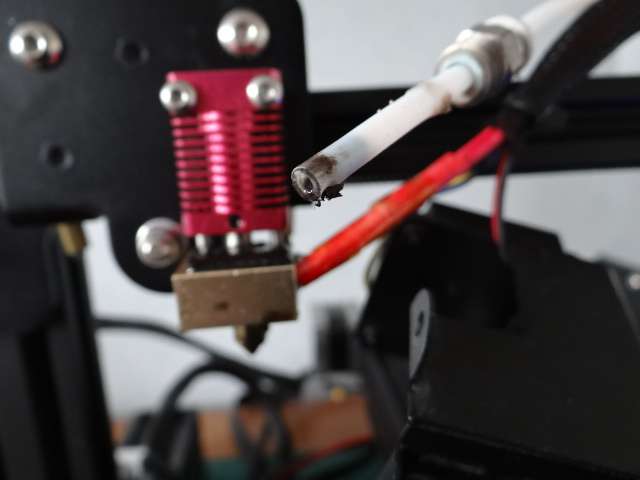
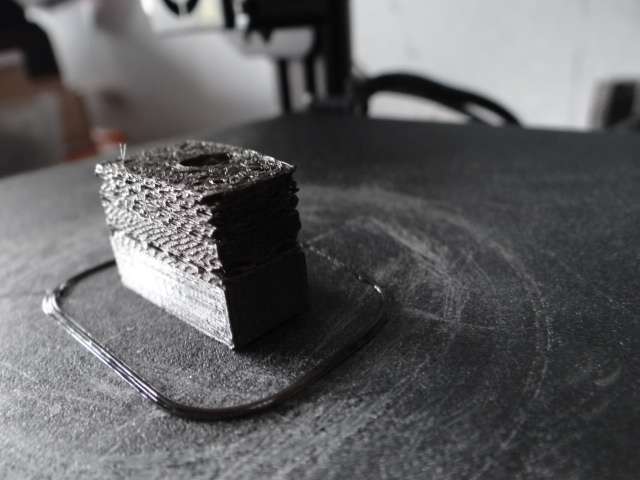
                                Lubed the worm.  Then checked the Bowden feed tube and discovered it was burned and obstructed:

                                DSC06926

                                Chopped the end off to clear it.

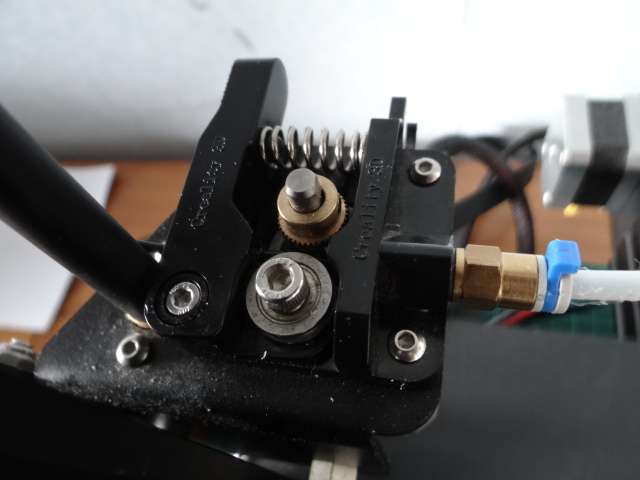
                                Running a test print went well until half-way when the printer made some odd knocking noises and the print quality dropped.  The knocking noise came from the extruder driver:

                                DSC06927

                                A stepper motor underneath drives the brass gear.  The gear pinches the filament against the steel pulley, forcing it down the bowden tube to the hot nozzle.  The banging seems to be due to the gear slipping, unable to force the filament through.   Could be due to the coil spring being too weak, or a worn gear, or friction in the Bowden tube, or gumming in the nozzle (perhaps temperature too low), or a faulty motor.  The design could be improved by pinching the filament between two driven gears, and I thought my fortune was made.  Nope, already been done, plus later printers move the driver into the hot end so the filament isn’t pushed down a tube, it’s just pulled.

                                When the driver started clonking the print degraded:

                                DSC06930

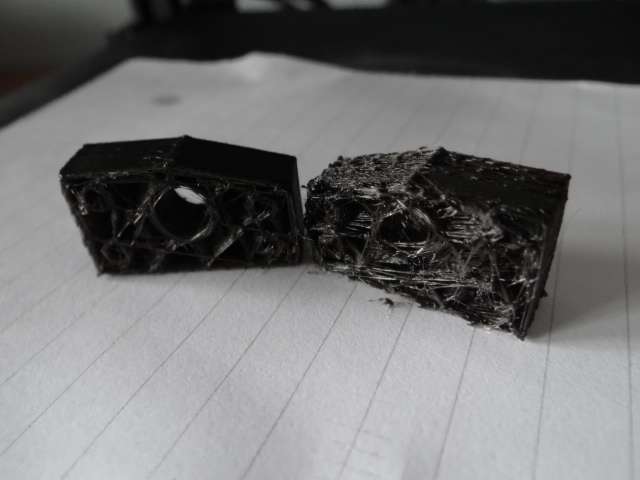
                                And the item fell in half when removed from the bed:

                                DSC06931

                                I think a combination of problems: drag pulling the heavy filament drum exacerbated the problems as noted above, leading to gumming at the nozzle, and a jamb.  Though it explains the bad test print, I’m not sure it explains why the wheel jumped.

                                Not sure what to do next!  A replacement dual-gear extruder with a slightly more powerful motor is about £15,  a PTFE tube with connectors is £11, and a replacement bed £19.  Not a problem except 3d-printers have moved on significantly, so is it time for a new one?  A Creality-Pro 3 in GWO prints well enough, but it’s rather slow…

                                Dave


                                #817633
                                Fulmen
                                Participant
                                  @fulmen

                                  Chances are you don’t need any new parts. I would do a full teardown of the hot end, it’s amazing how much crud can accumulate in the nozzle and heat break.

                                  #817634
                                  Grindstone Cowboy
                                  Participant
                                    @grindstonecowboy

                                    Replace the nozzle and sort out the Bowden tube would be my best guess, and check the position (and condition) of that brass drive gear as I mentioned in my PM. Looking at the photo, the teeth aren’t very visible – could be worn to the point it needs replacing (Amazon have them for not much money). I did find it’s quite easy to get the filament in such a position that it isn’t properly pinched, and the idler doesn’t turn. I made a few marks with a felt tip on both the idler and drive gear so that movement is easily visible.

                                    I upgraded to a direct drive extruder a little while ago in order to be able to use TPU – although I haven’t tried it yet – but there are pros and cons for both types. I got it on a sale at Amazon a while back with quite a hefty discount – and I think Prime day / Black Friday or whatever it’s called is coming up soon, so you might be able to pick one up then if you decide to stick with it.

                                    Rob

                                    #817641
                                    Bazyle
                                    Participant
                                      @bazyle

                                      If the filament driver is having difficulty pushing the plastic through it might be that it is not melted enough because the head is not at the temperature it is due to a faulty or mispositioned heater or temp sensor. Doesn’t explain the initial position jumps problem though.

                                      #817669
                                      Howi
                                      Participant
                                        @howi

                                        The problem seems to be the extruder is not pushing enough filament through, probably due to a partial blockage somewhere or filament binding/not been pushed though to the nozzle quick enough or your extruder temperature is changing(lower).

                                        Try the “change filament” option in the menu, and keep feeding filament through a number of times.

                                        You should see a constant stream of filament being extruded, if intermitant, there’s your problem.

                                        My printer has a direct extruder, one of the main reasons I chose the Genius over a lot of other printers.

                                        #817676
                                        SillyOldDuffer
                                        Moderator
                                          @sillyoldduffer
                                          On Fulmen Said:

                                          Chances are you don’t need any new parts. I would do a full teardown of the hot end, it’s amazing how much crud can accumulate in the nozzle and heat break.

                                          Apologies for not explaining fully, but I did all that.   Also new nozzle.  The head was crudded up, but the test print failed after I fixed it.  Judging by the ouch factor, the nozzle is hot enough, and manually pushed filament extrudes properly. May have missed something, but the machine has had a full-service, short of replacing parts (except the nozzle and new filament)

                                          The brass gear clonking in the filament driver is suspicious.   Did some research last night, and the mechanism supplied by Creality isn’t as good as it might be:  weak spring, plastic lever fractures, brass gear not well-made enough, and wears out.  The inside of the bowden cable gets scratched.   Several aftermarket alternatives correct these shortcomings, and at least one comes with a more powerful stepper motor as well.  Pushing filament down a Bowden cable from the top isn’t ideal either, and modern designs pull filament at the hot-end.

                                          Visitors today, but I might have time to get the driver assembly off the machine for a closer look.   But first an easier test:  Rob suggested increasing the default nozzle temperature.   Should make it easier to push filament out,

                                          Having slept on it, I’ll probably buy the upgrades rather than a new machine.  Depends on more testing.

                                          All suggestions very helpful thanks!!!

                                          Dave

                                          #817713
                                          SillyOldDuffer
                                          Moderator
                                            @sillyoldduffer

                                            Now I’m confused – this morning’s test print is perfect.  Despite me messing up the nozzle temperature change, so it ran with  standard settings.

                                            I’ve given it a bigger model to print – let’s see how that goes.

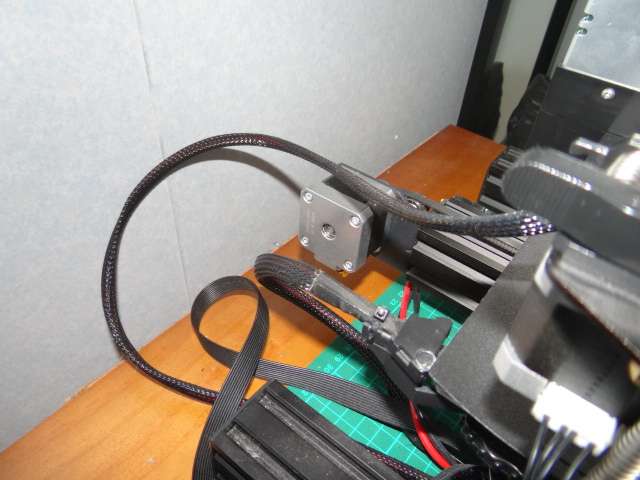
                                            Very few changes.   I rotated the bracket that supports the filament drum by 180° to increase the overhang and give the drum a bit more space.  Also moved the printer further away from the wall, in case the plug and wire on the back of the bed got close enough to collide.   That might explain the jumping.

                                            DSC06933

                                            I wonder if bed movement has enough momentum to gradually slide the whole printer closer to the wall. It’s on a shiny topped chest of drawers.   If the wire hit with the wall during a normal bed movement, it could push the printer away from the wall again, so it looks OK.  I’ve marked the top to see if the printer moves whilst printing!

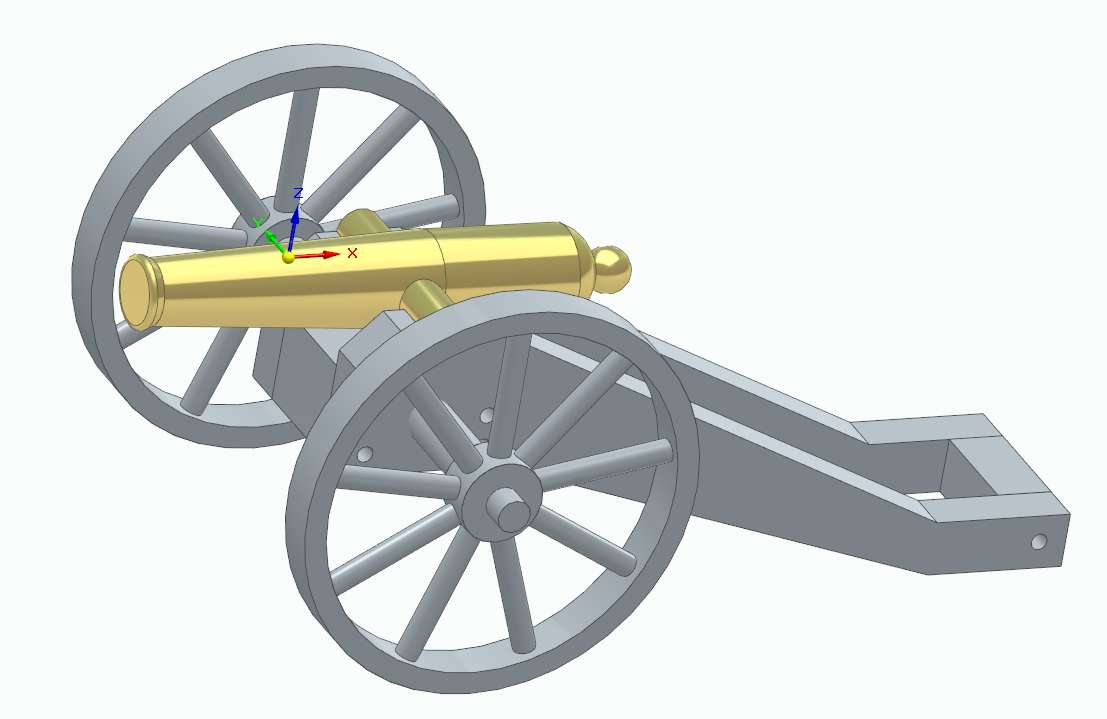
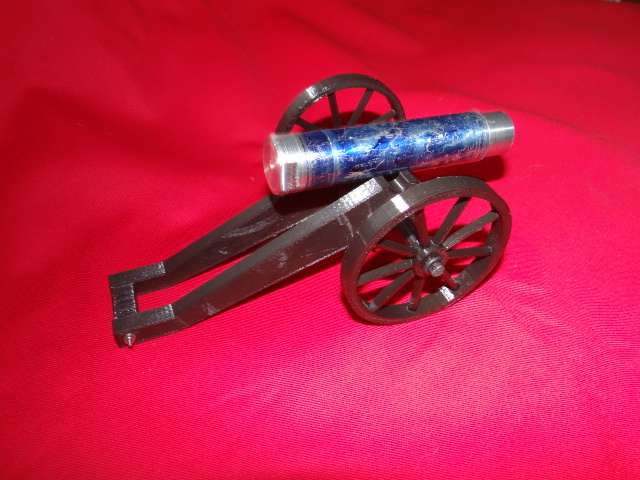
                                            As the experimental objects I make are meaningless to my kids and relatives, I thought an heirloom would be nice.  I don’t normally make scale models,  but a simple Napoleon Cannon might end up on a mantelpiece.  (Awkward silence until a small boy of 40 years asks “what’s a mantelpiece grandad?”)  It’s providing the parts I’m 3D-printing, should look like this:

                                            napcannon

                                            A full-size Napoleon would be accessorised with buckets, rammer, linstock and other artillery gizmos.  Quite hard to make by hand, but straightforward with CAD and 3D-printing.    I’d turn the Barrel in a lathe because metal looks pretty!  Should be bronze rather than Brass.   The Napoleon is a development of the French field artillery used during the Napoleonic Wars, then a recent improvement.

                                            If I had the time and inclination, modelling artillery as it improved between 1760 and 1860 would make an interesting display.  After 1860, artillery gets progressively harder to model:  a WW2 octuple 47mm Anti-aircraft gun is horrendously complicated!

                                            Dave


                                            #817739
                                            Martin of Wick
                                            Participant
                                              @martinofwick

                                              Assuming you have cleared up the gross malfunctions, try running a few calibration routines on the various axis and filament feeds, that will usually reveal any further potential issues.

                                              #818375
                                              Grindstone Cowboy
                                              Participant
                                                @grindstonecowboy

                                                This link may be helpful for those experiencing printing issues – it’s the most comprehensive I’ve found, but there are a couple of errors which look like a cut and paste issue. But easy enough to work out what they mean.

                                                https://www.3dsourced.com/rigid-ink/ultimate-3d-printing-troubleshooting-guide/

                                                Wondering if SOD’s original problem may have been warping, which caused part of the print to lift, and which may have then caught on the nozzle, either shifting the print or causing a belt to jump?

                                                Rob

                                                #818385
                                                SillyOldDuffer
                                                Moderator
                                                  @sillyoldduffer

                                                  Been distracted, and awaiting for supplies to arrive.  A litre of Acetone, yum, yum!

                                                  Current problem is I can’t get the printer to go wrong, and don’t know what I did to fix it!

                                                  The plastic below is straight off the printer, assembled with only minor fettling to get the wheels spinning on the axle.

                                                  DSC06937

                                                  Possible causes:

                                                  • jumping caused by the bed hitting the wall (unlikely) or debris getting under a toothed belt.  The latter is possible: a 100mm length of filament washed out when I showered yesterday.  Hard to imagine where it came from – I’m a close cropped baldy!   Printing does make lots of debris.
                                                  • friction due to gummed up and damaged Bowden tube.  This I attended to, and will replace the tube.
                                                  • slippage due to excessive friction and dirt choking the filament drive gear.   May have been unchoked by running clean new filament through the feeder.

                                                  Most unsatisfactory; I hate technical problems that fix themselves leaving me baffled.  Perhaps me threatening a damn good Basil Fawlty style thrashing did the trick!

                                                  Another print planned, but it’s still on the back on an envelope.  Tonight’s job with Solid Edge.

                                                  Thanks again for all the help and encouragement!  Kept me from slacking off!

                                                  Dave


                                                  #818395
                                                  Fulmen
                                                  Participant
                                                    @fulmen

                                                    I have the solution: Break it with a hammer, that way you’ll know exactly whats wrong.

                                                    I have it the same way, I need to know what went wrong so I can prevent it from happening again. Sadly these skills have limited shelf life, you need to run the printer somewhat regular to keep both it and you “well oiled”. And since filament has a shelf life as well you might as well waste it on something silly.

                                                  Viewing 24 posts - 1 through 24 (of 24 total)
                                                  • Please log in to reply to this topic. Registering is free and easy using the links on the menu at the top of this page.

                                                  Latest Replies

                                                  Viewing 25 topics - 1 through 25 (of 25 total)
                                                  Viewing 25 topics - 1 through 25 (of 25 total)

                                                  View full reply list.