Micro Mill SX1LP will not work.

Micro Mill SX1LP will not work.

Home Forums Electronics in the Workshop Micro Mill SX1LP will not work.

Viewing 12 posts - 1 through 12 (of 12 total)
  • Author
    Posts
  • #817077
    George Tilley
    Participant
      @georgetilley96475

      Hi Guys,

      Wonder if you can help me?

      My Seig micro mill stopped working some time back, Green light comes on but nothing happens.

      I have fitted the latest circuit board, swopped leads identical to original board including the small wire loop at the opposite RH end of board.

      Tested potentiometer as per youtube videos and that appears to be working but I changed it anyway. Ordered one online, asked for Z4K7 but got B5K which I assume is an acceptable alternative.

      Removed motor and connected it to my car battery and it revolved.

      After I put it all together I still get just the green light but the motor does not revolve.

      The components are loose on the machine and not yet screwed down.

      Any ideas or are there some electrical tests I can do?

      Cheers Brett


      #817079
      Robert Atkinson 2
      Participant
        @robertatkinson2

        Hi Brett,
        Can you post a picture of the control panel of your mill? I have a SX1LP (from ArcEuro Trade) and your description does not match mine. Mine has a brushless DC motor with feedback which won’t run when connected to a DC supply like a car battery.
        Maybe yours is an earlier version.
        If you are anywhere near Cambridge I’d be happy to come and have a look at it. I’m an electrinics engineer.
        If there is a circuit in you manual can you post a copy of that too?

        Robert.

        #817080
        JasonB
        Moderator
          @jasonb

          Is the e-stop unlocked?

          #817187
          George Tilley
          Participant
            @georgetilley96475

            Hi Guys,

            Firstly my apologies my mill is an SX1 not SX1LP.

            It is about 15 years old, one of the first with the longer bed. It has a brushed motor.

            Robert, I won’t send a picture as mine is an SX1 and explains why it is different. I wish I was near Cambridge as your expertise would be most welcome. I live in Oldham, Greater Manchester.

            JasonB. I presume the e-stop is the emergency stop unfortunately the SX1 does not have one.

            Would a faulty EMC filter cause problems? I have my mill on a bench in my garage and it has been very damp in the past with a leaky roof, now fixed. I cannot find fault with the potentiometer and have switch the 2 thick black wires without result. Everything is wired as before before I changed the circuit board.

            Regards,

            Brett


            #817192
            Robert Atkinson 2
            Participant
              @robertatkinson2

              Having forund a circuit here :

              https://littlemachineshop.com/images/gallery/drawings/4512-XMT-X1MicroMill.pdf

              the most likely culprit is the forward / reverse switch.
              With the power lead unplugged disconnect the DC + and DC- leads fron the control board. If you have a multimeter check for a low resistance between the wires (<20 ohms) with the switch in forward and reverse positions. If you don’t have a meter you could try connecting a car battery to the wires instead.

              Robert.

              #817237
              Keith Petley
              Participant
                @keithpetley53472

                Hi Brett,

                I don’t see in the description above that you have checked the fuse – in the circuit Robert found the power light will still come on even if the fuse has blown.

                Keith

                #817375
                George Tilley
                Participant
                  @georgetilley96475

                  Hi Guys,

                  Thanks for your interest.

                  Robert. I have ordered a new switch off the internet as they are cheap. Might as well replace it and have a spare if the original is OK.

                  Keith. I did not realise that. I have ordered a pack of fuses off ebay.

                  I have also ordered an EMC filter off Arc Euro as it is would be the only item I not have replaced.

                  Once I have changed them I will be back to report success (hopefully) or otherwise.

                  Cheers,

                  Brett

                  #817435
                  Hollowpoint
                  Participant
                    @hollowpoint

                    Does it have any micro switches on it anywhere? Like on the safety guard?

                    #817495
                    George Tilley
                    Participant
                      @georgetilley96475

                      Had a look and there are no micro switches on it. The only guard is round the chuck and that cannot be moved without removing it totally.

                      #817546
                      SillyOldDuffer
                      Moderator
                        @sillyoldduffer

                        I agree that the reversing switch is a likely suspect, but, in the event swapping it doesn’t fix the problem, we can try a methodical analysis.

                        Though it can be done without a multimeter, I recommend buying one. A cheap digital meter will do, this example from Amazon, other meters and vendors available.   A meter is aafer and less error prone than messing about with light-bulbs and car-batteries!

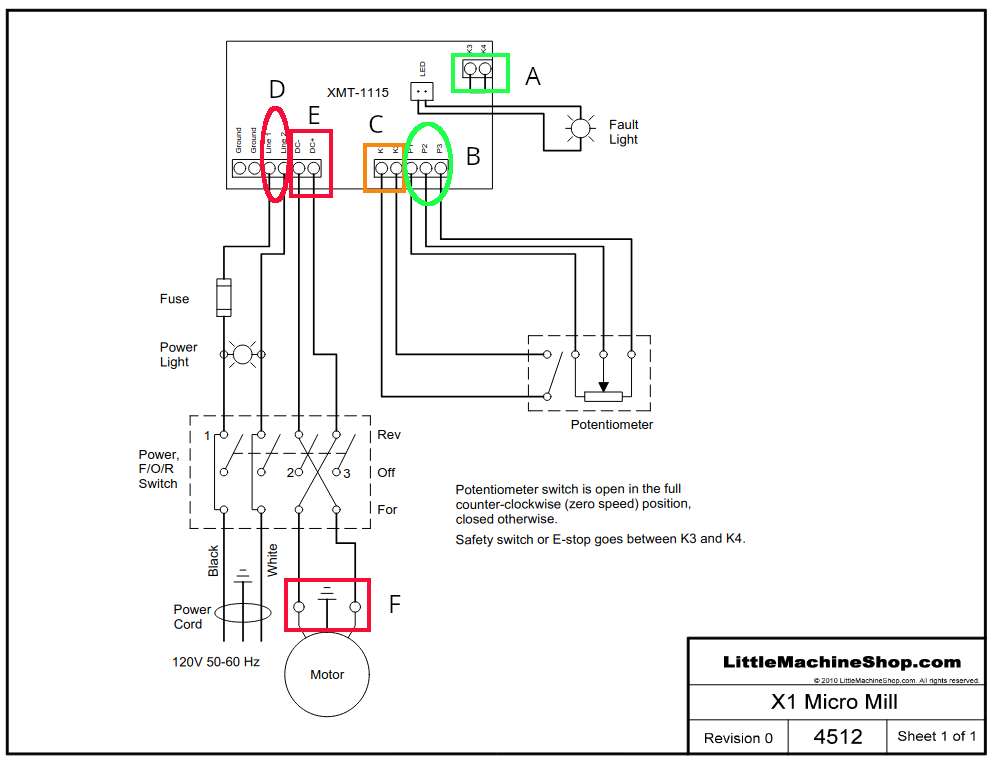
                        On the subject of safety, some tests are done on live equipment so be careful not to put self in contact with anything.   In the diagram terminals marked in GREEN are low-voltage safe; and those in RED are high-voltage dangerous.   Box C is AMBER because I don’t know!  Probably low, might be high, so approach with caution.

                        I’ve annotated Robert’s diagram to show where to test:

                        sxcircuit

                        Before starting, confirm the board is wired as per diagram.  Mistakes, loose wires etc will stop it working: everything has to be right.   (Within reason, substituting a 4k7 pot for 5k is OK!)  Don’t assume things are OK just because they look right – do the electrical test.

                        With the mill unplugged from the mains.

                        1. Set multimeter to ohms and test terminals K3 and K4 really are connected together by the strap shown in Green Box A.  The meter should read zero ohms.
                        2. Set multimeter to read ohms about 5k.  Connect probes between terminals P1 and P2 (Green box B).   Then turn the speed control pot: the ohms reading should vary between zero and 5000 ohms.
                        3. Now connect probes between terminals P2 and P3 (Green box B).   Again turn the speed control pot: the ohms reading should vary between zero and 5000 ohms.
                        4. Still on ohms, move probes to terminals K1 and K2 (Amber Box C)   Turn the speed control pot so that it’s ON/OFF switch operates.   The meter should read zero ohms when switched ON and infinity (1) when OFF

                        The controller will not work unless all the tests above pass:

                        • K3/K4 are for the emergency stop.  Although this particular mill doesn’t have any e-stops, the terminals must be closed by a strap.
                        • The pot controls speed by applying a varying voltage to terminal P2.  The controller won’t work unless the pot is working and correctly connected.
                        • K1 and K2 turn the motor ON/OFF.  No power is output to the motor unless the pot switch is working and properly connected.

                        With the mill plugged in and turned ON.  (CAUTION: shock hazard!)

                        1. Set meter to an AC volts range suitable for measuring 240Vac.   Probe terminals Line 1 and Line 2 (RED ellipse D) to confirm power is reaching the board.    If not check fuse with ohms range and wiring.
                        2. Set meter to a DC range suitable for measuring 200Vdc.   Set the pot to mid-range and probe terminals DC+ and DC- (RED box E).  This should confirm the board is supplying power.
                        3. Next set the Forward/Off/Reverse switch to Forward and DC probe the motor (RED box  F) to confirm that power is reaching the motor.   May be difficult to probe the motor, might be easier to connect to the output tags on the F/O/R switch.   Operate the switch to confirm it goes OFF and then reverses.

                        Mechanically minded chaps like to believe that electronics are less reliable than mechanical objects.  Not so!  The main cause of electronic failures are mechanical:  worn switch contacts, corrosion, cracked tracks, loose connections, frayed insulation, dry solder joints etc.  Unfortunately, mechanical failures can stress the electronics to destruction – they’re only reliable within their design operating range.   F/O/R switches are quite complicated and may be too cheaply made! If one goes wrong, mains may not get to the board, and/or DC may not get to the motor.   A meter is the best way of testing it, but they’re cheap enough to replace on suspicion.

                        Dave


                        #817781
                        George Tilley
                        Participant
                          @georgetilley96475

                          Hi Guys,

                          Thanks Dave for that very comprehensive testing procedure, fortunately I did not need to use it.

                          The mill now works!

                          After being broken for about two years I was able to get it running this afternoon.

                          I bought a new circuit board, new motor at a very reduced price, a new potentiometer, new on/off switch and a bag of fast blow fuses. Fitted the circuit board and potentiometer, no joy. Fitted a new fast-blow fuse and eureka it worked. So after spending a small fortune on spares the actual repair was about 20p.

                          Thanks to everybody who took an interest and gave advice. Hope I can return the favour one day.

                          Cheers,

                          Brett


                          #817785
                          Robert Atkinson 2
                          Participant
                            @robertatkinson2

                            Don’t feel too bad.
                            Something blew the fuse. Likely the control board and possibly the motor failed first and damaged that.

                            Robert.

                          Viewing 12 posts - 1 through 12 (of 12 total)
                          • Please log in to reply to this topic. Registering is free and easy using the links on the menu at the top of this page.

                          Latest Replies

                          Viewing 25 topics - 1 through 25 (of 25 total)
                          Viewing 25 topics - 1 through 25 (of 25 total)

                          View full reply list.