Is software like Catia or Siemens NX overkill for model engineering?

Is software like Catia or Siemens NX overkill for model engineering?

Home Forums CAD – Technical drawing & design Is software like Catia or Siemens NX overkill for model engineering?

Viewing 25 posts - 1 through 25 (of 33 total)
  • Author
    Posts
  • #827361
    nilunquamsimile1914
    Participant
      @nilunquamsimile1914

      I want to design OO gauge, NG7 and Gn15 locomotives. They’re all similar in size and run on HO scale track. I’ve been shopping around for software and I am lost. So many packages, bundles and custom quotes. I want the same software that the big model railway manufacturers use like for example Rapido Trains UK and Accurascale. They don’t publicly state the software they use and I don’t it’s a good idea to ask them.

      #827365
      JasonB
      Moderator
        @jasonb

        In a word yes.

        There are many reasonably priced or even free CAD packages out there which in the right hands can produce a complete assembly of a loco and animate the moving parts.

        I use Alibre and sometimes Fusion 360. Alibre is a reasonable $199 one off purchase the other will give you quite a lot for free though check what file formats it will output. Both offer a 1 month FREE trial.

        https://www.alibre.com/historic-preservation-screenshots/

        Other options were listed in your other thread.

        #827376
        IanT
        Participant
          @iant

          Is software like Catia or Siemens NX overkill for model engineering?

          In short – Yes!  🙂

          Regards,


          IanT

          #827385
          Fulmen
          Participant
            @fulmen

            I’ve used stuff like Solid Edge, Solidworks and Inventor, and these are of course the best that money can buy. But unless you’ve just won the lottery it’s not really something you can afford. Not that it’s any of my business how you spend your money or anything. You do you and all that, but you’ll be paying for a lot of stuff you’ll never going to need.

            I’m currently building a Bonelle tool grinder using Fusion 360, That’s a 200 parts build, and I have no problems working on this with the free edition that has a limit on 10 active files. And there are multiple tiers of upgrades available for a modest fee.

            #827387
            SillyOldDuffer
            Moderator
              @sillyoldduffer

              Do you need a product that supports?

              • large multi-disciplinary teams collaborating on many complex projects
              • integrated Computer Aided Engineering, Design and Manufacturing
              • Advanced Generative Design, Simulations,Thermal, Structural and Motion analysis
              • Lifecycle Management

              And don’t mind a steep learning curve and have a hefty budget to pay for?

              • high-end workstations
              • server(s)
              • professional training courses (essential)
              • licence and support fees
              • admin staff to run the thing

              In short, NX and Catia are enterprise level tools, waaay over the top for a lone Modeller. A huge investment in time and money.  They’re not shinier versions of cheaper CAD, they provide a lot of costly features needed by big organisations, rarely by hobbyists.

              Many small and medium businesses decide they don’t need NX and buy Siemens SolidEdge instead.   Unless a Model Engineer is very special, the Community version of SE will do all that’s needed.  As will Fusion and FreeCAD, except I’m not sure how well FreeCAD supports assemblies. Do you need Assemblies? (Probably yes in the long run,(

              Most of the free packages are teach yourself, and not everyone is good at that.  If so consider paying for Alibre because it includes support.  Learning 3D-CAD is quite difficult, partly because there’s so much to it.   After 3 or 4 years with Solid Edge I’m still learning, and I’ve barely dipped into Sheet Metal, Surfacing, Generative Design, Reverse Engineering, or Finite Element Analysis.

              Download FreeCAD, SE or Fusion360 and have a go.  I think one of them will keep you happy for several years!  If you struggle to learn on your own, cough up for Alibre, or other supported package.

              Dave

              #827410
              Wade Beatty
              Participant
                @wadebeatty78296

                SOD, Jason and Fulmen said it all above. To answer Dave’s question, FreeCad does support assemblies. All of the packages have really great help on YouTube for beginners and advanced users as well. All of the packages have VERY active forums where you will get specific questions answered quickly. Of the mentioned packages, Freecad ( although I love the concept and respect the creators) has the least developed interface.

                #827418
                JasonB
                Moderator
                  @jasonb

                  Have you had any previous CAD experience?

                  Have you done any scratch building in the past or even kit building ? As there is a lot more to designing  a miniature than just redrawing parts to a smaller size, the best CAD in the world won’t help with that.

                  #827468
                  David Jupp
                  Participant
                    @davidjupp51506

                    Catia & NX very, very expensive to buy and to maintain – both excellent products.

                    Many other less expensive mid range products which are still very capable.

                    Lower cost or even free products available as mentioned above.

                    Do you need surface modelling?  Not all products offer a full set of surfacing tools.  Most modelling can be done without surfacing, but if you are used to surface tools, or you are tackling certain tasks that benefit from surface manipulation, this could be an important factor in your choice.

                    It’s horses for courses.  Catia is widely used in the Automotive industry, but companies designing tooling  for the car makers may save some significant costs by using Alibre to read Catia files (though they’ll probably maintain one seat of Catia at the insistence of Ford, JLR, etc.).

                    I’m aware of some subsidiaries of large Aerospace companies that shun the big budget CAD systems used at corporate level, because a simpler, less expensive product is good enough for their specific needs.  It’s also much faster for new users to get up to speed on a simpler product.

                    Perhaps take a look also as ‘non-traditional’ CAD such as MoI3D – at least one contributor here uses it.  Very good for modelling more organic shapes.  Though it isn’t really targeted at mechanical design – some people happily use it in that field.

                    Unless you’ll actually be sharing native files with the manufacturers that you mention, there is no obvious benefit to having the same software (even if you can find out which one(s) they use).  Note also that if you want to open native files from any 3D CAD system, you need to have a version no older than the one the file was produced or last edited on.  This can force you into regular updates.

                    Even evaluating a trial of CAD software is a significant undertaking, so try to be clear about what capabilities are important to you.  There is no single correct answer.

                    #827484
                    Neil Wyatt
                    Moderator
                      @neilwyatt

                      Yes. Not just because their functionality goes way beyond what is required and the high cost, but also because a product aimed at hobbyists and small engineering companies is focussed on our needs: easier to learn, faster to use and less demanding of hardware.

                      Plus, we have a free six-month trial of Alibre Atom 3D which will be announced in the next issue of ME&W.

                      So, no reason not try a package aimed at our hobby and see how you get on with it, before making any financial commitment.

                      Neil


                      #827496
                      mike robinson 2
                      Participant
                        @mikerobinson2

                        I work for Siemens Industry Software (in Cambridge) who develop the Parasolid geometry modeller and some modules of the NX product suite. Its nice to get a mention on these pages. As Dave said, unless your designing Rolls Royce aircraft engines, F1 cars, aircraft, cars or ships, or even your iPhones its otherwise out of reach, NX Designer Node Locked starts at around £490 per month subscription.

                        #827501
                        IanT
                        Participant
                          @iant

                          I’m very happy with Solid Edge CE Mike (which is probably under another product group) but thank you Siemens! 🙂

                          Regards,


                          Ian T

                          #827544
                          duncan webster 1
                          Participant
                            @duncanwebster1
                            On Neil Wyatt Said:

                            Yes. Not just because their functionality goes way beyond what is required and the high cost, but also because a product aimed at hobbyists and small engineering companies is focussed on our needs: easier to learn, faster to use and less demanding of hardware.

                            Plus, we have a free six-month trial of Alibre Atom 3D which will be announced in the next issue of ME&W.

                            So, no reason not try a package aimed at our hobby and see how you get on with it, before making any financial commitment.

                            Neil


                            I’m glad you told me that, I was going to buy it for Xmas, now I can give it a good try before deciding. Last time ME had an offer it came with a written tutorial, much better than u tube. Are you repeating this?

                            #827609
                            nilunquamsimile1914
                            Participant
                              @nilunquamsimile1914

                              Is solidworks standard overkill too?

                              #827610
                              nilunquamsimile1914
                              Participant
                                @nilunquamsimile1914
                                1. On JasonB Said:

                                  Have you had any previous CAD experience?

                                  Have you done any scratch building in the past or even kit building ? As there is a lot more to designing  a miniature than just redrawing parts to a smaller size, the best CAD in the world won’t help with that.

                                  No, I don’t have any experience with cad, scratchbuilding, or kit building. I’ve seen the OO kits online and they’re hundreds of dollars and I’d have to pay import fees so I didn’t think it made sense to buy one. I don’t think I can buy them on a consistent basis to practice.

                                #827615
                                JasonB
                                Moderator
                                  @jasonb

                                  Solidworks is still quite expensive though as you are in the US if you are a Veteran I think they do a free or very cheap option. Given your comment about the cost of kits why are you looking at top end expensive CAD packages when cheaper or free ones have been suggested. If you look at that Alibre link I posted earlier you can see some examples of Locos. The others suggested are all capable of producing similar 3D models in the right hands.

                                  I would look at one of the free trials, find a few online videos and have a go. Some people pick it up quite easily others never really get beyond the first steps.

                                  Maybe Ian or one of teh others who build in the small scales could chip in but I would have thought trying to assemble a kit would be a good way to see if you have the aptitude before making a big investment. It would also let you see the component parts and give you a good idea of what you would need to design and make. You will still need all the tools use dto assemble a kit to assemble the parts you eventually produce yourself so no wasted money.

                                  Just so we are on the right track (no pun) is this the sort of thing you hope to make?

                                  https://www.djhmodelloco.co.uk/product/k72-kit-nbr-lner-br-j35-0-6-0/

                                  #827619
                                  David Jupp
                                  Participant
                                    @davidjupp51506

                                    SolidWorks, Inventor, SolidEdge and other ‘mid-range’ products would all probably be more than adequate.

                                    Do be aware that SolidWorks has gone down the subscription route – pay every year or the software stops working.  This seems to be becoming more the norm from many companies.

                                    Mid-range is a relative term, the costs for these are still pretty significant unless you can access an educational or some other special version at deeply reduced cost.

                                    #827621
                                    SillyOldDuffer
                                    Moderator
                                      @sillyoldduffer
                                      On nilunquamsimile1914 Said:

                                      Is solidworks standard overkill too?

                                      Easy to confirm that Catia and NX are over the top because they’re Enterprise level tools.   Not possible to simply categorise mid-range products.

                                      I suspect a case of “Beginner Feeling His Way”.  No shame in that, we all have to start somewhere. The term “Model Engineering” doesn’t narrow the field because the hobby ranges from folk pushing CAD to the limit down to chaps who don’t need it at all.

                                      The best way to choose tools to identify what they need to do.  Write a list of the jobs you need CAD to do, then use the list to narrow choices down, either by reading specs, or asking here.   The forum is much better at answering specific questions than generalisations lacking detail.

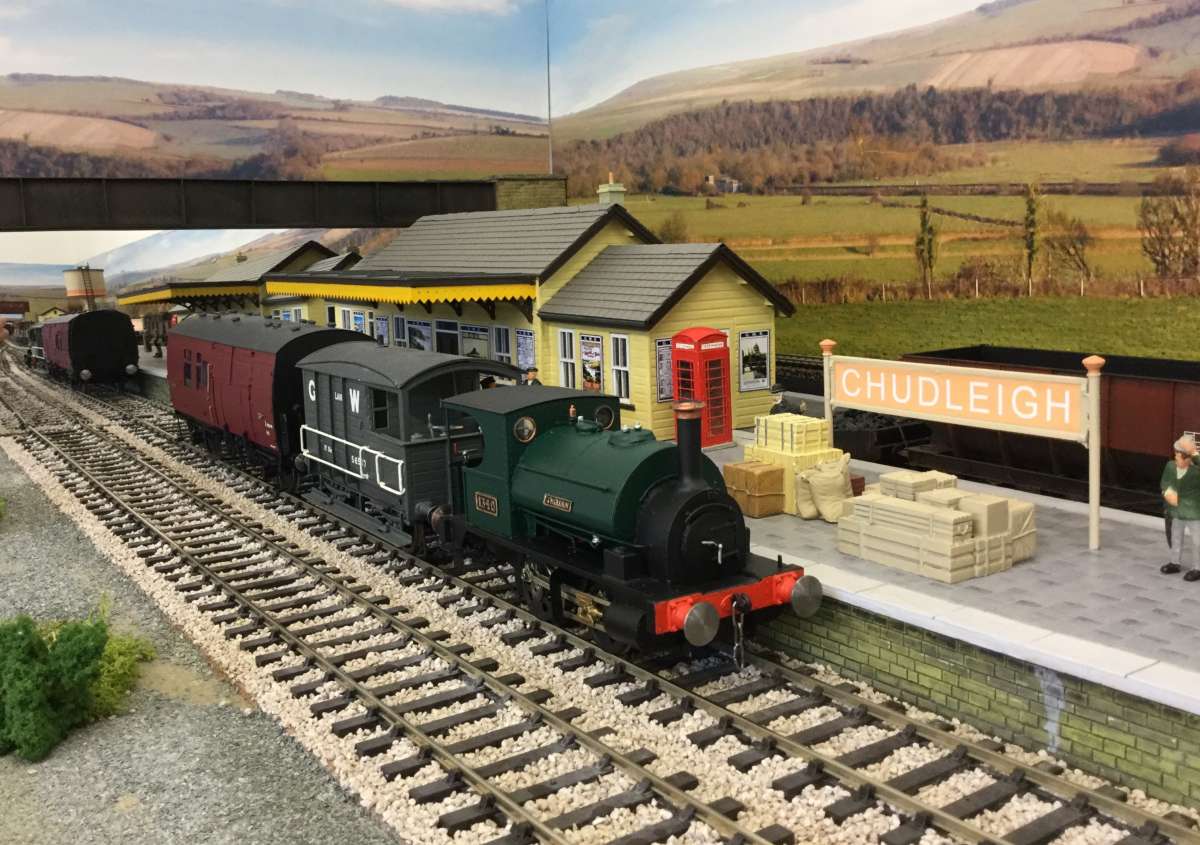
                                      Looking at the example below, what do you want to model?

                                      railwayscene


                                      Is it the engine, the buildings, the street furniture or the figurines?   If the engine, then it’s useful to CAD model it as dozens of individual parts in an Assembly.

                                      Is photo-realism important?

                                      Think about support.  CAD being quite difficult to learn it’s good to have help.  Solidworks isn’t well supported on this forum – not enough users.  Alibre, FreeCAD, Fusion360 and SolidEdge all have active users who can answer questions. Alibre is particularly well supported at the moment because the company are actively promoting their product.

                                      Solidworks sell Standard, Professional and Premium versions:  if Standard doesn’t cut mustard, upgrade it. Fusion, Alibre and others do the same.  I get on well with the community edition of SolidEdge because it’s almost the full-product, no limits.   SE is harder to learn than Fusion360, but F360’s community edition has a 10 part limit that’s too low for me.  Freebie F360 is great for small projects, but not if you exceed the limits.

                                      Budget may be the deciding factor.

                                      Can you explain what you expect of 3D-CAD?  If not possible at this stage of the game, I suggest starting with paper and pencil.   After doing that for a while, what you need from CAD will become more obvious, and it may not be needed at all!  Alternatively, choose one, preferably free, and get stuck in.   Learn from the experience, and upgrade or switch products as necessary.   All the CAD products mentioned do most of what most Model Engineers need, which is wonderful until we find we are special.

                                      Dave


                                      #827622
                                      JasonB
                                      Moderator
                                        @jasonb
                                        On SillyOldDuffer Said


                                        SE is harder to learn than Fusion360, but F360’s community edition has a 10 part limit that’s too low for me.  Freebie F360 is great for small projects, but not if you exceed the limits.


                                        This is not Correct.

                                        You have a limit of 10 actively editable files. You can have loads more files and those files can be individual parts or contain many parts. So quite possible to model every item in a loco of OO scale or larger.

                                        It is quite easy to close an editable file and open another so it can be edited should the need arise so really there is no limit just a bit of an inconvinience that is unlikely to be a problem for a hobby user.

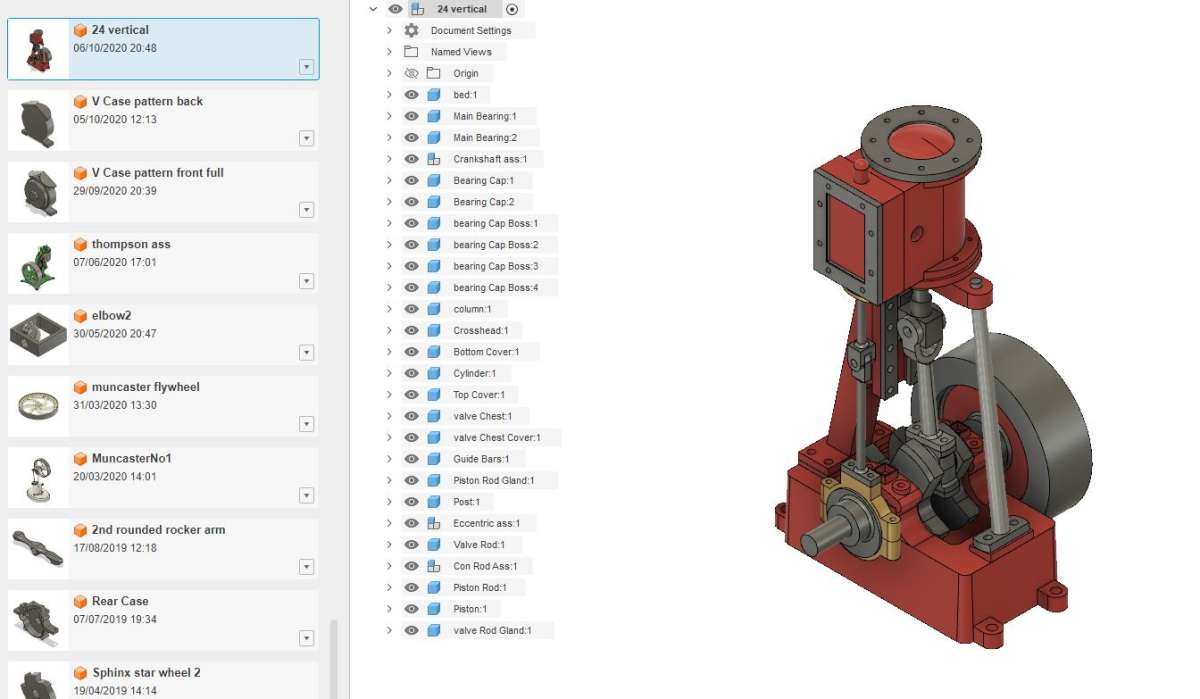
                                        Here is a screen shot of my non commercial (free) Fusion F360 screen. Down the left are 74 different items. Quite a few of which are complete assembled engines like the one shown on the main screen listing all it’s parts and sub assemblies down the side. I can work on any one of those if I wanted.

                                        many

                                        #827625
                                        JasonB
                                        Moderator
                                          @jasonb
                                          On nilunquamsimile1914 Said:
                                          1. On JasonB Said:

                                            Have you had any previous CAD experience?

                                            Have you done any scratch building in the past or even kit building ? As there is a lot more to designing  a miniature than just redrawing parts to a smaller size, the best CAD in the world won’t help with that.

                                            No, I don’t have any experience with cad, scratchbuilding, or kit building. I’ve seen the OO kits online and they’re hundreds of dollars and I’d have to pay import fees so I didn’t think it made sense to buy one. I don’t think I can buy them on a consistent basis to practice.

                                          The other big question before you think about designing and making your own is have you thought about where you will get info on the full size prototype from?

                                          You mentioned a Sterlin Single in your other thread. Can you find access to old works drawings, can you get access to one in preservation, can you take measurements and many photos if you can get access to? Only with info like that can you start to think about doing a scale model. You may get away with working from a few photos and odd sizes off the net but it depends on the accuracy you are wanting in your miniatures.

                                          #827641
                                          nilunquamsimile1914
                                          Participant
                                            @nilunquamsimile1914
                                            On JasonB Said:
                                            On nilunquamsimile1914 Said:
                                            1. On JasonB Said:

                                              Have you had any previous CAD experience?

                                              Have you done any scratch building in the past or even kit building ? As there is a lot more to designing  a miniature than just redrawing parts to a smaller size, the best CAD in the world won’t help with that.

                                              No, I don’t have any experience with cad, scratchbuilding, or kit building. I’ve seen the OO kits online and they’re hundreds of dollars and I’d have to pay import fees so I didn’t think it made sense to buy one. I don’t think I can buy them on a consistent basis to practice.

                                            The other big question before you think about designing and making your own is have you thought about where you will get info on the full size prototype from?

                                            You mentioned a Sterlin Single in your other thread. Can you find access to old works drawings, can you get access to one in preservation, can you take measurements and many photos if you can get access to? Only with info like that can you start to think about doing a scale model. You may get away with working from a few photos and odd sizes off the net but it depends on the accuracy you are wanting in your miniatures.

                                            Best way would be to go in person so I guess I can’t do anything thats foreign and I need to readjust my expectations.

                                            #827645
                                            blowlamp
                                            Participant
                                              @blowlamp
                                              On David Jupp Said:


                                              Perhaps take a look also as ‘non-traditional’ CAD such as MoI3D – at least one contributor here uses it.  Very good for modelling more organic shapes.  Though it isn’t really targeted at mechanical design – some people happily use it in that field.


                                              As that probable contributor on here, I feel I should correct David slightly by pointing out that MoI is very much intended for mechanical design. 😉

                                              It’s a powerfull NURBS Direct Modeller with fairly substantial surfacing capabilites which aren’t typically available in its price range, but what it doesn’t have is assembly and constraint capabilities. However, by use of its excellent snap system and along with its transformation tools it’s pretty easy and effective to move and reposition parts to check for interference and mobility.

                                              One of the developer’s goals is to keep the interface as easy as possible to interact with by making each tool usable with curves, solids, surfaces and edges, so no swapping tools when moving from one thing to another – you also won’t find any ‘road block’ error messages.

                                              I think MoI of as a ‘manual’ rather than an ‘automatic’ vehicle which takes you to your destination, but just needs a bit more input from the driver.

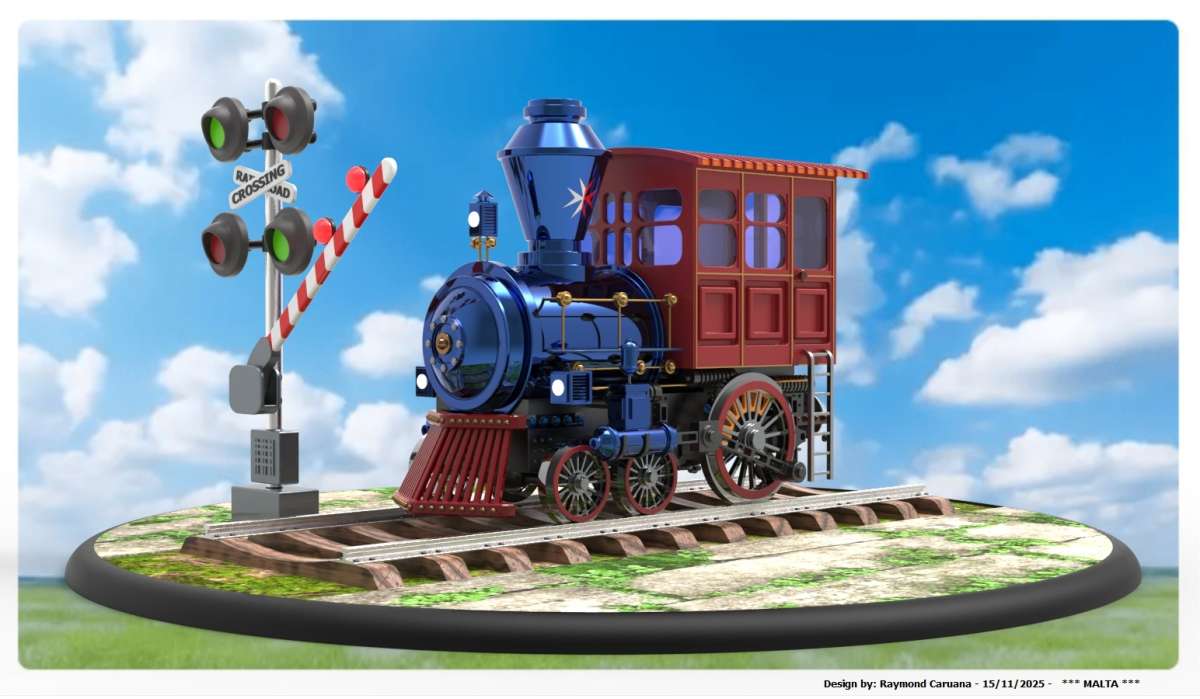
                                              Never the less, Moi is well capable of solid modelling a locomotive.

                                              This isn’t my model, it’s simply the first locomotive I came across in the MoI gallery.

                                              RC Maltese Train 1a

                                              Martin.


                                              #827648
                                              IanT
                                              Participant
                                                @iant

                                                “Maybe Ian or one of the others who build in the small scales could chip in but I would have thought trying to assemble a kit would be a good way to see if you have the aptitude before making a big investment”

                                                Yes Jason, most ‘scratch’ modellers arrive at that point having moved through ready-to-run, then kits and then (for a number of reasons) scratch building. These reasons can be cost, lack of availability of the model you really want or a desire for ‘fidelity’ in ‘OO’.  Usually in this OO this would be some form of ‘finescale’ modelling such as the EM or P4 standards.

                                                I do think that building a few ‘kits’ can very useful before attempting to design your own models, as it will give a good idea of might be required. I think the OP has mentioned cost – and I would agree that I’ve seen some very expensive kits (that have been purchased as a ‘first’ attempt) and the outcome has not always been a happy one. However, I imagine there are some quite affordable/simpler OO kits available too and these might provide a better starting point to cut one’s modelling ‘teeth’ on.

                                                Having said all that, I know someone who jumped right in at the deep end and who manages to produce some excellent models. Everyone is different in their experience, skills and determination.

                                                I have models that will never see the light of day (in Public) because I can see their flaws (which are many and varied). I always recall my first boss, who had a wonderful model of ‘Victory’ that he’d hand built from a very expensive kit. It looked perfect to me but he was almost embaressed about it, much prefering to show me a model of a gun-deck he’d built, which by comparison to the ship, looked rather plain to me. To his eye though, there was a world of difference between the two models.

                                                The OP should do whatever is going to best satisfy his interests and ambitions but also try to be realistic in the process (to avoid early disappointment). A few simple models (well executed) can be a much better encouragement than a complex one that disappoints.

                                                Regards,


                                                IanT


                                                #827816
                                                nilunquamsimile1914
                                                Participant
                                                  @nilunquamsimile1914

                                                  <p style=”text-align: right;”>I’ll just copy what tom mallard chose to work with and call it a day. I don’t have to do locomotives, freight cars or carriages would be simpler and not discouraging.  They’re only boxes with wheels slapped on them. Make it out of etched brass because I hate plastic. The dude uses progecad for making etched parts and fusion for the 3d bits and for progecad it’s a 1 time payment.</p>

                                                  #827826
                                                  blowlamp
                                                  Participant
                                                    @blowlamp

                                                    Having just looked at Progecad on YT, I’d say it isn’t really aimed at mechanical CAD. It seems to have a heavy slant towards the architectural side of modelling, so it may lack some useful tools. I wouldn’t use it given what else is available.


                                                    Martin.

                                                    #827838
                                                    Bazyle
                                                    Participant
                                                      @bazyle
                                                      On Neil Wyatt Said:

                                                      Plus, we have a free six-month trial of Alibre Atom 3D which will be announced in the next issue of ME&W.

                                                      So, no reason not try a package aimed at our hobby and see how you get on with it, before making any financial commitment.

                                                      Neil

                                                      Start with FreeCAD as it won’t cost a bean to try. In 2019 I think there was a thread on here that explained a quick trial in very simple terms and within a few hours max I was able to design and 3D print a change gear on the work printer.
                                                      I had started with Onshape but work blocked the necessary online access for lunchtime playing and I switched to F360. My mistake then was to go with the ME trial of Alibre because after 6 months the purchase offer was anything but hobby level being more than twice what my last lathe cost.
                                                      So FreeCAD wins.

                                                    Viewing 25 posts - 1 through 25 (of 33 total)
                                                    • Please log in to reply to this topic. Registering is free and easy using the links on the menu at the top of this page.

                                                    Latest Replies

                                                    Viewing 25 topics - 1 through 25 (of 25 total)
                                                    Viewing 25 topics - 1 through 25 (of 25 total)

                                                    View full reply list.