A Simpler Rotation Problem?

A Simpler Rotation Problem?

Home Forums CAD – Technical drawing & design A Simpler Rotation Problem?

Viewing 12 posts - 26 through 37 (of 37 total)
  • Author
    Posts
  • #828154
    David Jupp
    Participant
      @davidjupp51506

      Nigel,

      It is no trouble.  If you don’t know what is wrong, how can you realistically judge whether or not you would learn from having the issues identified?

      You are probably not alone in hitting problems, it may benefit others too.


      #828159
      JasonB
      Moderator
        @jasonb

        Nigel. As I have said several times when I put up a video click the “Youtube”  that comes up once the video is playing this is at the bottom in the black bar. Then when in youtube click bottom right of the screen on the two diagonal arrows to get full screen. This will come up crisper than watching on this website. Yes it is still a bit fuzzy as the free screen video software I use is not that high a resolution but a lot better than not watching on Youtube..

        Again as said many times I use Alibre Pro but all the tools I used should be available to you in Atom.

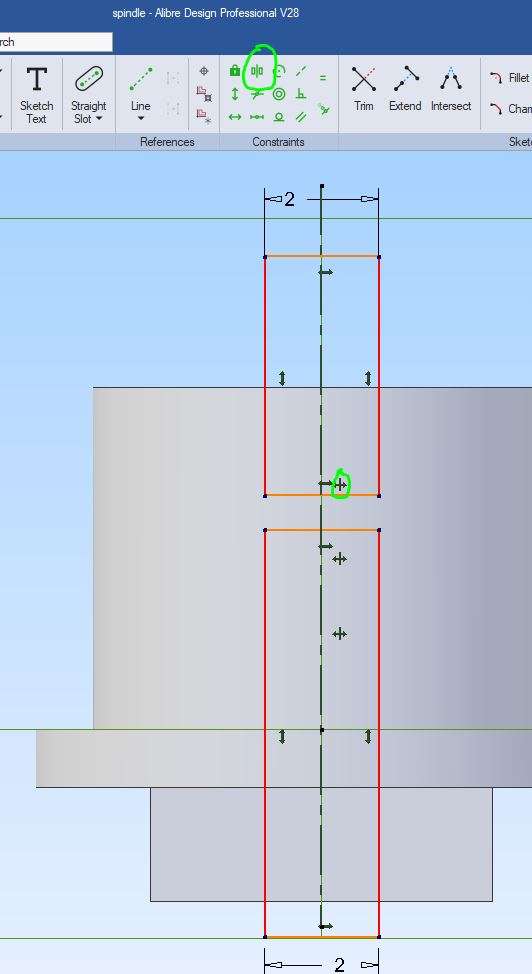
        As for 5 to 6 decimal places. Taking your 2mm slot as an example. If you just draw a rectangle, give it a width of 2 then it will indeed be 2.0000000etc. But if you just place that centrally by eye you could have 0.999999mm on one side and 1.000001 on the other. The only way to ensure it is truely central is to constrain it, eithe dimension one side so that it is 1mm from the central axis but better still use the “symmetric” constraint and that will place it equally about the ctr line. The advantage of this method is that should you subsequently change the width of the slot it will always be central

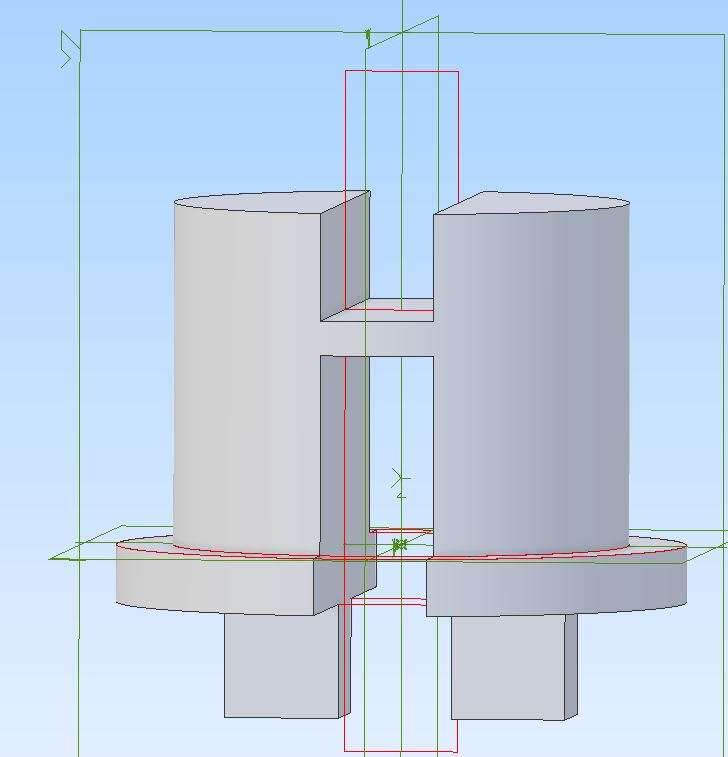
        The top rectangle here was my sketch for the slot, you can see the symmetric constraint ringed and the icon to use at the top. I have also placed a second 2mm wide slot by eye that looks like it is also in the middle but if I were to measure it is actually 0.003mm off.

        sym

        sym2

        #828172
        Nigel Graham 2
        Participant
          @nigelgraham2

          I tried to align them by constraints. I’d read a previous instruction as meaning to use the objects’ reference planes, so tried to put them together.

          That didn’t work so I tried to constrain the surfaces of one side of the tenon and slot. That didn’t work either.

          The only bit I aligned visually was the right-hand O-ring because I could not define anything to constrain it to. I ought to have represented the clip retaining the real one.

          The left-hand one sticks to the circular bulkhead next to it.


          I did use the symmetry constraint in plotting the individual parts.


          The problem I find in assembling anything is forever over-constraining them without really knowing which constraints are wrong and why, because the error warning highlights all the wrong ones.

          As I see it the constraints lock two part surfaces together, and using two or more risk locking them rigidly, but it’s not clear which to use where, if you want one part to move on the other in only one way, or one moving part to make another move..


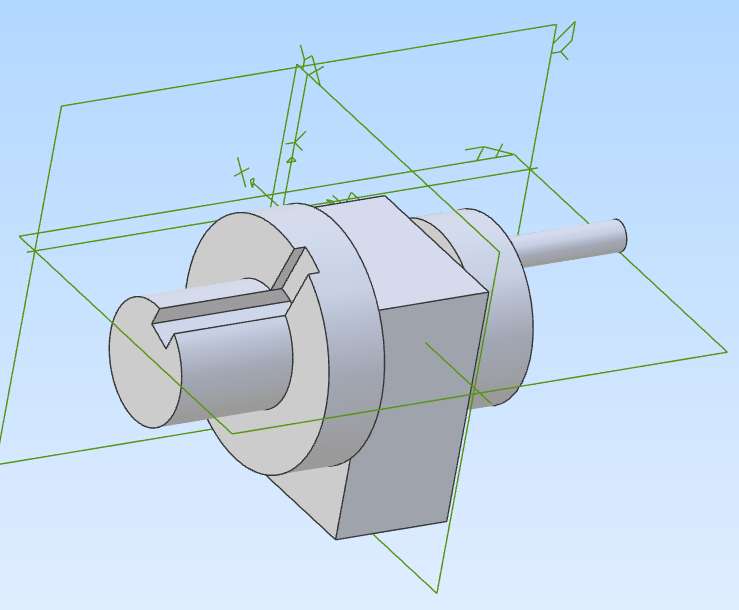
          So I created the attached, with just three simple Parts, to try to see just what does what.

          The shaft with its keyway, enlarged head and handle is a single Part. The journal and keywayed disc are merely drilled to the same diameter as the shaft.

          I constrained:

          The shaft concentrically with the anchored journal, and the inner face of its handle disc to the face of the journal.

          The other disc concentrically with the shaft, and its inner face to the journal face.

          Four constraints so far…

          Pulling the handle round did not seem to do much so I cut the two keyways initially to indicate any movement.

          This proved the handle revolved the shaft in both the journal and disc. The disc stayed still so I thought it was stuck to the block.


          Trying to constrain the disc face and shaft surface over-constrained the lot, with all the previous constraints now listed as wrong!

          So I deleted that last constraint, and then constrained the lower edge of the disc’s keyway with the adjoining edge of the shaft keyway. This time both parts revolved as if keyed together.

          A further test showed the shaft and disc would revolve as one, but not slide sideways.


          I had expected the disc to stick to the bearing, or slide along the shaft, or some similar failure, so was surprised when it all worked. I am still not really clear why it worked: I used inspired guess-work at best for some of it.


          Screenshot 2025-12-08 222611


          #828180
          JasonB
          Moderator
            @jasonb

            Going back to what I said about assembling the valve, the same applies here.

            Best think how the real valve works. That small lip around the bottom of the spindle runs against the recess at the bottom of the vertical hole. So constrain those two surfaces together just as they would be on the real thing. Then the spindle can’t move up or down as you try to rotate it with the mouse.

            The CAD does not know what the parts are supposed to do until you tell it. That is why just like if you were assembling the parts in your workshop the disc did not turn with the handle. We have to put in keyways to drive gears or a flywheel as one with the crankshaft so that is what you eventually did to get it working. Had the CAD treated the journal like the disc and made the two move as one that would not have been what you wanted so you can’t expect the CAD to do one thing for one pair of parts and another for a different pair. YOU HAVE TO TELL IT.

            The CAD was not to know if that disc were say a bearing that you where then going to assemble into a housing in which case you would have wanted the shaft to rotate in it not move as one.

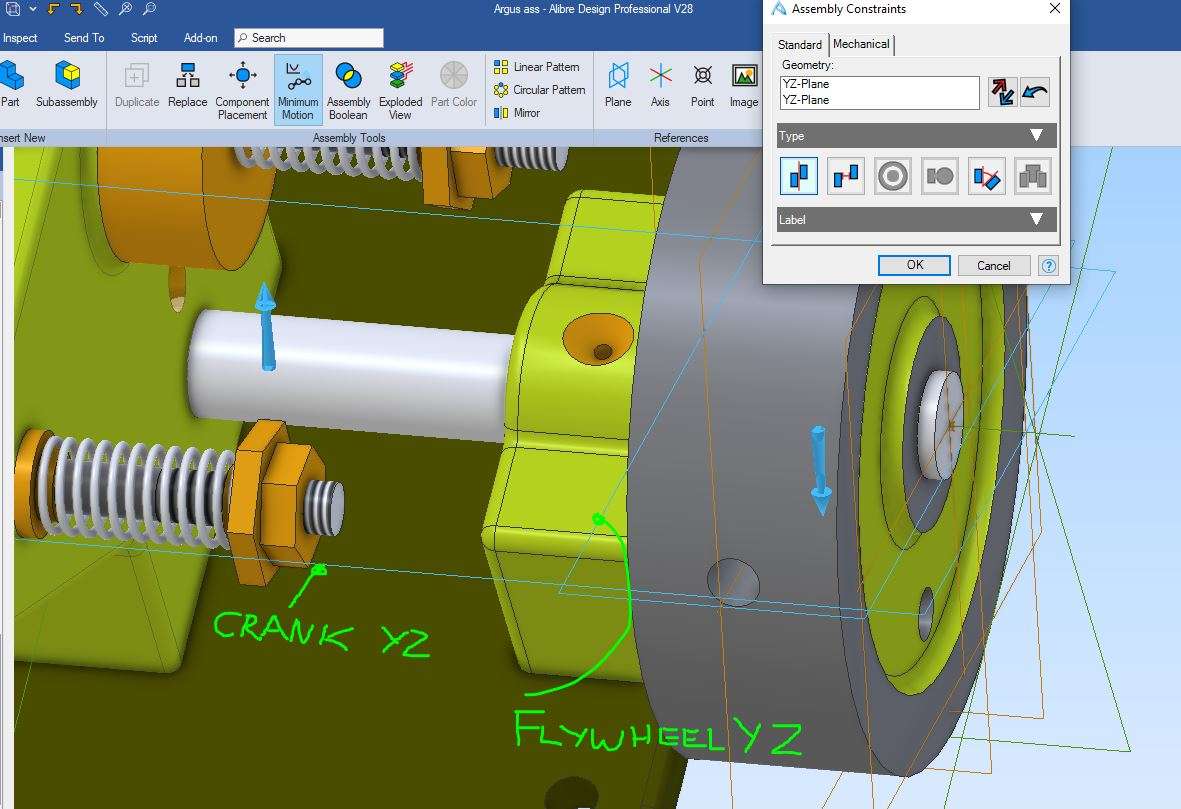
            However if the disc was intended to be Loctited to the shaft then you could not draw and constrain keyways so the other method I have shown would need to be used. That is right clicking each part, selecting “show reference geometry” and then constraining one plane passing through the crankshaft with another passing through the disc.

            This is an example where I have constrained the flywheel to the crankshaft as it is retained by a grub screw not a keyway. You can see the two planes marked in blue and I have noted what each is. Click the pictur ebelow and it will come up larger and clearer

            planes

            #828211
            blowlamp
            Participant
              @blowlamp

              It’s very frustrating watching Nigel’s struggles with constraints. I hope you get it soon Nigel, as I’m on the edge of my seat here. 😉

              Ball Valve Rotate in MoI.

              Martin.


              #828212
              Nigel Graham 2
              Participant
                @nigelgraham2

                Thankyou Jason.

                That’s what I did try to do with the ball and spindle in the valve: constrain their central planes.

                I knew the method only works if constrained properly, but it’s not always easy to know what constraints to use where. With that little shaft and disc problem it took me a few tries to find one that held those parts together so they would turn as a unit.

                Martin:

                It’s even more fustrating for me! 🙂

                There comes a point in anything, not only CAD, where I hit some obstacle I can’t overcome without a struggle. Sometimes I never overcome it, so cannot advance any further with the subject and have to stay at only a basic level.

                I tried your reference, without knowing what “MOI” stands for, and opened a bewildering array of advertisements and diagrams from all sorts of companies trying to sell me theirs. I know how the things are made and work, by dissecting an old domestic plumbing one. I simply wanted to see if I could make a larger version suited to my intended purpose for it.

                #828213
                Michael Gilligan
                Participant
                  @michaelgilligan61133

                  A hint for you, Nigel

                  http://moi3d.com

                  MichaelG.

                  #828220
                  blowlamp
                  Participant
                    @blowlamp

                    Nigel, why didn’t you just click on the link to the video I made for you?


                    Martin.

                    #828249
                    Nigel Graham 2
                    Participant
                      @nigelgraham2

                      Oops, I became a bit confused as who sent what there!


                      Martin:

                      Just tried it. I wasn’t sure if that was MOI or something yet again, and at the end it dived headlong into a SolidWorks demonstration of a pipeline fitting with St. Vitus’ Dance to an exciteable German commentary.


                      Michael –

                      MOI’s own gallery, which I examined to about page 10, certainly shows a lot of impressive and very imaginative art-work but I can’t help thinking that pretty pictures and resin-prints are its primary purposes. Though if it can drive a CNC 3D-printer presumably it can also drive the CNC milling-machine I don’t own.

                      It made me wonder if it can be used for mechanical-engineering design in the sense we know from TurboCAD, SolidEdge, Alibre Atom, etc. The company’s web-site implies otherwise, despite one or two possible gallery examples.

                      TurboCAD and MOI seem to have comparable rendering powers, but neither I nor my PC could handle those.

                      Alibre’s simple “painting” is fine for designing purely mechanical objects by creating 3D models and their derived elevation drawings. It’s finished, physical metalwork I want after all.

                      TurboCAD Deluxe allows simple “painting” too, of course, but it lacks the very useful transparency control as offered in Alibre Atom.


                      Besides, why abandon two CAD makes I have made some progress in, albeit to modest levels and for different purposes, and try to learn yet another?

                      MOI looks superficially similar to Alibre Atom, though perhaps more comprehensive, and I would likely be better staying with Alibre and avoiding or working round problems I can’t overcome.

                      #828252
                      Michael Gilligan
                      Participant
                        @michaelgilligan61133

                        I have zero experience of MOI, Nigel … I was just trying to help you locate where Martin was sending you.

                        MichaelG.

                        #828269
                        blowlamp
                        Participant
                          @blowlamp

                          Nigel. If you had watched the video I made, you would have seen that I had simply recreated your own efforts in Alibre – including rotating internal parts of the model.

                          MoI isn’t a ‘painting program’ or renderer, it’s a NURBS solid modeller, just like TurboCAD, SolidEdge, Alibre Atom, etc and outputs DXF, SVG, PDF, 3DM, SAT, IGES, STEP engineering orientated file types, as well as STL for things such as 3D printing or sending to rendering apps. It’s also perfectly capable of producing fully dimensioned line drawings for workshop use, albeit not automatically.

                          Martin.


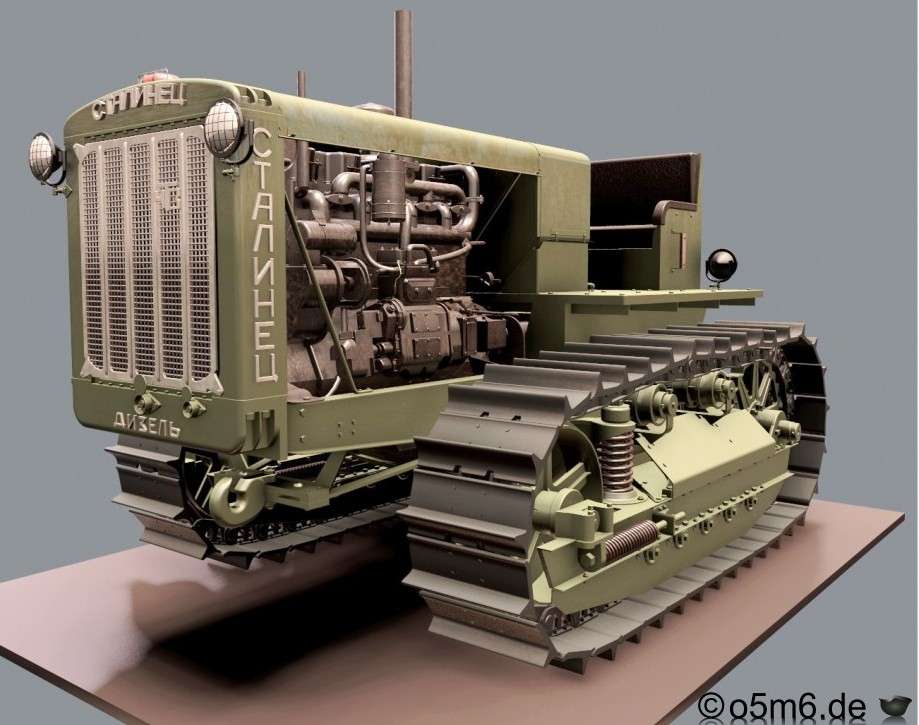
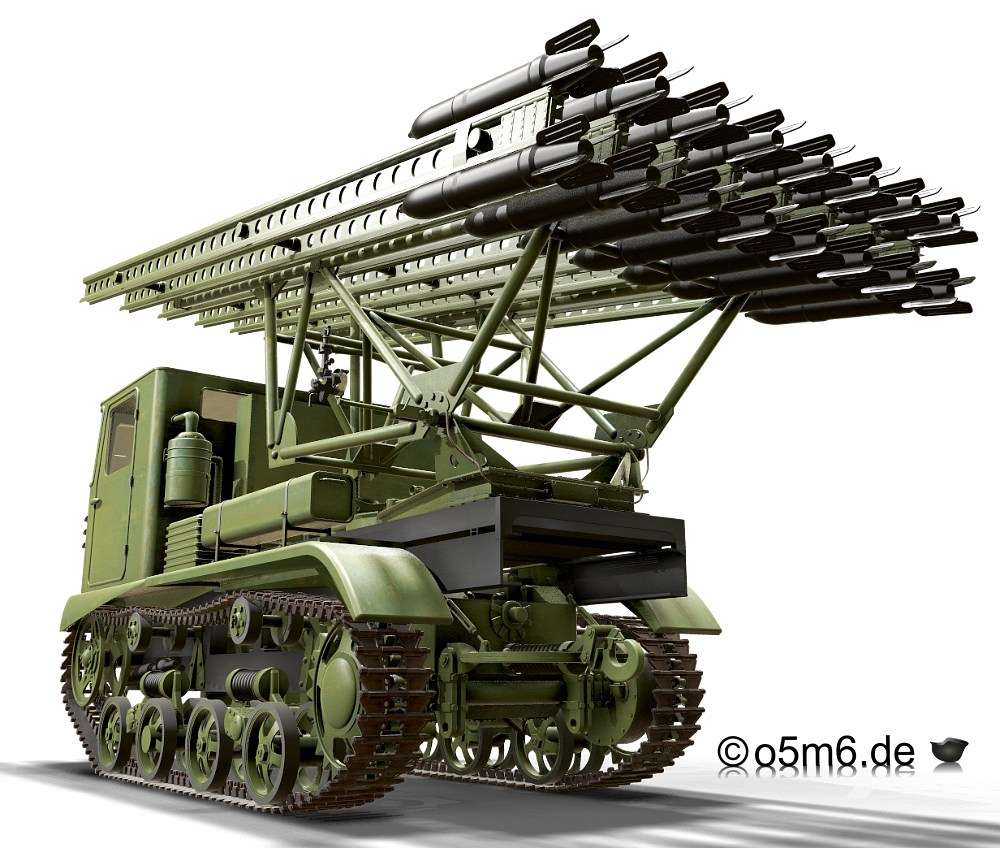
                          These pictures from the MoI gallery have been solid modelled in MoI and rendered in other programs once complete.

                          TractorRocket Launcher

                          #828275
                          Nigel Graham 2
                          Participant
                            @nigelgraham2

                            Thank you for sorting out who referred to what!

                            I never tried to imply “painting” is any sort of proper CAD term. I was describing simply the outwards effect.

                            The Gallery on the TurboCAD Users’ Forum shows many images of similar quality to these, and those are produced using the higher-rate editions of TC itself and with other rendering attachments or programmes. It’s not an area I have tried to explore beyond simply knowing it exists and the picture quality possible.

                            I recall one user is a British kitchen-designer who uses this software to create pseudo-photographic pictures he uses in negotiating contracts with his customers. I did think it a bit churlish of another user to criticise the sunlight effect when the details extended to a bowl of fruit on the otherwise-empty worktop!

                            This though is not relevant; nor is the difference between CAD draughting and art-rendering, nor the file-types except when I need copy a CAD file in .jpg format. I do not need such subleties.

                            I have the greatest respect for those who make images like that tractor and rocket-launcher; or who form and use CAD/CAM files. I admire their necessary CAD skills even though obviously far beyond me, whatever software I use; but I do not need those anyway.

                            I want only to be able to use CAD to help me design and make real machines, not elaborate pictures or printed plastic models.


                            Yes, it is far beneath the dignity of advanced CAD packages like MOI or the full versions of Alibre and TurboCAD, but I can’t help that. I can calculate simple volumes but never comprehend matrices. I enjoyed hill-walking but could never climb mountains.

                            We all have our natural limits and I need only what I can use practically, and provided I can learn it.


                          Viewing 12 posts - 26 through 37 (of 37 total)
                          • Please log in to reply to this topic. Registering is free and easy using the links on the menu at the top of this page.

                          Latest Replies

                          Viewing 25 topics - 1 through 25 (of 25 total)
                          Viewing 25 topics - 1 through 25 (of 25 total)

                          View full reply list.