AT1 inverter 3 wire control

AT1 inverter 3 wire control

Home Forums General Questions AT1 inverter 3 wire control

Viewing 25 posts - 1 through 25 (of 26 total)
  • Author
    Posts
  • #454486
    John Lisle
    Participant
      @johnlisle80524

      I've seen that several people on here have one of the "cheap Chinese" VFDs – in my case an AT1-2200X.

      I'm trying to wire up a standard 3-wire control (run Normally open; Stop normally closed)… and it's doing my head in. Has anyone accomplished this?

      I have X1 (say) set to 11 – keying forward switch. When I connect this to common across the NO button, the momentary push works perfectly – motor runs.

      The problem comes with the NC stop button. I connect that across common and X5 and have tried:

      X5 set to 1 – Starts normally but only get a momentary stop by pressing stop

      X5 set to 2 – The motor runs immediately on turning on power at the wall. Stop works, but only on release of the button (as the circuit is re-made, not as it is broken)

      X5 set to 4 – As 2 above, except the motor did not immediately run on startup. This seems to effectively make the NC button into a NO one.

      X5 set to 19 (emergency stop) – Motor will not start, unless I hold in the stop button to break that circuit. Then stops when I release the button.

      I'm obviously doing somethign foolish with either the wiring or the parameters, but I can't for the life of me see what.

      I'd be very grateful if someone has done this and can tell me the two parameters!

      #27175
      John Lisle
      Participant
        @johnlisle80524
        #454494
        Ian P
        Participant
          @ianp

          I dont know the VFD you have (a link to the manual would save people having to do their own research)

          A 'standard 3 wire control' unit (two switches presumably) is only standard in respect of a non VFD motor control setup. Your VFD might need two N.O. switches.

          Possibly your VFD might cater for one switch being N.C. but if not it may be that your switches have open and closed contacts so could be rewired (still should only need three wires).

          You will probably need another three wires for the speed potentiometer too.

          Ian P

          #454517
          Steviegtr
          Participant
            @steviegtr

            Hi john. They can be awkward to connect & set up. Mine is a different model to yours. It is a Omron But the connections to inverters are usually similar throughout. So this is how mine is connected. One of the menu options without any other choices being made was 3 wire mode. Which I used + lots of others. In total I think I altered something like 30 of the parameters over a few days of braying my head against the wall. I am a retired Electrician & did loads of these in the past. But you know old age dulls the grey matter somewhat. Anyway hope this helps you. Steve.wiring3.jpgwiring2.jpg

            wiring.jpg

            #454529
            John Lisle
            Participant
              @johnlisle80524

              Thanks everyone – lots to try there.

              The manual linked (thank you martin) matches my machine. Alas there's no setting for 3 wire control.

              I didn't explain very well – my setup was as the second picture just above – the switches in series.

              It appears to me that the inverter only does "action when circuit closed" not "action when circuit broken", which seems surprising but there you are.

              I can try to replace the NC stop with a NO one – I know from fly-lead testing that I can get that to work. I don't have a solution for the NC microswitches though.

              I will have a go at the "keying operation" and "keying stop" tomorrow!

              Thanks again – much appreciated.

              #454556
              Martin of Wick
              Participant
                @martinofwick

                Hmmm, John,

                Bear in mind the 'fully comprehensive manual' has obviously had a very basic translation. Because the term 'three wire control' is not explicitly stated doesn't necessarily mean it is absent. Rather, I suspect it is wrapped up in the strange terminology of the various 'keying' inputs that need to be de-coded.

                If a true three wire mode is not possible, I wouldn't mind betting there is a substitute via pulsed inputs. Hence it is useful to have a selection of push button switchgear that is configurable NO NC latching non latching etc.

                I have used these inverters successfully in the past for lathes or mills but only ever set them up with wire control (rotary or toggle switches or push to make, etc).

                In my experience, these are pretty capable devices for the hobbyist, just a shame the manufacturers don't quite set out control configurations, but I bet the simple modes of operation are all available in a limited form.

                I was hoping to eventually configure my new AT4 for a recently acquired Viceroy drill and had myself been trying to translate how the available parameters for three wire on off or similar could be implemented, to allow drill style push button controls (all delayed while waiting for a suitable selection of switchgear to arrive from China for testing purposes).

                Naturally, I would be most interested in your experimental results!

                #454655
                Gavlar
                Participant
                  @gavlar

                  Program the parameters as follows;

                  P11 to 2 (tells the VFD on/off will be via an external switch)

                  P53 to 5 ( X4 Wire forward)

                  P54 to 6 ( X5 wire reverse)

                  Those settings will give you three wire on, forward and reverse via external switches.

                  Connect com to X4 for forward, or com to X5 for reverse.

                  In its simplest form, you could do that with a single, three position switch to give forward / off / reverse.

                  You will still need to program the VFD for all the other parameters, ramp up and down times, max speed, min speed etc but for most of those the supplied instructions are easier to work out.


                  Edited By Gavin Freeman 1 on 28/02/2020 18:12:16

                  Edited By Gavin Freeman 1 on 28/02/2020 18:17:25

                  #454660
                  Martin of Wick
                  Participant
                    @martinofwick

                    Gavin, your settings work well but are form of operation that I would call wire control switching, implemented by using a simple latching switch ie. a toggle switch or rotary switch that maintains the contact between com and the terminal to permit running. This is a perfectly respectable control arrangement an one I have used myself for lathes.

                    I think what the OP (and I) are aiming at is control implemented by push button, non latching switches that send a signal or interrupt a signal to engage or release the terminal. Think of the two button arrangement RUN / STOP on a drill.

                    The point of '3 wire' control is to avoid powering the VFD with the drill or mill set in the active state ( in reality, the VFD would not permit this to happen and would set a fault condition, which would then have to be cleared etc).

                    Whether the ATn can be configured '3 wire' is more of a subtle problem, the question being does the peculiar and poorly documented range of available parameters for the AT series actually allow for that type of keying (press and release) type operation.

                    #454664
                    Emgee
                    Participant
                      @emgee

                      John, youtube link here to your inverter's big brother, likely will apply to your model.

                      **LINK**

                      Emgee

                      #454668
                      Steviegtr
                      Participant
                        @steviegtr

                        The Omron inverter manual is 166 pages long & very complex. I thought the Asian imported ones would have been the same. Using the theory that they are copied from European inverters.

                        Steve.

                        #454673
                        Martin of Wick
                        Participant
                          @martinofwick

                          There are Asian VFDs and Asian VFDs….

                          The XSY AT series are the ones that are commonly available on the bay etc., cost between £50 and £80 for usual hobby workshop powers. They are the cheapest of the cheap, the rock bottom, bargain basement, slum dogs of the inverter world! If you want upmarket, you go to the full blown Huanyang retail product, which is much more configurable

                          The reason XST ATs are cheap is because they have extremely limited software and very few set up modes and parameters as evidenced by the linked manual and name extension '… simple series'.

                          What little they do, they do very well as simple device controllers, and at £70 delivered, no questions asked for a two stage device, hard to complain. Except that the documentation is so poor that it is worth pooling some knowledge on control setup on this forum in order to help others. Omrons or IMOs they are not!


                          Edited By Martin of Wick on 28/02/2020 19:41:38

                          #454674
                          Steviegtr
                          Participant
                            @steviegtr

                            Ah just looked at the manual. It is as said above the switches cannot be pushbutton momentary contact. But have to be latching N/O rotary switches. But that said everything you would need to program is there. I have selected an input for an e-stop that cut the inverter output instantly instead of ramp up/down times etc. But again for the money they look ok.

                            Steve.

                            #454690
                            John Lisle
                            Participant
                              @johnlisle80524

                              Hello again – OP here

                              Thanks everyone once again for sharing your expertise.

                              Stevie, not sure which manual you viewed that says "cannot be momentary pushbutton" – I can get start up and continuous run with momentary push with parameter 3 or 11. And I can get stop with momentary push on parameter 4 or 19. What I'm looking for is somethign activated when a circuit is broken momentarily, not when it is made momentarily.

                              Today I had a jolly time trying all the modes on flying lead-test and most again with the actual switches wired in.

                              The device behaves, to be honest, a bit oddly – I couldn't distinguish between some parameters, and others behaved differently to what the manual suggested, acting as change state switches (on and off) rather than one-time.

                              Bottom line is I didn't find an answer, so I think I need ot change my NC panic button to a NO one. That's a shame as my lathe has both in a single block )and imperial measurments), so replacing is going to be a bore.

                              Thanks again!

                              #454725
                              Martin of Wick
                              Participant
                                @martinofwick

                                John, ahhh….thanks for your valiant work.

                                it rather looks from your investigations that parameters available on these XSY devices all set the 'multifunction inputs' to the active high state (meaning they only respond to a VI increase). Given this is a budget unit, not entirely surprising. I guess if you need more control over parameters you will have move a bit upmarket.

                                This can be a bit of a pain if you are trying to use an existing or traditional switch gear that is non configurable.

                                For multiple e-stops or multiple limit switch inputs (if you can set them or replace them with NO switch units), the work around is to wire the switches in parallel rather than daisy chaining them in series as you would for NC/active low terminals.

                                So if building from scratch it looks if push button control is available but only via NO non latching switches individually linked com to terminal; com X1 50 P3 to start and com X2 51 P4 to stop. achieves the same a '3 wire' control (but only if you can reconfigure existing switches to NO).

                                When/if my switch collection arrives I will go test out the common control arrangements for lathes mills and drills and post some pictures of the wiring arrangement in the album for future ref. – may take me a couple of weeks though!

                                #454848
                                Martin of Wick
                                Participant
                                  @martinofwick

                                  For anybody struggling with the XSY AT series VFD manual cryptic control parameter descriptions, based on my limited testing. I hope this will be useful to someone. Further details set out below:

                                  As suspected, all 6 of the analogue inputs are configure as active high, meaning the control logic is activated by an input signal and not an interruption of signal. There appears to be no way of changing this.

                                  The VFD in its default state set no signal input to the non running condition.

                                  The permissible control inputs are restricted, but do allow for continuous contacts via a latching switch (described as 'wire' switching, or momentary contact via a non latching push button arrangement described as 'key or keying'. The more useful input parameters for the 6 analogue input block locations 50 to 55 are as follow:

                                  PARAM 1 wire control stop  This changes the VFD default condition to run on power. With contact between com and terminal, the attached motor will not run. with no contact, the device will revert to the previous control state. It is unlikely that many workshop users will need to use this parameter.

                                  PARAM 2 keying stop   should really say key start/stop This uses a single non latching push button control to activate the motor. Push the button once for on, push same button again to turn off. It requires a contact set that is NO, or 'push to make' linking com and the terminal set as P2. useful if you only have one button!

                                  PARAM 3 keying operation This changes state from deafault non run condition to the motor run condition and uses a single non latching push button control with a contact set that is NO. Pushing the button starts the motor, further button pushes have no effect unless the status has been changed by the input to another terminal.

                                  PARAM 4 stop keying This changes control state from the run condition to a stop condition and uses a single non latching push button control with a contact set that is NO. Pushing the button changes motor run state to motor off but will have no effect ( it may however interrupt jog mode if pressed during jogging ops). P3 and 4 are used normally used together to effect two button RUN and STOP controls (if that is what you want).

                                  PARAM 5 and 6 wire forward operation wire reverse operation These require a latched contact between com and terminal. Forward and reverse are relative conditions, so need to be set in the context of your particular application. used if a toggle switch or rotary switch operation is required. For example, you might set com on the centre of a 3 way switch wit rev one way and forward as the other. HAVE A CARE as leaving the machine switched to run and starting the VFD a couple of days later without remembering will result in a start up on powering the VFD. you may want to set parameter 1 in location 65 to avoid this.

                                  PARAM 9 wire reversing switch This changes the run state from forward to reverse. When latched, setting the motor to run by another terminal, will cause the motor to run in the reverse direction. Unlatching will restore the original direction of rotation. Normally used with a simple toggle/rocker switch in conjunction with a wire run or key run input.

                                  PARAM 10, 11,12 keying commands These are not well described in the manual. P10 should really say Key forward/reverse switching). They are all momentary inputs requiring non latching NO push button control. P10 allows a single push button to change motor direction, pressing the will reverse the current run direction and so on backwards and forwards. This function will only operate in conjunction with other keying commands (ie P3 or 11 or 12 in the active condition). P11 will start the motor only in the forward direction, P 12 will start the motor only in the reverse direction.

                                  PARAM 17,18 jog forward / reverse Self evident, use if you want a jog function. Can be used with a latching switch to connect com to terminal to hold in jog or NO non latching if you just want to 'blip' the rotation for a part rotation. See params 86 onward for controlling the jog frequency braking etc.

                                  PARAM 19 E stop FWIW, a stop switch and all round missed opportunity. Requires a NO contact mode for your e-stop input. Can be implemented as latching or instant. Latching is preferable as it sets an interlock and prevents normal or jog start until unlatched. If you don't have a latching e-stop, I suggest you also wire into another terminal set with P16 so it sets a fault condition at the drive as ERR 9 preventing further unwanted starts until the cause of the panic has been sorted and the VFD re-set.

                                  Unfortunately, there appears to be no way of setting a braking function on the E-stop, the condition when you most want to stop the rotation instantly. You can set the brake to operate on the normal stop where you don't really need it, but it doesn't implement in the E-stop. Grind your teeth in rage if you will, but remember how little you paid for the device.


                                  Edited By Martin of Wick on 01/03/2020 11:32:05

                                  Edited By Martin of Wick on 01/03/2020 11:34:02

                                  #512283
                                  Luqmaan Baboo
                                  Participant
                                    @luqmaanbaboo17852

                                    Thanks for this information. It was really helpful.

                                    I have the AT1-4000. I thought of creating the conventional 3 wire control using the relay output and just setting an input to forward operation. I've set the input pin to 20 (relay output) but the relay is not activating when I connect COM to the input.

                                    Any idea why?

                                    #589145
                                    David Jenkins 4
                                    Participant
                                      @davidjenkins4

                                      Many thanks for this info – perfect timing, as I'm just about to set up a VFD for my Zyto lathe. Although this info is in the 'user handbook' (a.k.a. a sheet of paper) it's short on info, often obscure and, sometimes, plain inaccurate.

                                      This will make my life much easier. angel

                                      David

                                      Posted by Martin of Wick on 01/03/2020 11:29:59:

                                      For anybody struggling with the XSY AT series VFD manual cryptic control parameter descriptions, based on my limited testing. I hope this will be useful to someone. Further details set out below:

                                      #589154
                                      david sanderson 3
                                      Participant
                                        @davidsanderson3

                                        John theres some youtube videos of wiring an at1 by steve jordan may be of help

                                        Dave

                                        #591132
                                        An Other
                                        Participant
                                          @another21905

                                          Sorry to resurrect this thread, but I thought this may be useful – I found the following on Youtube, (Link at end of post) – I have three of these Chinese-made units, running a woodturning lathe (1.5HP), a mini-lathe and an SX2 Mill, (both 3/4 HP) all converted to 3-phase, with belt drive operation.

                                          They all worked out of the box, and I have had no problems with them. They seem to be well-made, and certainly do the job. Mine are all 2.2kW rating, all connected in Delta. I have not seen any problems, or overheating. They are fitted with small cooling fans, which operate only when switched to 'Run'. (I also have a German-made Moeller unit rated for 1.1 kW, which has no fan, and gets quite warm after extended use).

                                          The only problem was that the supplied documentation was 'minimal' to say the least, so I ended up Youtubing to find some useful data. (I wanted to use a pendant with two of them).

                                          The units I have are marketed under the name 'Topshak' – there seem to be others, but it is the same inverter – it also comes in different output ratings. (I have no connection with the manufacturers).

                                          Link

                                          #591142
                                          Neil Lickfold
                                          Participant
                                            @neillickfold44316

                                            I got a drive recently, and was surprised that the motor current could not be set in any of the parameters. Martin , can you recommend a VFD that allows an effective E Stop please. A pm or on here would be appreciated. That is a great break down what you wrote above. Seems to be a lot clearer than trying to read through the manual. Thanks. Neil

                                            #833200
                                            Marcel Jolinon
                                            Participant
                                              @marceljolinon76204

                                              I have an AT1 inverter. The manual is light on detail.

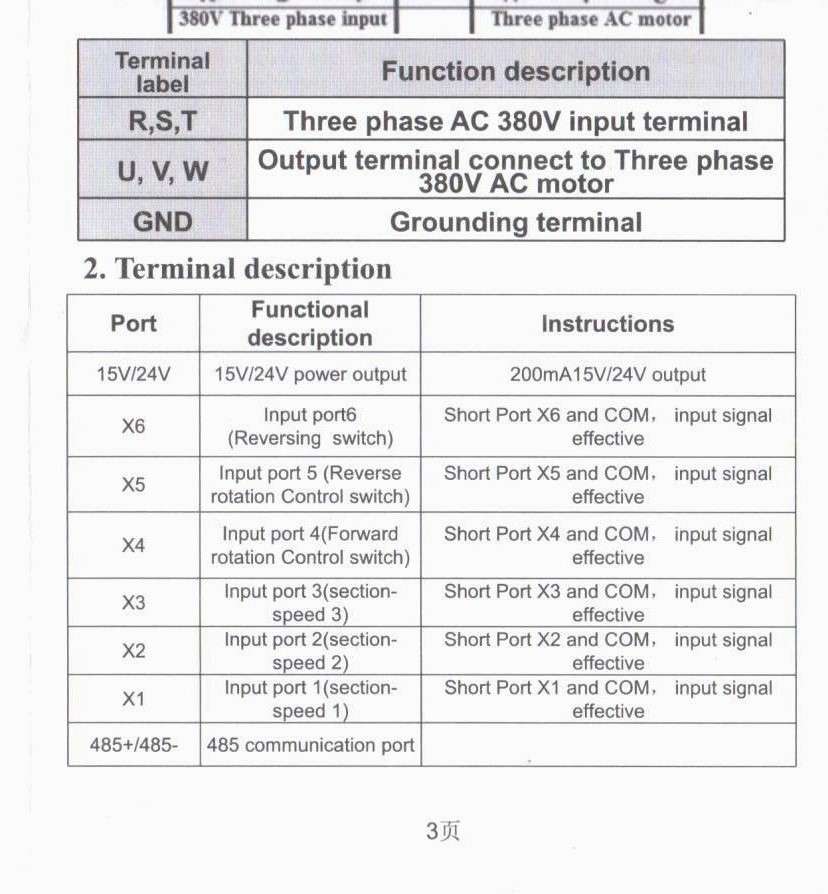
                                              I am trying to wire start and stop buttons along with an emergency stop button. The manual lists 6 input terminals (X1 to X6 & com)


                                              AT1.1

                                              Does anyone know the difference between X5 and X6, are these wired to start/stop switches, and where to wire the pot for speed control?

                                              I am thinking X4 momentary for forwards X6 for reverse but dont know if these inputs are latching, I will have to experiment with that…. unless someone knows different for this model.


                                              Speed control, There are three terminals Com, VL1 & Com, I think these may be for speed control but dont know.


                                              Any help please


                                              #833222
                                              Robert Atkinson 2
                                              Participant
                                                @robertatkinson2

                                                Have you asked the supplier?

                                                Robert.

                                                #833233
                                                Marcel Jolinon
                                                Participant
                                                  @marceljolinon76204

                                                  Yes, The supplier, Amazon, will not give me the contact details for the manufacturer or wholesaler. spent 2 1/2 hours on a chat to a muppet who could only fo;;ow ascript and did not appear to understand the requirement to answer a technical query.

                                                  #833276
                                                  Martin of Wick
                                                  Participant
                                                    @martinofwick

                                                    You wont get any technical support from Amazon. They probably don’t even know who the manufacturer is. They should refund you if the item is ‘not fit for purpose’.

                                                    The trouble with these devices is due to missing or inappropriate documentation, you have no idea how they have been configured. In addition, some are supplied with reduced or disabled functionality which may mean you are limited as to what parameters you can change or set.

                                                    All you have to go on is sketchy functional descriptions in the digital input table. You should really check the parameters loaded in the multi function input registers to ensure they are enabling the control you wish.

                                                    Looking at the description details you have provided, I suggest (and it is only a possibility) that the MFIs are set up as follows. At best treat this information as an poorly informed guess and proceed at your own risk.

                                                    X4 – for latching switch (or rotary) which when latched starts the motor in one direction-when unlatched motor power is off

                                                    X5 – for latching switch (or rotary) which when latched starts the motor in the other direction-when unlatched motor power is off

                                                    X6 – for latching switch (or rotary) which when latched overrides the direction, ie reverses direction set by either X4 or X5 and when unlatched, reverts rotation to the previous state set by X4 or X5.

                                                    For the analogue input, there will be separate connections on the low voltage input. Connect one end of the pot to terminal  10V (or whatever the low voltage side is), the wiper to VLI and the other pot connection to COM. The circuit diagram provided in the manual will identify the connections.

                                                    Suggest you set everything up on the bench with the controls of your choice and test everything first.

                                                    EDIT and also bear in mind that low voltage rail may have a floating common and will be at mains potential or even higher with respect to the true or external ground.


                                                    #833328
                                                    Marcel Jolinon
                                                    Participant
                                                      @marceljolinon76204

                                                      I have found this Youtube video https://www.youtube.com/watch?v=XLhDivVlp2Q

                                                      And Vevor sell the same unit with a much better manual which I have downloaded.  Yipee!!

                                                      Wired the thing up this morning and have all the remote functions I need to drive the milling machine main motor.

                                                      Now all I have to do is control the feed motor with a smaler similar device ( UX52); should be simple enough…………

                                                      Watch this space.


                                                      We have just moved house and I have a much more comfortable workshop so evrything is being serviced, painted and organised.

                                                    Viewing 25 posts - 1 through 25 (of 26 total)
                                                    • Please log in to reply to this topic. Registering is free and easy using the links on the menu at the top of this page.

                                                    Latest Replies

                                                    Home Forums General Questions Topics

                                                    Viewing 25 topics - 1 through 25 (of 25 total)
                                                    Viewing 25 topics - 1 through 25 (of 25 total)

                                                    View full reply list.