Making a paper scale

Making a paper scale

Home Forums General Questions Making a paper scale

Viewing 17 posts - 1 through 17 (of 17 total)
  • Author
    Posts
  • #200343
    Douglas Johnston
    Participant
      @douglasjohnston98463

      I have just been reading the article in MEW 232 by Peter Shaw describing a depth readout scale for a pillar drill,and am intending copying the idea.

      My only problem is finding a way of designing the scale on my computer. I don't have any CAD programs but seem to remember seeing a simple free program that would do this sort of thing. I had no use for it at the time and just made a mental note, but now can't find it anywhere.

      Can anybody suggest a simple free program that would enable me to produce a scale of the type shown in the article?

      Doug

      #24033
      Douglas Johnston
      Participant
        @douglasjohnston98463
        #200345
        Michael Gilligan
        Participant
          @michaelgilligan61133

          Doug,

          Allow me … Here is a link to the previous thread.

          I included some, hopefully useful, notes.

          MichaelG.

          #200365
          Douglas Johnston
          Participant
            @douglasjohnston98463

            Thanks for your reply Michael, I have just had a look at the thread you highlighted and that was probably where I first saw the information. I did do a search on this forum but must have missed some key words.

            My joy came to an abrupt halt, however,when the original link to the program for drawing the scales no longer seems to work (not on my computer anyway ) so I am back to square one.

            Doug

            #200371
            John McNamara
            Participant
              @johnmcnamara74883

              Hi Douglas

              You only need 2D cad to draw scales. You could download a copy of Draftsight **LINK** (Free) then use the array command to draw evenly spaced lines.

              Its a pretty easy job. If you are able to sketch your requirements and post here I will draw one for you and save it as a PDF you can print. If it is very big you could have it printed on a plan plotter at a copy service centre.

              Regards
              John

              #200375
              clivel
              Participant
                @clivel
                Posted by Douglas Johnston on 14/08/2015 15:42:47:

                My joy came to an abrupt halt, however,when the original link to the program for drawing the scales no longer seems to work (not on my computer anyway ) so I am back to square one.

                Doug

                Hi Doug,
                There is now an error in the link, try it like this instead **LINK** something must have changed with the website host in the 2 years since the link was first posted.
                Clive

                #200378
                frank brown
                Participant
                  @frankbrown22225

                  For labels , I have used large sticky label paper, the largest is a whole A4 sheet. So this takes your print and sticks on the background. Then get some clear book covering plastic, also sticky. There, a finger proof label Blue Peter would be proud of. Not Professional, but very clear and practical and DONE!

                  Frank

                  #200379
                  Michael Gilligan
                  Participant
                    @michaelgilligan61133

                    Thanks for updating the link, Clive star

                    I was on my way out when I posted my first response to Doug, and didn't have time to check. blush

                    MichaelG.

                    #200401
                    Douglas Johnston
                    Participant
                      @douglasjohnston98463

                      Thanks for all the very helpful responses, the new link works perfectly and I will have a play with the program and should be able to print out a suitable scale. I will probably laminate the scale before fixing it in place in order to give some protection from my oily fingers.

                      Thanks for your offer John, I think I will get the result I need from the program link Michael found and Clive amended, but I know where to come if I have a problem with it! smile

                      Doug

                      #200407
                      jason udall
                      Participant
                        @jasonudall57142

                        You could of course use a straight edge and a set square..to divide a given length into n equal parts…
                        But then again cad does do neat lettering

                        #200411
                        Vic
                        Participant
                          @vic

                          You don't need anything fancy to do simple scales. The Drawing application in Free Office will do it for you and is, well, free!

                          #200414
                          Jeff Dayman
                          Participant
                            @jeffdayman43397

                            It may sound obvious, but do measure a known size on your printed scales before spending money laminating and before fitting and trusting them. I have seen printers vary the scale on items many times, so now I check. Good luck with yours. JD

                            #201418
                            Douglas Johnston
                            Participant
                              @douglasjohnston98463

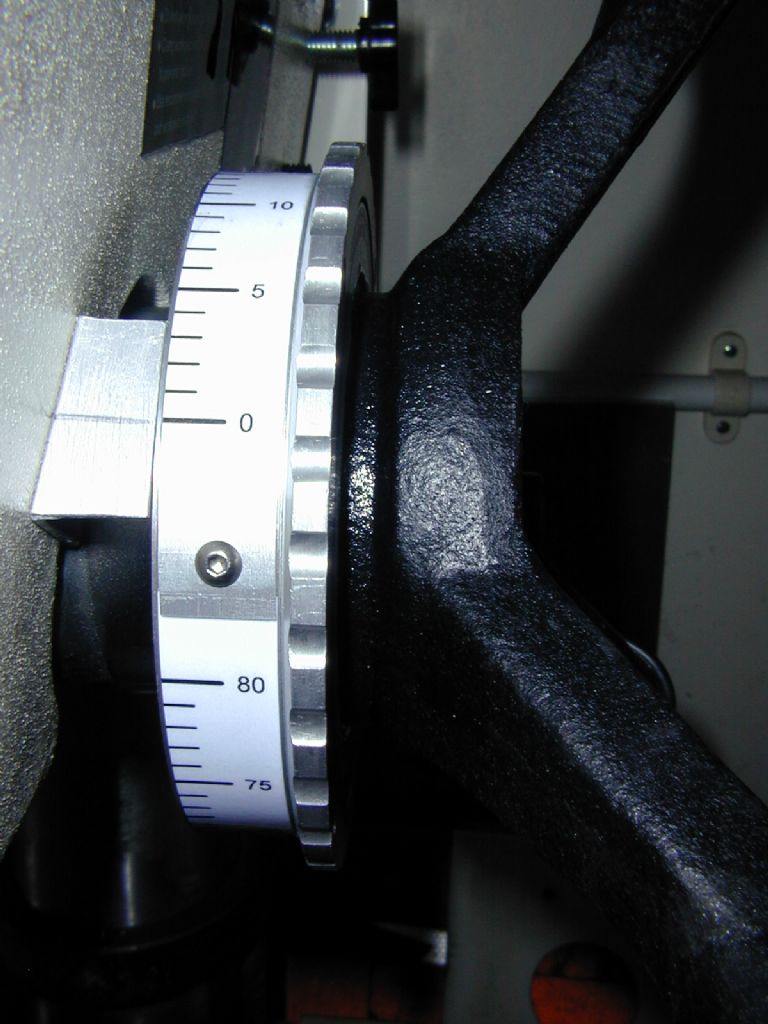
                              Finally completed the depth scale, in the end I used a pcb drafting tool to design the scale.I had to print the scale in two parts then laminate the joined lengths. I put the scale on a slip ring since I often just want a set depth of drilling on a number of holes and this makes it easier to read when set to zero for the desired depth. Doug

                              009.jpg

                              #201424
                              Michael Gilligan
                              Participant
                                @michaelgilligan61133

                                Looks neat, Doug

                                Out of curiosity; may I ask: What 'pcb drafting tool' did you use, and what was its advantage?

                                … Always useful to have these things on the record.

                                MichaelG.

                                #201432
                                David Gosden
                                Participant
                                  @davidgosden83033

                                  CAD DraftSight is free but beware, the one found does not work on Windows XP. However older versions are as available as per my post in the CAD forum as follows…..

                                  'I checked DraftSight but the current version does not work with Windows XP. However anyone wanting the XP or any other version can search http://download.cnet.com/windows/cad-software/

                                  There is a dropdown list of many versions, sortable by operating system and variant – very handy!

                                  The XP download is 117MB and it is the 2013 version of DraftSight. When installed it works sweetly.'

                                  David G

                                  #201455
                                  Douglas Johnston
                                  Participant
                                    @douglasjohnston98463

                                    Michael- the drafting tool was PCB Wizard 3 which I bought from Maplin a few years ago and has managed the transition from Windows XP to Windows 7, but I now wonder if it will survive if I download Windows 10.

                                    There was no great advantage in using this program, it was simply the only program I had available which I could get to work for this task. A decent drawing program like Turbocad would probably be much better, but I don't have that.

                                    I had a senior moment when adding the numbers to the scale as I started at the top with zero and worked down the scale, only to then realise the scale read the wrong way round and I should have had zero at the bottom.

                                    The scale on the friction ring was well worth the extra work and I would advise anyone making a similar dial to do this since it makes it much more versatile.

                                    Doug

                                    #201461
                                    Michael Gilligan
                                    Participant
                                      @michaelgilligan61133
                                      Posted by Douglas Johnston on 22/08/2015 15:05:58:

                                      Michael- the drafting tool was PCB Wizard 3 which I bought from Maplin a few years ago and has managed the transition from Windows XP to Windows 7, but I now wonder if it will survive if I download Windows 10.

                                      .

                                      Thanks, Doug

                                      MichaleG.

                                    Viewing 17 posts - 1 through 17 (of 17 total)
                                    • Please log in to reply to this topic. Registering is free and easy using the links on the menu at the top of this page.

                                    Latest Replies

                                    Home Forums General Questions Topics

                                    Viewing 25 topics - 1 through 25 (of 25 total)
                                    Viewing 25 topics - 1 through 25 (of 25 total)

                                    View full reply list.