TurboCAD Security Problem Returned

TurboCAD Security Problem Returned

Home Forums CAD – Technical drawing & design TurboCAD Security Problem Returned

Viewing 8 posts - 1 through 8 (of 8 total)
  • Author
    Posts
  • #826369
    Nigel Graham 2
    Participant
      @nigelgraham2

      Yes, Firefox blocks TurboCAD’s “Help” Manual as being totally insecure. This was confirmed by someone else on the TurboCAD Users’ Forum.


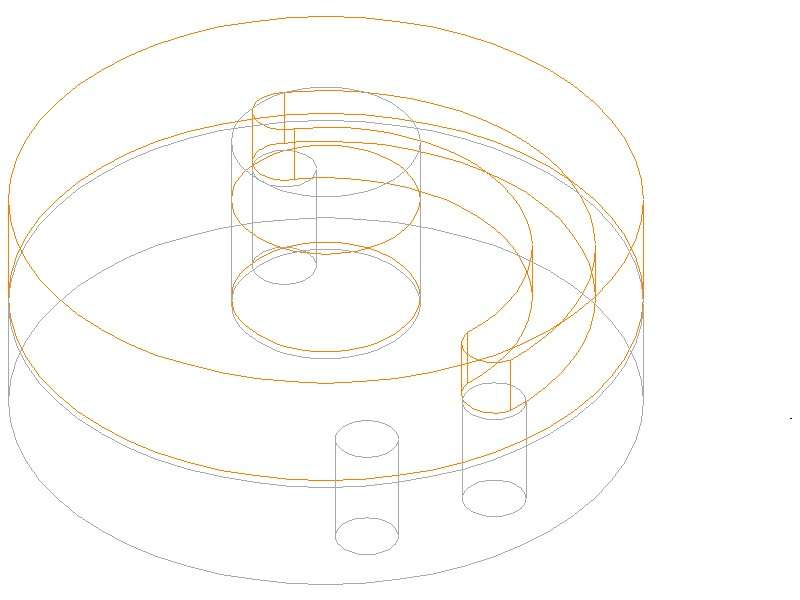
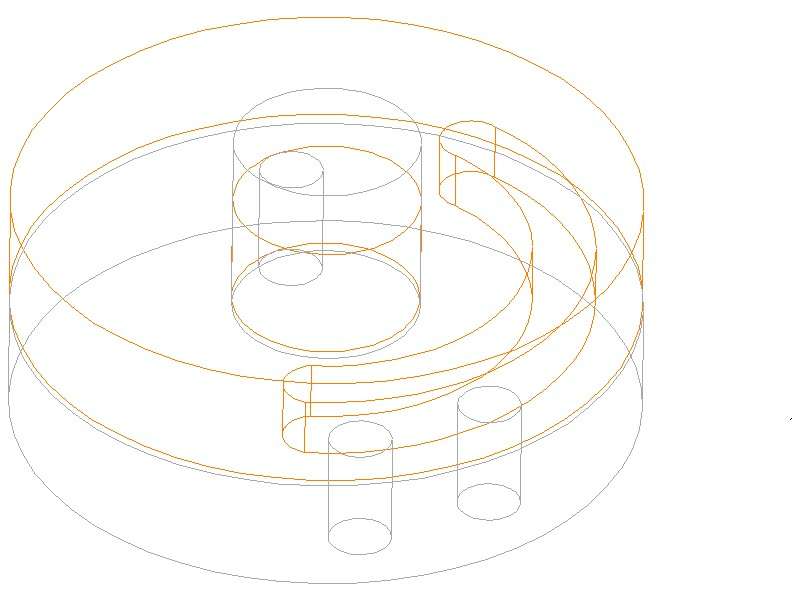
      I had a go at making a 3D image of my Vacuum-Brake Valve, this time in TC: Brakes OFF in upper, ON in lower, images. Far port: vacuum reservoir. Near right: train pipe. Near left: air in.

      In this case I made the static lower disc and the spindle as one piece.

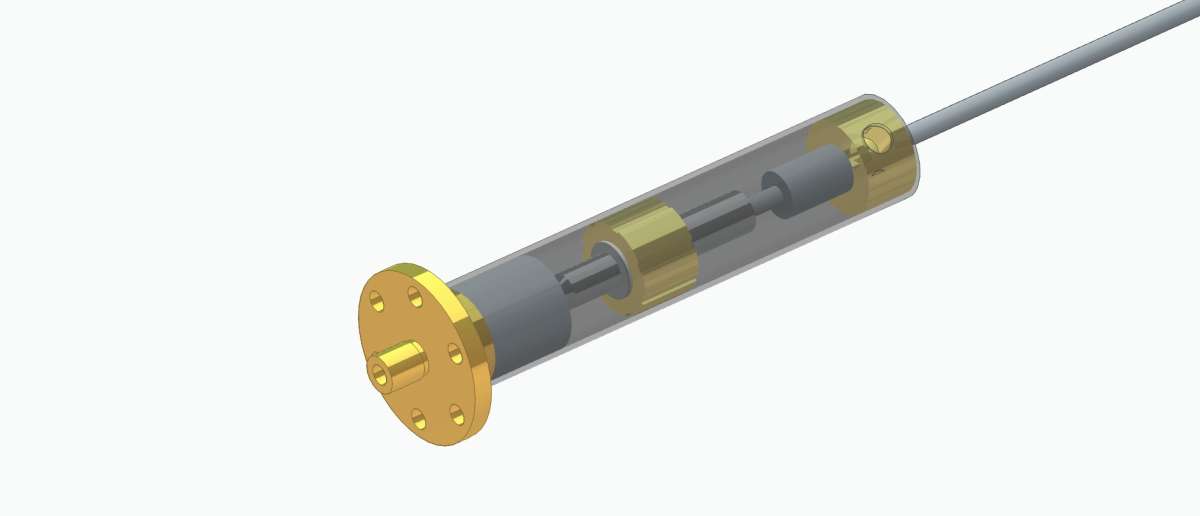
      Assembling something like this in TurboCAD is harder than in Alibre. Nor as elegant as my Alibre effort, which makes the rotor look as if in tinted plastic, because the rendering does not have a translucency setting.


      Tender Vacuum Brake Sys w 3D

      Tender Vacuum Brake Valve ON TC 3D

      #826404
      IanT
      Participant
        @iant

        Assembling something like this in TurboCAD is harder than in Alibre

        Doing this in TurboCAd is harder than doing it in any modern 3D CAD I would imagine Nigel.

        I tried it many years ago and I have no desire to ever go back and try again.   🙂

        Regards,

        IanT

        #826405
        SillyOldDuffer
        Moderator
          @sillyoldduffer

          I share Nigel’s pain – SolidEdge makes transparency hard too.

          The internet is full of outdated advice, and it seems Siemens have made transparency extra difficult and changed how it’s done over time.  Confused and obscure.   Selecting parts and typing ctrl-T doesn’t work and right clicking doesn’t open the Properties dialogue.   Maybe I’m doing it wrong – maybe something needs to be switched on in the configuration and I can’t find it.

          One way is paint the object as Clear Glass – clunky and undone by painting as something solid,  Easier to change the material to clear glass, but that feels wrong too, even as a temporary work-around.

          Altering transparency in FreeCAD and F360 is simple.

          🙁

          Dave


          #826438
          Nigel Graham 2
          Participant
            @nigelgraham2

            On the security-certificate matter, TurboCAD is, or was, created by a company callled IMSI, but I gather from comments on its Users’ Forum that it was sold a few years ago, and although continuing to be developed the new owners seem far less interested in it, only in selling it. The security problem is from their end of things.


            Regarding its “age”, TurboCAD is very much modern in so far as it is still being developed, heavily aimed at architects as well as engineers, and with extremely comprehensive rendering functions. Though to obtain the most from it means expertise with its full, professional editions, and a very powerful, industrial-grade computer.

            However, it is hard to use, especially in 3D, and I have met one or two who confess being totally unable to grasp it. I do not know if they have tried other CAD makes.


            I use TurboCAD [number] Deluxe, the stripped-down, lower-cost version, but still very powerful with more facilities than most model-engineering projects might need. So perhaps the higher-grade editions do include transparency. Its Users’ Gallery is a display of very fine, complex, photo-like images; very much experts’ territory.

            I am surprised transparency is omitted, or is of low quality, in SolidEdge – also a matter of version?

            In Alibre Atom, the “smallest” Alibre version, translucency (I think labelled the opposite way, “Opacity”) is there on the Parts colour menu, and very simple.  Strange that SE lacks it.

            …..

            I tried SE Community Edition, briefly: also a stripped version of the trade editions. Well, CAD is really an industrial tool to earn lots of money; but the makers realised the potential amateur and student market for reduced, low-cost editions. IMSI was probably the first, retailing TurboCAD 2019 Deluxe via its UK agent, Paul (“The CAD”) Tracy.

            He ran training-courses in TurboCAD for professional users, but also created a pdf (static) introductory video on a CD he sold along with the IMSI disc, in the same box.  Paul decorated the box with model-engineering themed 3D drawings; and sold these CD sets at the model-engineering shows and by mail-order, using regular advertisements in the magazines. IMSI’s tutorial material was sparse, apparently only the poorly-designed document reached by the “Help” button – its modern equivalent is no better but there are now separate, more comprehensive guides.*

            So realising the possibilities by seeing CAD-made drawings at work, I bought TurboCAD 2019 Deluxe from one of Paul Tracy’s stands; still have it on my spare, off-line PC. I bought version 2024 a couple of years ago because my copy of 2019 would not run on my new, main PC – long-expired installation key. Functionally there is not too much difference between the editions, for my uses of them, apart from 2019 unable to use 2024-edition .tcw files.

            TurboCAD, like Alibre Atom, is still sold up-front, by simple one-price retailing; not costly subscriptions certain other software manufacturers are introducing. And I think there is now a TurboCAD 2025 in its various versions.

            IMSI’s version numbers look like years, but seem not related to the calendar, so may mean something else.


            My eventual adoption of Alibre, without complete replacement, came from finding it easier than TurboCAD in some ways, and having a lot more support readily available; but TC has certain advantages over Alibre, for me.

            It is not their fault I find both packages so difficult, limiting my use. It’s simply physiology: I could never learn anything above rigid, quite modest levels, long before computery complications. (Which for me started at work, with late-stage MS-DOS, and progressed via typing a book manuscript on an Amstrad PCW-9512!)

            ….

            * “Help” manual.

            It was, and still is, an on-line pdf document with no proper search functions, so using it can be a nightmare.

            By using Word and Excel I extracted the ‘Contents’ pages for the TC2019 manual and re-wrote them as a proper, alphabetical, noun-adjective-adjective index. This greatly helped searching the document on the screen.

            I can do the same for TC 2024’s “manual” but its many more pages would make the already laborious editing task, far greater.

            #826443
            blowlamp
            Participant
              @blowlamp

              Have a browse at MoI’s online Command Reference. It’s straightforward and informative when compared to many CAD packages. The built-in version is just the same and opens on the correct page for the tool you happen to be using at the time. I think it works quite nicely.


              Martin.

              #826444
              SillyOldDuffer
              Moderator
                @sillyoldduffer

                Re TurboCAD’s online help, try a Browser other than Firefox.  Firefox takes a hard-line on security and privacy and red flags risks more aggressively than other browsers.  Stronger security is why I use Firefox.  Try Edge if you don’t mind taking a risk or trust IMSI.

                Solid Edge is misunderstood!  I didn’t say “transparency is omitted, or is of low quality“; I said “Confused and obscure” and “Maybe I’m doing it wrong“.  The problem is transparency isn’t user friendly.  I’m suggesting TurboCAD is the same: doesn’t do what Nigel wants as reasonably expected.  The answer might be hidden in the manual.

                I don’t know why Nigel thinks SE Community Edition is a stripped version of the trade edition. It’s almost fully functional, except:

                • can’t interact with the licensed version,
                • no support or in-year bug fixes,
                • no collaborative development,
                • paid for plug-ins aren’t paid for,
                • Generative design and the parts database are incomplete.

                SE is all there so far as a singleton hobbyist is concerned.  Main problem is it’s harder to learn.

                Nigel says TurboCAD is “very modern” because it’s still being developed.  That’s not “very modern” in my view.  TC started in 1985 as a pioneer and is stuck with four decades of back-compatibility requirements.

                Solid Edge arrived much later.  Dates from 1996, and it shows.  Started as a History based tool.  Synchronous mode was invented later, in 2007.  Synchronous is excellent, once mastered,  but having two modes makes SE even harder to learn. History bites!

                Alibre is a late nineties product.   Stayed loyal to History, didn’t confuse customers with synchronous, and is good value for money.  Got a lot going for it.

                Fusion 360 dates from 2013, and it’s developers benefited from 3 decades of CAD experience. They learned from everyone else’s mistakes!   Best of all, they were free to develop a clean product because they weren’t fettered by existing customers.

                In that sense TurboCAD isn’t modern. In Nigel’s place I’d ruthlessly dump it and concentrate on learning Alibre properly.  The many difference between TurboCAD and Alibre multiply the learning load.  Learning doesn’t transfer from one to the other, and neither builds on 2D.  Massively confusing.

                Dave


                #826511
                Nigel Graham 2
                Participant
                  @nigelgraham2

                  “Synchronous” ! That’s the Siemens term I was trying to remember.

                  The tutorial I attempted gave the impression that this and Whatever-is-its-partner system are Very Important, but did not not define them. So not a good start: which do I need? Would it mean some tools would not work?, and so on.

                  Another advantage Alibre has over TurboCAD is that if the image represents a solid, it is a solid. Just one way to draw it: extrude an outline. TC has two methods of generating them in the Deluxe version including by extrusion, three in the fuller versions, and they can react to the normal editing tools in different ways, sometimes bringing you to a crashing halt. Also TC Deluxe will only extrude outline-by-outline: you can’t represent a washer by extruding two circles, but by extruding a solid disc then extracting an extruded “rod” from the centre: two stages instead of one.

                  Anyway, I have just spent a couple of hours developing that brake-valve design further…..This time also forming an auxiliary assembly to test its mechanical operation.


                  I always knew the two makes are not compatible, to the extent of quite different ways of doing the same things – including obviously TurboCAD letting you draw only orthographically although it expects developing 3D models.

                  Many people warned me this can be a trap, but CAD is quite different from manual drawing, using a Harrison L5 lathe is different from a Myford ML7 (I have both). So you don’t think one while using the other.


                  I think TurboCAD goes back to AutoCAD. I have or had an early version of that on a CD, orthogonal only, and very limited compared to TC Deluxe 2019 even in 2D mode. I expect it was quite the thing when it was current!


                  #826541
                  IanT
                  Participant
                    @iant

                    Solid Edge Communty Edition is the full ‘Academic’ licence, with the limitations described by Dave – which in practice are not an issue for the “Hobbyist”. The only thing really missing is a CAM module.

                    I don’t have any problems with Synchronous versus Ordered, as I’ve never used Ordered. I’ve never needed to do so. I’m sure Ordered has it’s uses (surfacing maybe?) but Synch is very easy to use, most especially if you’ve never used Ordered previously as in my case. So my advice would be to learn SE just using Synch and don’t touch Ordered unless you need to (simples!)

                    Assembling parts in SE is very straighforward and I don’t normally use ‘Styles’ when doing so but they can be useful for some things (mostly illustrations in my case). I generally have the Pathfinder open and can turn things on and off from there with just a click. The Radial Menus are context specific and can be customised to whatever you want, so any combination of commands you use/like in Assemblies, Drafts, Sheetwork, Parts, Harnesses, Frames, Templates etc) can be set-up for both Ordered and Synch modes. Commands are then just a click away – or else use the Command Finder…

                    I’ve never used any other (modern) 3D CAD in anger, so I can’t compare SE with them. However, I’ve not had any issues with SE in paractice and (as usual) I suspect that what you know – is what you love.

                    Regards,


                    IanT

                    RegulatorBR_041125

                    RegulatorWF_041125

                    Regulator_041125


                  Viewing 8 posts - 1 through 8 (of 8 total)
                  • Please log in to reply to this topic. Registering is free and easy using the links on the menu at the top of this page.

                  Latest Replies

                  Viewing 25 topics - 1 through 25 (of 25 total)
                  Viewing 25 topics - 1 through 25 (of 25 total)

                  View full reply list.