Sy Certificate Expired? (TurboCAD Help / Manual access)

Sy Certificate Expired? (TurboCAD Help / Manual access)

Home Forums CAD – Technical drawing & design Sy Certificate Expired? (TurboCAD Help / Manual access)

Viewing 17 posts - 1 through 17 (of 17 total)
  • Author
    Posts
  • #825610
    Nigel Graham 2
    Participant
      @nigelgraham2

      I use TurboCAD in 2D mode when geometry-plotting more than part-imaging, among other purposes.

      A frustrating battle with the latest this afternoon sent me to find the “HELP” menu.

      Only, “Firefox” said something about its “Security Certificate” having expired, presenting a serious security risk to my computer, and obligingly blocked access. Trying to elicit further information simply produced a page-full of random letters of the alphabet.

      Is this common with such extension web-sites, and how does one deal with it, please? If one can.

      Or is this a problem with the publishers, perhaps failing to do something they should, only they can find and correct?

      I don’t recall any such message previously on anything else.


      …….

      The actual battle, for any TC users here:

      Designing a disc-valve gave me a polyline that itself had proved very difficult to create. Then trying to test its rotation about its axis, I had forgotten I have no idea how to move an object’s Reference Point to an intended location (here, the axis). Nor could I make the Delta Angle tool work.

      This drawing is more geometry than component pictures, because I need determine how to link the valve to an existing lever working through a different angle to operate another mechanism, such that they co-operate in the right order. Drawing the parts to match is the next stage.


      #825619
      Grindstone Cowboy
      Participant
        @grindstonecowboy

        All seems OK to me. Have you got an up to date version of Firefox?

        Rob

        #825632
        JasonB
        Moderator
          @jasonb

          Or an up to date Turbocad as the link to help may be going to an old out of date url

          #825634
          SillyOldDuffer
          Moderator
            @sillyoldduffer

            Probably not a Firefox problem.  More likely it’s flagging the error, not causing it.

            Various reasons, all related to Security certificates being dated. They time expire and have to renewed, or are confused by time errors. Two certificates have to align:

            • the one on the local computer (actually several – unlikely that a Web Browser and Email client share the same certificate) AND
            • those on the server.

            The certificates provide proof the server-side has not been spoofed, and exchange the keys needed to encrypt the communications between client and server.  They are vital.

            Local certificate problems caused by:

            • Computer off-line so the certificate isn’t automatically updated when it expires.  Usually sorts itself out when the computer connects to the internet, but can take a while and sometimes goes wrong,
            • Operating system so out-of-date that the certificate can’t be updated.
            • Local computer gets the time wrong:
              • flat BIOS battery.
              • clock drifted due to not being connected to an internet time service.
              • operating system failed to get the right time due to a network or time-server error.  The latter is unlikely, usually 3 available.
              • computer configured to use a geographically distant time-server, increasing the risk that a time update will be lost in the post.  (A computer in Dorset configured to get time from New Zealand.)
            • Server issues:
              • Server gets the time wrong as per local.
              • Server certificates are installed by an administrator, so human error.  Certificates should be updated before they expire, and someone forgets, is ill, or on holiday.    Amateur websites are particularly vulnerable, but the pros get it wrong too!
              • Server might have to be updated across the board before the new certificate can be applied, which takes time.
              • Certificate provider malfunctions, goes out of business, or their certificates are invalidated en-mass by a security breach.

            Most of these correct in due course: try again later.  But:

            • Setting time manually is an option.
            • A flat BIOS battery must be replaced
            • Frequently connect the computer to the internet so it gets up-to-date time corrections and new certificates.  The longer a computer stays off-line, the more updates it has to do, and they might go wrong!  After a few years off-line, a Windows computer will apply hundreds of W10 upgrades before pushing W11.  Takes for ever and might go wrong.
            • Keep the system up-to-date by taking updates when they’re offered.
            • Might be necessary to contact a website owner and tell them their certificate has expired!
            • Be wary of websites that allow their certificates to expire.  Often a sign of sloppy security; negligence, incompetence, cost-cutting, or ignorance.

            Dave

            #825651
            IanT
            Participant
              @iant

              I’ve just opened TC2016DL and the online Help opens without issues (using Edge) Nigel

              I’m afraid I can’t help you with TC these days as I’ve moved completely over to Solid Edge. I have a large body of TC2D work that I’ve moved seamlessly to SE2D as required over the past five years. I do this using DXF exports.

              However, if I need to work in 2D (which isn’t so often now) I simply open a new SE ‘Draft’ document and switch the view to ‘Work’. I then have an environment very similar to TC in terms of drawing tools, constructions, layers, dimensioning etc but using the SE UI (which is similar to the SE3D one). I find it very difficult to return to TC now, so try to avoid doing anything other than ‘export’ when required. When I export a TC DXF into SE it simply opens in a SE ‘Draft’ doc with everything intact, so it’s been a very useful feature for me.

              Regards,


              IanT


              #825705
              Nigel Graham 2
              Participant
                @nigelgraham2

                Thankyou Chaps.

                Subsequently looking at the TurboCAD Uers’ Forum suggests the fault lay with whoever took TurboCAD, or its creators IMSI, over; by failing to renew the certificate.

                All other software runs fine on my PC so it’s not a local problem.


                Dave –

                It looks as if it was one of the faults you list: missed up-dating

                Usually sorts itself out when the computer connects to the internet, but can take a while and sometimes goes wrong.

                The computer’s now been off and on again twice since last night, and using the Help menu now works.

                Not only that, I could then discover the tool I should have used, was not the obvious one at all, but lives on an auxiliary tool-bar. I called that up and placed it on the main tool-bar for future use!

                (TurboCAD very usefully has a whole library of these auxiliary tool-sets you can display or turn off individually as needed, to avoid a confusing mass of symbols on the screen, but I had not known which to find and was trying to use an apparently-obvious choice on permanent display.)

                ….

                Rob –

                Yes, Firefox is up-to-date. It does that semi-automatically.

                ….

                Ian –

                I have tried exporting a TurboCAD 2D file in DXF form to Alibre, but although it worked it was not very satisfactory. It is better to work in one or the other, not both for the same drawing, and accept needing open the correct application for the drawing. (Well, let the drawing open it.)

                #825710
                blowlamp
                Participant
                  @blowlamp

                  Nigel.

                  Is there any chance of a few screen shots of your CAD disc valve to help in showing what you are doing?


                  Martin.

                  #825741
                  Nigel Graham 2
                  Participant
                    @nigelgraham2

                    Martin –

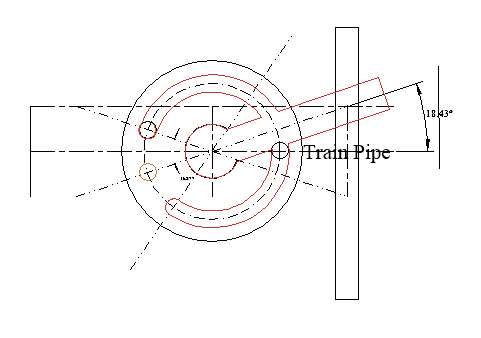
                    That below is all I can offer.

                    The drawing is totally symbolic to investigate if my proposed geometry will work, of the simplest way to combine a vacuum-brake valve with an existing, purely mechanical, hand-brake lever, on a driving-truck.

                    The valve has a set travel. The lever does not, due to brake lining wear and adjustment.

                    The valve was on the loco but hard to reach in use, and I am modifying the system for easier, and safer, operation.

                    Drawing the actual bits comes later.


                    It needs a bit of imagination to read the diagram’s peculiar shape as it should be. It is of three separate objects. They are joined as one polyline only so I could (I thought) rotate it to find where things go.

                    The two arcuate sections are really one, representing a curved channel in the underside of a disc we are looking “down” on. This links the train-pipe port (circle on the right of centre) to either of the two to the left, with no overlap while the channel is moved round. Upper port: vacuum, lower port, air. Brakes OFF in this diagram.

                    The centre circle is the axis: with no real, open link to the channel.

                    The rectangle represents part of some form of “handle” – again no open link to the channel.

                    The valve to be operated by moving the existing lever, represented as standing out of the screen within that narrow rectangle on the right. This physical lever is a flat bar working through a slot in an angle-steel frame.

                    I need the “handle” such that pulling the lever backwards (“downwards” on this drawing), will rotate the disc through its set 37º before slipping past its end and leaving it behind, in the vacuum ON position, to then bring the driving-truck’s mechanical brake ON.

                    Pushing the lever forwards will release the truck brake then push the valve handle forwards to release the train vacuum-brakes in turn.

                    This because the vacuum-valve has a fixed travel although the mechanical brake lever travel is not well defined and changes with wear; and the train brakes need come ON before the truck brake. The release order is less important but will be approximately train-second.

                    The valve is shown here OFF: the driving-truck’s leading right-hand corner is above and to the right of the diagram, the mechanical-brake lever below the “handle”.

                    Screenshot 2025-11-22 171322

                    Confused by now? Trust me!

                    I know it is possible (but not by me) to drag objects round in an Alibre Atom “Assembly”, but this is part of a larger TurboCAD drawing that includes the circuit-diagram, needing a 2D-only approach.

                    Besides, I need establish the part sizes, angles etc before I can draw them, and I cannot see if a geometrical problem like this can even be solved in Alibre Atom.

                    Ironically, I thought I had discovered how to produce that rotation in TurboCAD… Wrong. It does not work, so TurboCAD’s angular transform must be for a 3D model, not 2D drawing. So I will have to draw this in the two positions anyway to establish its dimensions; and may as well draw everything in TurboCAD (in 2D, not a 3D model).


                    In fact what I propose might not work anyway, so I may need think a different way.


                    #825775
                    blowlamp
                    Participant
                      @blowlamp

                      Deleted.


                      #825787
                      blowlamp
                      Participant
                        @blowlamp

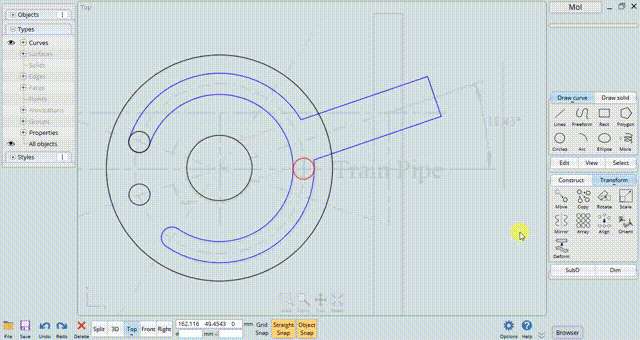
                        Someting like this very short video I made?

                        Martin.

                        ice_video_20251122-205109(1)

                        https://odysee.com/@vwa1244302:8/Rotate:d

                        #825823
                        IanT
                        Participant
                          @iant

                          I have tried exporting a TurboCAD 2D file in DXF form to Alibre, but although it worked it was not very satisfactory. It is better to work in one or the other, not both for the same drawing, and accept needing open the application for the drawing. (Well, let the drawing open it.)

                          Yes, that’s exactly what I do in Solid Edge Nigel. Once imported, the DXF file is saved as a native SE file and all further work is carried out in SE2D. I really don’t like returning to TC now and with SE have no need to do so. I have some 20 years of TC2D work (albeit much of it now redundant) and it is very useful to be able to retrieve it into SE and convert it to 3D ‘parts’ if so required.

                          I have no knowledge of Alibre but Solid Edge 2D brings everything across ‘as was’ and also has tools to find/correct problems in the orginal TC drawings, which is very helpful if then moving it to 3D.

                          However, whilst Solid Edge suits my needs, I understand why you’ve decided to stick with what you know.

                          Regards,


                          IanT

                          #825927
                          Nigel Graham 2
                          Participant
                            @nigelgraham2

                            Exactly like that, Martin. Thankyou!

                            This was to initiate things.

                            Later I realised from it that by altering the length of the channel and positions of the ports I can obtain the same effect irrespective of the brake-lever’s over-run, simplifying the linking.

                            What CAD package is that in, though? It does not resemble TurboCAD Deluxe, and I am not sure what I was attempting will work in that.

                            ……

                            Ian 


                            I think Solid Edge and Alibre work in basically similar ways.


                            I tried SolidEdge CE when looking for a possible alternative to the very powerful but very difficult TurboCAD I had bought some years previously. I gave up because Siemens’ scanty training material was hard to find, failed to explain at least one crucial choice, then ended in mid-project. It seemed as if lifted from material written for experienced CAD users moving to the Siemen’s products.

                            Alibre Atom came along, and with much better tuturial and help support.

                            I do like AA’s active dimensions method, and its Parts & Assemblies system.

                            TurboCAD does not offer those functions. It can help you repeat parts but within only their own drawing, and I do not know the right tool and proper operation.

                            Alibre’s system for deriving elevation drawings is easier than TurboCAD’s “Viewports”, but I still use trial-and-error. For example, selecting the views by plonking all seven or eight in and deleting the surplus.


                            I probably use Alibre very inefficiently, to a very low level, and TurboCAD perhaps worse still.

                            #825934
                            JasonB
                            Moderator
                              @jasonb

                              I’ve got a similar valve on the current build I’m posting about elsewhere.

                              Drew it and then put it into the assembly and made a couple of changes as I saw it interacting with the other parts. It’s only a little engine so a small assembly but Alibre would handle it in a larger assembly just as well. I’ve made the main standard transparent so I can see how the cavity in the valve moves over the passages in the standard.

                              All the drillings angles and timing worked out with Alibre


                              #825947
                              Nigel Graham 2
                              Participant
                                @nigelgraham2

                                Thankyou Jason.

                                The first part of the question – the security certificate – has been resolved.

                                I think we’ve now shown the valve type is fine but I was trying to link its definite travel to a lever with longer but rather indefinite travel.

                                So what I can do now is modify the valve so the over-run function is absorbed by the proportions of the valve itself.

                                I need close the train-pipe’s connection to the vacuum reservoir and ejector pipe before opening it to air, and vice-versa. I think if I modify the channel in the valve-disc and the ports suitably they should accommodate the extra rotation, giving an easier and more elegant solution.

                                The next stage then will be determining the lever’s potential full angle. The swing will change with brake wear and adjustment, and be different in each application, but the maximum is set by working in a closed-ended slot in the truck frame.


                                I can try drawing it in Alibre but am not confident I can develop the geometry in that.

                                Nor of testing its movement in an 3D model, like your engine. My previous attempts just went haywire when I tried rotating them.

                                #826008
                                Nigel Graham 2
                                Participant
                                  @nigelgraham2

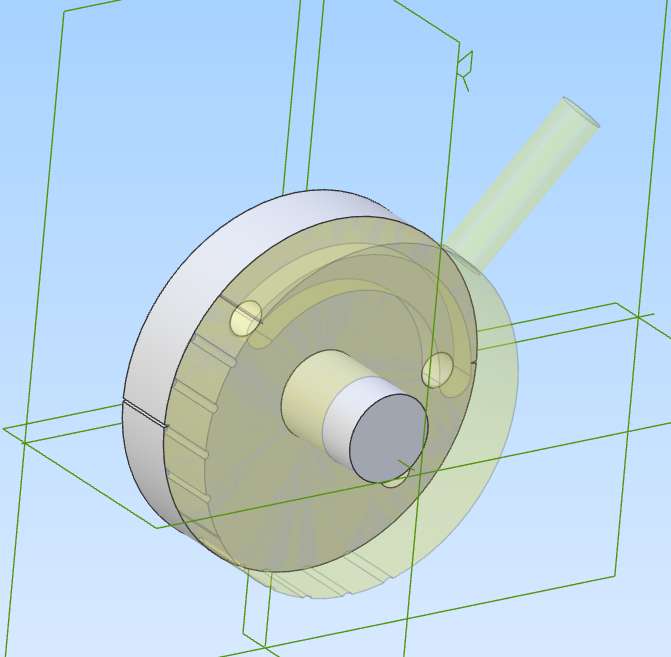
                                  Right, I think we’re there, thankyou! Result attached below.

                                  I tested the basic outline first in TurboCAD but could not animate it.

                                  Tried to copy the file to Alibre in DXF form: that failed. Alibre opens it as an image that’s neither use nor ornament.

                                  So I drew it completely afresh from what I’d worked out, and managed to make it work.

                                  I added 15º marks to the rim so I could measure it, and made the moving part translucent.

                                  Top-left hole in the rear, static disc: vacuum reservoir and ejector.

                                  Centre: train-pipe.

                                  Lower: air in.

                                  I’ve still to verify the actual angles through which the operating-lever already on the truck moves through but as drawn this valve takes 45º from brakes Full OFF to Full ON, which should be about right, and with plenty of over-run. The channel depth is calculated to give the same cross-sectional area as the ports.


                                  Prior to all this I examined the BR engineman’s official handbook, and was surprised to find the full size equivalent is pretty much the same, just bigger. I.e. a single, full transfer from ejector pipe to air inlet, with a few other details including a sprung detent to hold the valve in either position. The full circuit is fairly elaborate but the brake-valve itself very simple; not graduable as I’d imagined. On the other hand in full-size it is handling considerably more air through a very long pipe, perhaps giving a slight ramping effect to help the driver ease the brakes on and off.  That could be given on a miniature-railway application like this by replacing the single, “large” air inlet with a series of small holes connected below the valve surface.


                                  Screenshot 2025-11-23 230733

                                  #826019
                                  JasonB
                                  Moderator
                                    @jasonb
                                    On Nigel Graham 2 Said:

                                    Tried to copy the file to Alibre in DXF form: that failed. Alibre opens it as an image that’s neither use nor ornament.


                                    Both myself and David have explained numerous times how to take an imported DXF and make use of that ornament. Go back and look at some of your older threads anbd see where we told you what to do.


                                    #826047
                                    Nigel Graham 2
                                    Participant
                                      @nigelgraham2

                                      Sorry Jason – too many things to remember in systems I don’t use very often.


                                      Besides, I could use it only for single, simple, flat bits with no features on their other faces.

                                      The TurboCAD diagram used to develop the geometry, combines all features and construction-lines in one flat, single piece, and I did not realise it cannot readily seed an Alibre model version as it is, even if imported correctly.


                                      The importing also brought in the entire drawing, including accompanying “circuit-diagram” and trial sketches. I deleted all unwanted parts except for a few I could not erase. Curiously, Alibre seemed to treat it as on many levels – probably stacked “workplanes” which TurboCAD sometimes generates unasked (it assumes 3D-modelling as the main technique). The whole thing opened as an Alibre drawing, not sketch, I could do nothing with.


                                      I am surprised I managed to create and animate that Alibre 3D model of the valve at all, from four parts, from fresh.


                                      CAD-modelling this driving-truck and its brake installation, including this valve, is not feasible; and there are no real drawings for the truck, not built by me. It is loosely based on the narrow-gauge wagons used in slate-quarries, holds a seat, water-tank and coal box, and has a mechanical hand-brake. The present vacuum-pipe from locomotive to passneger-trucks simply runs from end to end, interrupted only by the vacuum regulating relief-valve.


                                      (Usually I work to direct measuring “on the job” and rough sketches, creating formal CAD drawings only when particularly useful or necessary, so rarely, and of generally low standard.)

                                    Viewing 17 posts - 1 through 17 (of 17 total)
                                    • Please log in to reply to this topic. Registering is free and easy using the links on the menu at the top of this page.

                                    Latest Replies

                                    Viewing 25 topics - 1 through 25 (of 25 total)
                                    Viewing 25 topics - 1 through 25 (of 25 total)

                                    View full reply list.