Anyone using Q-CAD?

Anyone using Q-CAD?

Home Forums CAD – Technical drawing & design Anyone using Q-CAD?

Viewing 17 posts - 1 through 17 (of 17 total)
  • Author
    Posts
  • #820247
    Kevan Shaw
    Participant
      @kevanshaw32462

      I am coming back to CAD after a very long layoff. I used to use Vectorworks but that has grown into a very expensive monster. After looking for something affordable I came across Q-Cad which also has excellent video tutorials to get me started again. Is anyone else using this software?

      #820248
      Chris Kaminski
      Participant
        @chriskaminski64716

        yes

        #820262
        Clive Foster
        Participant
          @clivefoster55965

          Kevan

          Should you decide to try Q-CAD I’ll be interested to hear how you get on with Q-CAD as an ex-Vectorworks user. I’m still using VW2016 on perpetual licence but would dearly love to move over to something with a future. As you say the very high current subscription prices make upgrading unaffordable. Most especially as VW Mechnical hasn’t been updated for the best part of a decade.

          Clive

          #820268
          Graham Stoppani
          Participant
            @grahamstoppani46499

            Yes. I found it fairly easy to pick up.

            #820270
            Kevan Shaw
            Participant
              @kevanshaw32462

              Clive


              i am using Q-CAD. What I used to like about Vectorworks is that drawing was more analogous to drawing on paper it recognised entities like squares or hexes as single objects and it became easier to construct a drawing by thinking of a group of entities. What killed it was I needed DWG outputs integration with others using autocad and it was very poor at that. I could never get my head around the autocad method of drawing so as others in my business were autocad natives I just stepped back from producing drawings!


              Q-Cad is very much line focussed. There are tools to draw rectangles etc. but all it does is produce a set of lines and I am not finding convenient ways of defining a rectangle to given dimensions. It does have good tools to construct with , clipping, mirroring , offsets, splines, chamfers etc. layering works well but is in the autocad style that is entirely structured for pen plotters! Remember them🤣 it seems strange that many cad apps are still designed around logical needs of an output technology that became obsolete a quarter of a century ago!

              Q-CAD also has good image importing tools and a trace function that I haven’t used yet but makes it easy to scan a drawing or photo as a reference on screen to redraw. One major set up change I needed to do was stop the mouse controlling zoom and change it to pan that was a huge help to keeping where I needed to be in the drawing. I also changed to working on a white screen rather than black that was another big Vectorworks advantage in the old days!

              So far I am pretty happy with Q-CAD but it is strictly 2d so of limited use for 3D CAD/ CAM and 3d printing I think.

              #820283
              JasonB
              Moderator
                @jasonb

                Sound like it works like many 3D packages. Using various shapes to make up your sketches which are then given depth. I use Alibre most of the time or the odd bit of free F360 and find both very easy to manipulate and dimension the initial shapes as well as relate them to others. You only need give them a nominal depth if you just want 2D output.

                They will also import images to trace or design over.


                #820291
                John Hinkley
                Participant
                  @johnhinkley26699

                  Me, too. I’ve been using Q-CAD for many years, for the last 3 or 4, without renewing my subscription. I have found it to be a perfectly useable program, easy to pick up – even for a complete beginner like me at an advanced age.  It gives the ability to output files in numerous formats. I mostly used it, prior to taking up Alibre Atom, to produce workshop drawings in addition to supplying the MEW editor with supporting illustrations for inclusion in the few articles which I have written for the magazine.

                  Although rarely used these days, I recommend it.

                  John


                  #820294
                  Macolm
                  Participant
                    @macolm

                    I find QCAD excellent for quick design tasks. For example, to avoid the need for construction lines, just use the offset line feature in both axes, then “break out segment” to trim down to the actual profile. And so forth, it fits easily with my impatient and muddled approach to getting things done quickly and correctly.

                    #820300
                    Graham Meek
                    Participant
                      @grahammeek88282

                      Hi Kevin,

                      I came to use QCAD after my AutoCad Lite would not work on the latest Windows version at the time. AutoCad had been my mainstay for over 30 years. Both at work and for my hobby. I have been using the QCAD package for some 4-5 years. I do find some of the operations quirky when compared to AutoCad, but in other respects it is better in my opinion.

                      I do not recommend much in the way of Merchandise, but this I would. You will also find many users only too happy to help on the Forum. QCAD was recommended to me by a Forum member.

                      Regards

                      Gray,

                      PS Like the cat.

                      #820334
                      Clive Foster
                      Participant
                        @clivefoster55965

                        Kevin

                        Thanks for the response.

                        Looks like Q-CAD won’t meet my needs so I shall just have to soldier on with Vectorworks hoping the computer doesn’t die.

                        After using Vectorworks for some 20 odd years and maybe 1,000 drawings I’ve gotten quite used to it. I really couldn’t do without a lot of the moderately sophisticated features. It was after all a proper professional package back in the day.

                        If, has Jason says, Q-CAD methods have more in common with 3D CAD than old style 2D its even less likely that i’d be able to transition. I’ve never been able to adapt to the 3D of working. I have a very nice wetware 2D th 3D converter running in my head which, after 50 odd years of development, completely gets in the way of 3D CAD thinking where you start with primitive and remove the bits that aren’t what is wanted!

                        However the trace function sounds interesting. I’ve got some pdf copies of well foxed dyeline prints that would be much more comprehensible if I could get rid of the blotches and speckles. Obviously expecting to automatically shift them all is unreasonable but if trace could lift all but then worst affected parts of the drawing out it would seriously reduce the effort needed to sort them.

                        Clive

                        #820336
                        Julie Ann
                        Participant
                          @julieann
                          On Clive Foster Said:

                          …completely gets in the way of 3D CAD thinking where you start with primitive and remove the bits that aren’t what is wanted!

                          That is a fundamental misunderstanding of the way 3D CAD works. I almost never start with a primitive and only remove bits. More commonly I start with a primitive and add more primitives. But most often I use a combination of adding and subtracting. The most common use of subtraction is for holes and fillets.

                          Actual machining is basically a subtractive process; however much we would sometimes like an add metal tool on the lathe or mill.

                          Julie

                          #820340
                          Macolm
                          Participant
                            @macolm

                            I suppose the reason I find QCAD very satisfactory is that the authors make it quick, simple and uncomplicated to input the necessary information and values. It is also easy to see and immediately adjust numerical values in “properties”, and flexible in allowing you to adapt workflow to your preferences.

                            There is a permanently free QCAD Community Edition if you grub around the website, though you may find you want the paid version’s enhanced features. So an extended trial need cost you nothing other than your time, and you can go at your own pace.

                            #820344
                            JasonB
                            Moderator
                              @jasonb
                              On Clive Foster Said:

                              completely gets in the way of 3D CAD thinking where you start with primitive and remove the bits that aren’t what is wanted!

                              A lot will depend on the part you are modelling. Simple things may be easier that way but much like Julie I tend to “fabricate” the part from a series of primatives and then possibly cut some of them away or they may just stand on their own.

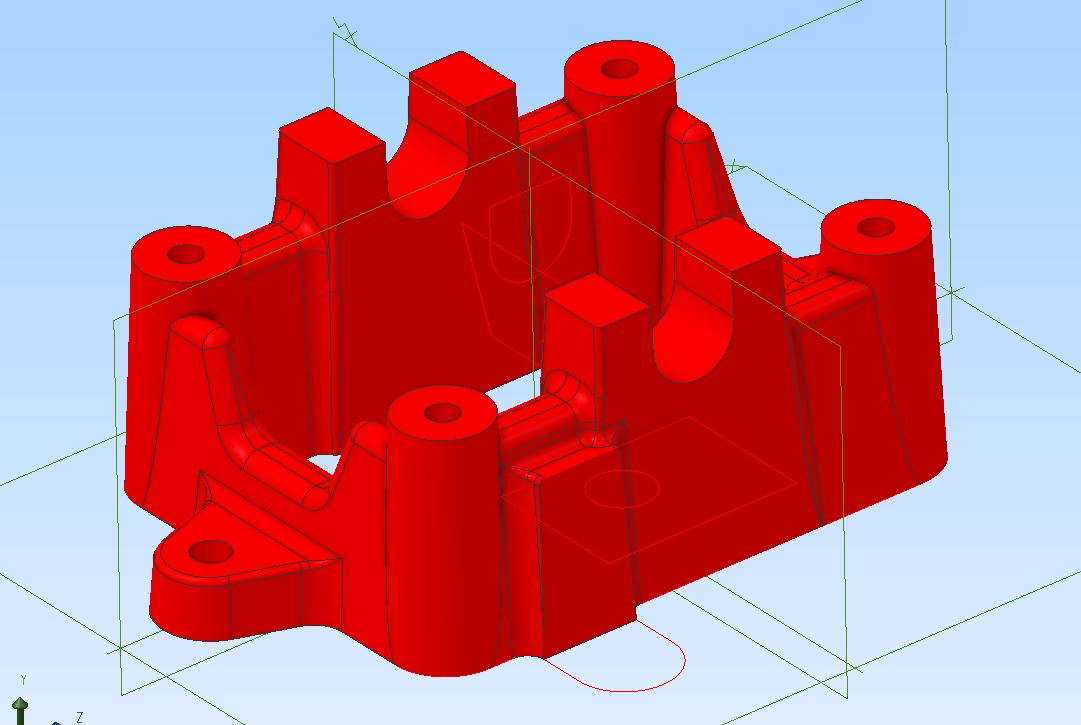
                              Take what I’m drawing up at the moment which is the bed plate for an engine which will be cast so there is draft on all the verticals..

                              primative

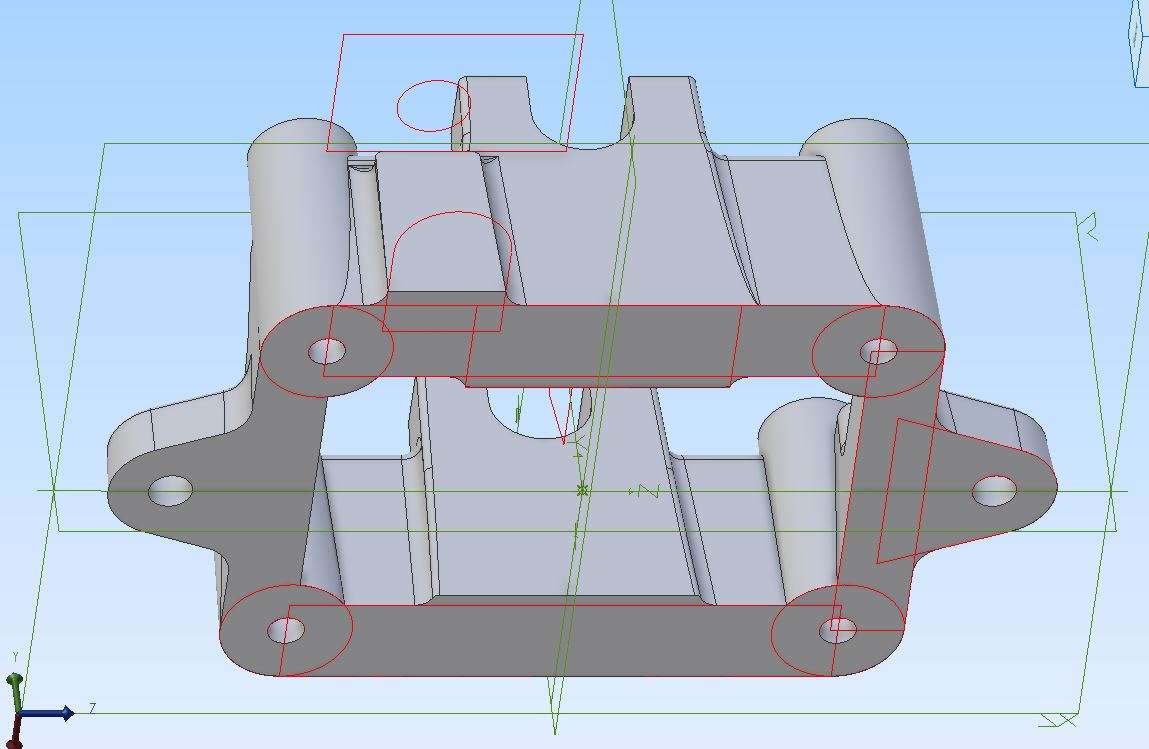
                              I did not start with a solid rectangular block. Instead I drew 4 circle in the corners and extruded then, then the walls between, then the thicker bearing supports and the mounting lugs. Only then did I cut out the various holes and the two “U” shapes which can be seen as red lines on the centre axis. A view from below shows the various sketches in red that were extruded with suitable draft angles to make up the part.

                              primative 2

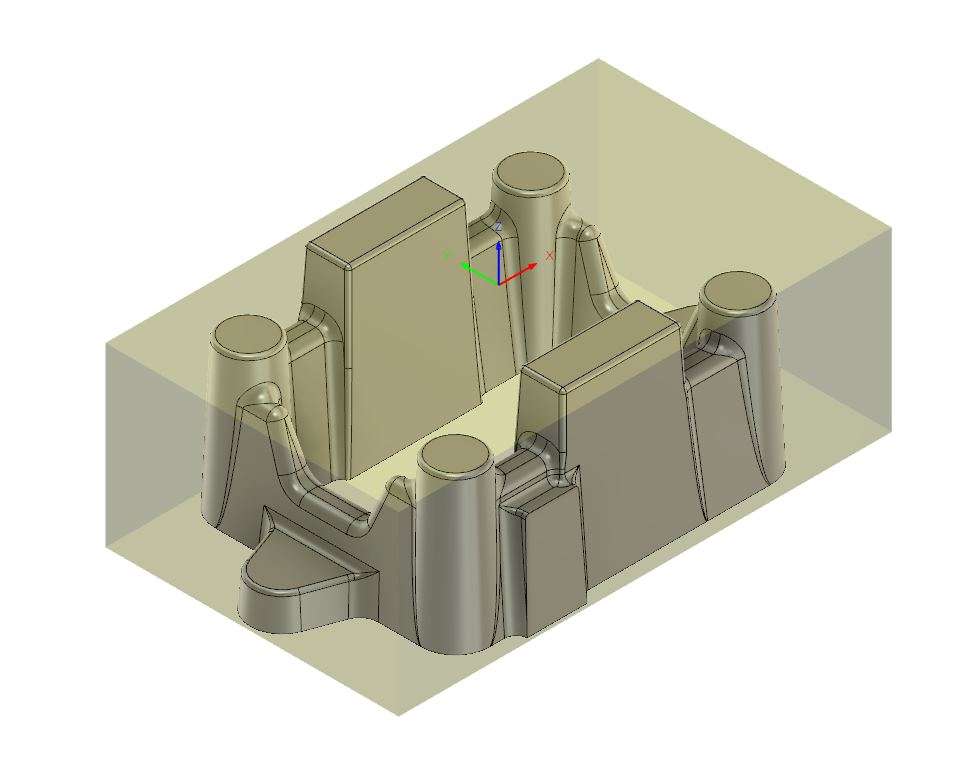
                              It is only when I get to the CAM that I tend to start with a solid block.

                              primative 3

                              #820383
                              duncan webster 1
                              Participant
                                @duncanwebster1

                                I’m sure QCad is excellent for some, but if you’re used to AutoCad and its clones, QCad is very different. I gave up and went to nanoCAD, the 2D version is free. OK it’s Russian, but I’m not giving them any money, and it doesn’t need an interweb connection apart from downloading

                                #820386
                                Clive Foster
                                Participant
                                  @clivefoster55965

                                  Julie, Jason

                                  Thanks for your efforts to help. However my problem is I “see” the 3D object I’m designing as the lines needed to depict it on 2D planes of whatever angle, section or projection is appropriate. So I never actually design it as an object. It’s all lines on flat planes. The 3D / 2D converter running in my head handles all the conversion to lines stuff automatically.

                                  If I throw a perspective view of a 3D object onto a flat screen and try too work with it the visualisation bit of my brain basically goes into meltdown. Trying the old style extrusion commands in Vectorworks to go from 2D to three hurts!

                                  No problem seeing some one else’s 3D design as a perspective on a flat screen. It’s doing my own that is the issue. I know exactly what the picture above represents and, in principle how it can be assembled in the CAD program. Do it myself, fergedditt. Maybe I could add a hole or simple feature to it but thats all.

                                  It’s an old fart problem really.

                                  Doesn’t help that the way I draw things manages perfectly well for what I make now so the motivation for learning new tricks is perhaps low. But 3D CNC and, maybe, printing would be nice.

                                  I’m sure I could crack it that if I finally persuaded the Taig CNC mill that has been sitting idle on the bench for 20 years to work, giving me something to practice 3D manufacture as well as design, and spent 6 months total immersion in 3D. Both learning 3D CAD and making the resulting objects on the mill without touching manual machines or using the 2D CAD. Trying to learn 3D CAD via free evenings or the odd day a week hasn’t done it.

                                  But that isn’t going to happen. I may be Home Shop Guy, rather than Model Maker Hobby Guy but it’s a very rare week that doesn’t see at least the equivalent of a couple of days on CAD or machines or both. Usually planting season or when the Official Unofficial Kid Sister has her annual visitation to tell me all the things I’m doing wrong. So I never get away from how I work now long enough for the new way to gel.

                                  Thanks

                                  Clive

                                  #820423
                                  Graham Meek
                                  Participant
                                    @grahammeek88282

                                    Hi Clive,

                                    Up until very recently I was quite happy seeing the 3D object in my head without the need for a 3D image. Until that is, I started drawing the last version of the screwcutting clutch for the Emco Compact 5. For some unknown reason I could no visualise the shape of the Main Body.

                                    Luckily John Slater came to my rescue and produced a 3D image. Prior to that 2D had always been enough for me and I think it harks back to being taught Technical Drawing at school. You had to visualise all the views as you were drawing them with paper and pencil.

                                    I do now find I use the Isometric facility on the QCAD much more. This is easier for my brain to deal with and again it goes back to the Technical Drawing days.

                                    I had better add I am not anti 3D. For those that can and do use this medium it is another “good tool” to have.

                                    Regards

                                    Gray,

                                    #820508
                                    SillyOldDuffer
                                    Moderator
                                      @sillyoldduffer
                                      On Clive Foster Said:

                                      …It’s an old fart problem really.

                                      …Clive

                                      Don’t beat yourself up too much.  This is about cost, which is a common problem.  Time versus money.  If moving away from Vectorworks is sufficiently painful, pay for it!

                                      Much time and effort has been invested learning a CAD package that used to be money affordable.  Unfortunately, the party is over and Vectorworks  want more money than you care to pay and a new computer is needed too.  Arghh!

                                      A tricky problem.  My bad experience: I walked away from Fusion360, originally free to hobbyists, and which I like very much, because:

                                      • I feared AutoCAD were luring me into a honeytrap and would require money after I was hooked!
                                      • After several months, AutoCAD did just what I feared, albeit in a small way.  They removed features from the hobby version, and now, if needed, customers have to pay for them.   They could do this again.
                                      • F360’s implementation makes it hard to avoid change.  It’s a Cloud Product, meaning the licence owner can change features or Terms and Conditions at any time.   (Some to believe F360 is free-standing because it will run off-line for about a month-ish, but no – it eventually has to phone-home, and then…)

                                      I was able to abandon F360 because I hadn’t invested significant time and effort in it.  Less than 10 models, only 3 of which were complex assemblies.  I switched to SolidEdge, where the community version is free, does not require a network connection, and is full function.   The main restrictions are it cannot exchange files with the paid version and get no bug fixes, feature upgrades or support.  That I can live with!

                                      There was a cost!  Though I’ve grown to appreciate Solid Edge, I had to put significant effort into learning it, and now I’ve got over 30 projects it will hurt if Siemens or Microsoft take Solid Edge away!   (Microsoft are a consideration because Windows 11 is very much against my best interests, demanding new hardware, restricting how that hardware is used, a Microsoft Account, connection to the cloud, plus major privacy intrusions, and a big security risk.  And I don’t trust Microsoft with my information!  No matter, application providers will slowly drift away from Windows 10, if Windows11 catches on.)

                                      These factors may eventually force me to buy a new computer, with all the unwanted disadvantages of Window 11, just to run Solid Edge.  And there’s a risk Siemens might withdraw the community edition, or even abandon Solid Edge entirely.   I’m partly insulated because I can keep W10 going for a long time by buying old kit, and securing it by not connecting to the internet.  But sooner or later I would have to change, and long delayed change is usually very painful.

                                      I’m not aware of a compatible alternative to Vectorworks.  If locked in by past experience, and unable to spare time and effort to learn something new, the best answer may be to pay for Vectorworks.   Investigate if you qualify for a free student licence first.   Requirements vary:  F360 and SolidEdge both allow hobbyists;  others insist students prove they are enrolled on a relevant course in an educational establishment.  I would have checked myself. but you need a Vectorworks account to find out.

                                      QCAD is excellent for 2D CAD and there are some CAM add-ons I’ve never explored.   Does all the basics – a computerised drawing board, highly recommended for general purpose engineering plans.   It’s similar to Autosketch, which was bought last century by AutoCAD and discontinued.  Whilst Autosketch lacked AutoCAD’s bells and whistles, it did all the basics and was much easier to learn. QCAD is better than Autosketch.  Not a 3D modelling tool, and it doesn’t look or function like Vectorworks.

                                      Dave

                                    Viewing 17 posts - 1 through 17 (of 17 total)
                                    • Please log in to reply to this topic. Registering is free and easy using the links on the menu at the top of this page.

                                    Latest Replies

                                    Viewing 25 topics - 1 through 25 (of 25 total)
                                    Viewing 25 topics - 1 through 25 (of 25 total)

                                    View full reply list.