My adventures with a bench top CNC mill

My adventures with a bench top CNC mill

Viewing 25 posts - 1 through 25 (of 58 total)
  • Author
    Posts
  • #845795
    John Hinkley
    Participant
      @johnhinkley26699

      About a month ago, I posted in the “What did you do today” thread that I had ordered a Carvera Air bench top CNC mill.  It has been in transit for over a month now (by boat) and is currently in a container in the port of Felixstowe awaiting customs clearance.  The manufacturers assure me that as soon as it has passed through customs it will be transported to their warehouse, from which it will be dispatched to me.  Watch this space (or one a bit further down the page) to find out what happens.

      As part of the package, I took advantage of the manufacturer’s Spring sale discount further enhanced by a random $80 US off in their lucky dip and a bonus free gift of a 26 piece essential milling bit set. No freight charges or taxes to pay (allegedly) made it too good an offer to pass up. I chose the mill/laser/4th axis option, too, to justify the outlay.

      In the meantime, I have been reacquainting myself with the delights of CAM and tool path generation in Fusion 360.  Oh, joy!  I managed to partially get to grips with it when I had my 3D router and produced a certain amount stuff, mostly in perspex.

      The reason that I went with the choice of the Carvera Air, as opposed to the  more expensive straight Carvera with auto tool changer, was that the personal edition (i.e. free) of Fusion 360 will allow the use of multiple tools in the Manufacture mode, but will only produce G-Code for one tool at a time, so I would not be able to use the auto tool changer, much though it looks cool!

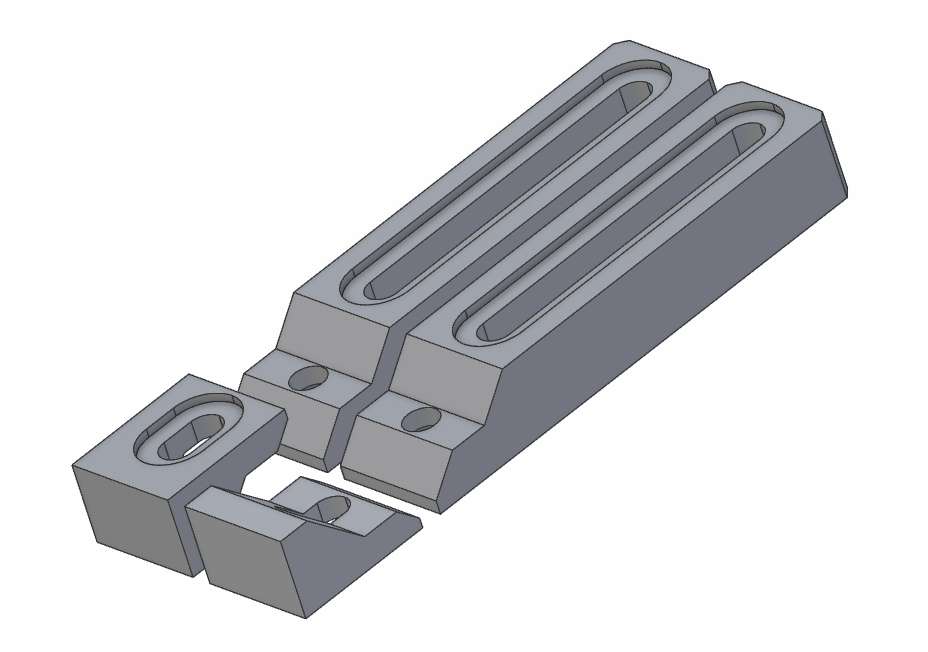
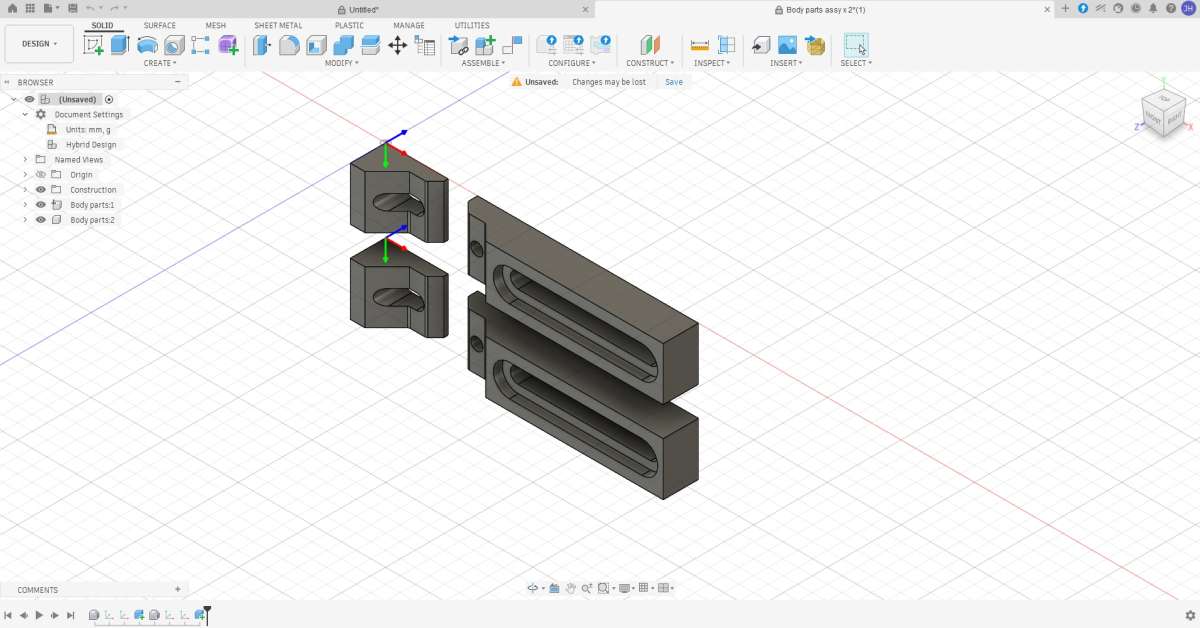
      As I have no need for a small bust of the Egyptian pharaoh’s wife, Nefertiti, I have selected a pair of low profile clamps to a design by a YouTuber to bemy first project and I have almost decided in my mind the order of operations to make them.  These are they:

      clamps

      (I’ve flipped one sliding part to show the underside.)

      It will involve machining from both sides, so I’ll have to alter the work coordinate system accordingly, but I’m  certain that I’ll beat it into submission somehow.

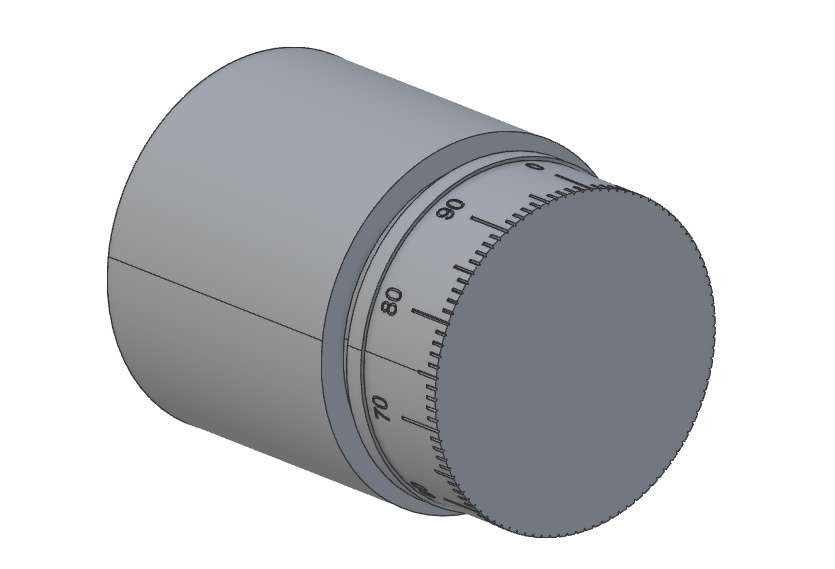
      I’ve also given some thought to the use of the 4th axis add-on and as an experiment, I’ll try to get it to make this:

      Graduated scale on stock

      I’ve had a couple of goes with Fusion 360 and Makera’s own CAM software, Makeras CAM, but can’t see it very well as the theme they’ve chosen doesn’t suit me.  For example, the “drawing area” is black and I prefer white and the icons on the toolbar have black text on a blue background.  Maybe its just me, but I have to get within a gnat’s of the screen to read anything, so for the moment I’ve given up with that.  I emailed Makera to query whether it’s possible to change the colour scheme, but, no, it’s not.  They suggest that I be patient and wait for the release of their Makera Studio software in May.  As I don’t expect the machine to arrive any day soon, I’m content to do that.

      If anybody has any good ideas about how I should attack the 4th axis conundrum, I’d be pleased to get their input.  Just don’t tell me I’ve made a terrible mistake buying what I have and should instead have bought such-and-such.  It’s too late for that!  Otherwise I’ll plug on with a suck-it-and see basis, until I’ve done it.

      Next update, probably when the mill arrives.

      John


      #845804
      Julie Ann
      Participant
        @julieann

        Looks a very nice machine, and a 4th axis is always worth having. The engraving ought to be straightforward but I am not familiar with Fusion or Makera CAM so cannot offer detailed advice.

        It is possible to simplify the design of the clamps so they can be machined in one setup. I would get rid of the recesses for the screw heads and add small fillets to the internal angles so that the slopes can be roughed with an endmill and finished with an ballnose mill without having to reclamp the part.

        Likewise I’d hate a black background, white is so much better. Black lettering on a blue background will have poor contrast, so not a good choice.

        Julie

        #845819
        Nealeb
        Participant
          @nealeb

          There are a few restrictions in F360 “home and hobby user” version that are presumably intended to stop commercial time-sensitive users using it but, supposedly, not affecting the h-and-h users too much. The principal restrictions are:

          – no rapid travel so that the max speed of the machine even when not cutting is limited to the maximum cutting speed used. Initial move to first cutting position and final return to rest position are at full rapid (G0) but everything else is G1.

          – no tool changing in a single gcode file. You can always separate different toolpaths into separate files but it’s a bit clunky.

          – no 4th-axis support. Probably the least of these restrictions as most of us do not have a 4th axis – but you do!

          However, it is possible to get round the first two issues with an open-source plugin called Post Process All. See this link for full info and download. By using this, you can restore the full G0 non-cutting moves and also include multiple tools in one file. I have been using this for a number of years for virtually every gcode file I have produced and it has always worked very well with no problems. That’s on the CNC mill – I have also tried it with CNC lathe gcode files but although they have always worked, the plugin does not always spot rapid travel possibilities and I have usually ended up with a few hand edits.

          Can’t help with 4th axis gcode generation, though – the fix for that is to buy the product!

          #845836
          JasonB
          Moderator
            @jasonb

            You can get the tool to move faster than the feed rate with certain paths. Adaptive has a separate box when doing adaptive cuts for the non engagement feed rate. I tend to cut at 5-600m/min but use 9-1000 for the return cut when cutting one way which seems better than both ways on my machine. If you also set it to stay down for longer you do not get the slow up-along-down at feed rate.

            I assume cutting from both sides is due to the depth being more than the cutters flutes or the captive nut recess which you could possibly tap rather than use a nut which seems more suited to printed ones.

            Can’t help with the 4th axis but working from both sides is quite easy just do a second “setup” and choose the face you want facing upwards. I tend to use Z axis plane and X for the orientation so just click the face for Z and a long corner for X

            If you are going to make two from one piece of metal as he shows then getting the Y axis centred well will be the key to not having a step on the sides if they don’t line up. As for the screw head recesses I suppose they helpkeep the height low which is th emain point of th eclamps though you are unlikely to be using a face mill that would have a large leadin distance that could cut the screw heads off.

            As Julie says a small fillet where slope meets flat will work better for the parallel finishing cuts shown in the video, if you make the fillet a little larger than the cutters rasius it makes for smoother cutting and you don’t get a large percentage engagement in the corner. He does have this on his one in the video, you can see it on the F360 screens at the start.


            #845837
            JasonB
            Moderator
              @jasonb

              The video from your other thread again which may be of use to those following.

              #845843
              John Hinkley
              Participant
                @johnhinkley26699

                Julie, Nealeb and Jason,

                Thank you for your comprehensive replies.  I have noted what you have collectively said but suspect it will take a while to completely digest and fully understand the comments/suggestions.

                Specifically, I have decided to completely remodel the clamps in Fusion, dispensing with the recess for the captive nut and just threading directly into the major part, particularly as I’ve re-read the list of included bits and see that there’s two thread milling bits in the original set.  That’s probably a whole day’s work at least as I try to learn Fusion’s foibles.  That will allow me to mill out the whole thing from one side, just leaving small tabs to stabilise everything.

                Jason,

                That’s a good tip about the feed speeds.  I’ll follow that one up, for sure.  The only reason I was intending to mill from both sides was the inclusion of that captive nut.  Removing that from the lower face negates the need to flip the material, so thread milling is the way to go. The material is only 12mm thick, so flute length is not a problem.

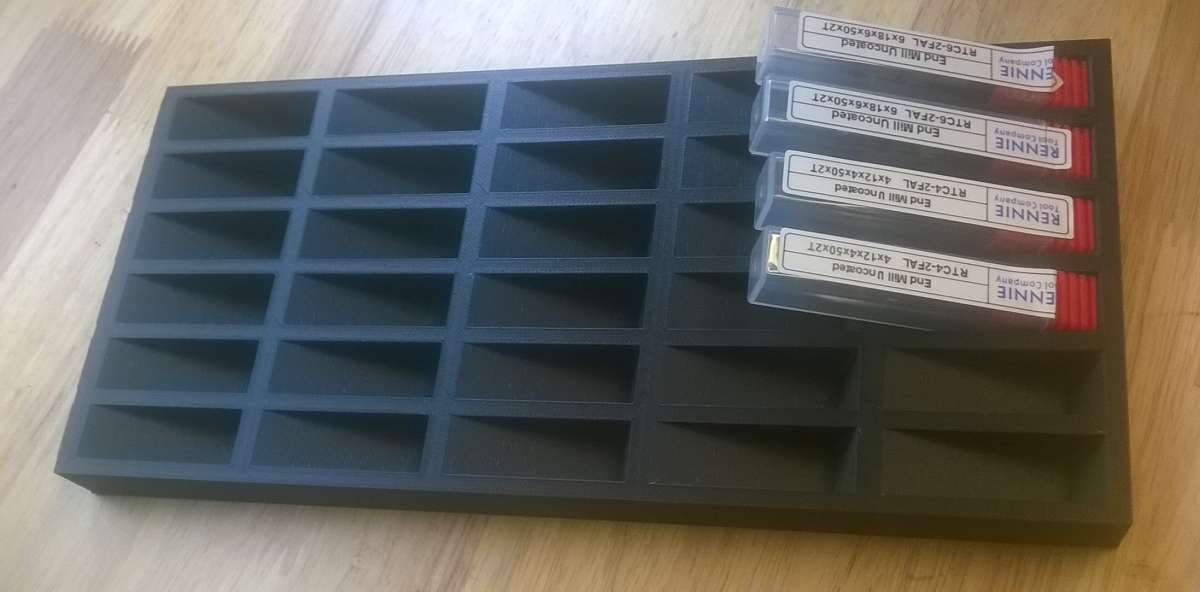
                I have designed and 3D printed a storage rack for the end mills that come with the machine and it also accommodates the 4mm and 6mm diameter 2-flute end mills that I’ve bought separately.  I’ve also purchased a pair of extra collets (4mm and 6mmØ) to accept the end mills of those diameters.  Actually, I bought them twice because the first pair got as far as transfer to the handover to the delivery driver whereupon  the courier mysteriously “lost” them.  Later, the package turned up, damaged, minus its contents.  Uncle Ali promptly refunded my money and a different supplier got the collets to me despite using the same courier.  (I think you all know which one.)

                If you’re interested, and even if you’re  not, here’s a photo of the end mill stacking tray anyway:

                end mill rack

                It took nearly six hours to print in PLA-CF, that being the only filament that have in stock that I could guarantee wouldn’t run out half way through the print.  At least it shouldn’t break!

                John


                #845857
                JasonB
                Moderator
                  @jasonb

                  If you are going to be using tabs then I find the triangular ones work better as the flat ones have the cutter plunging straight down as they pass the tab, triangular lets the cutter ramp down.

                  Also look at the lead in/out, set the leadout to inline rather than at 90deg otherwise you find at the end of the cut the cutter will move away from the work before lifting up. That would mean you are feeding straight into a 12mm high face!

                  #845903
                  John Hinkley
                  Participant
                    @johnhinkley26699

                    Thanks again, Jason. I’ll look into using triangular tabs in future, having only used rectangular ones in the past.  Not quite sure what you mean in the second part. I always ramp down into a cut and that continues until full depth is reached.

                    John


                    #845904
                    JasonB
                    Moderator
                      @jasonb

                      It will still do it if you ramp down as the ramp starts above the top surface you don’t have  a problem with the lead in. However F360 by default has the lead out the same as the lead in so both default to 90deg.

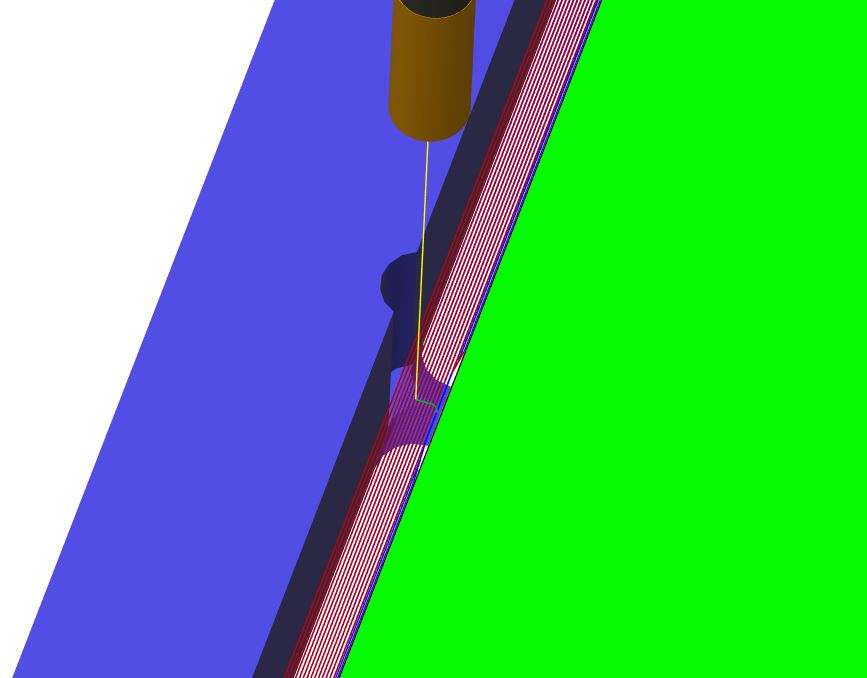
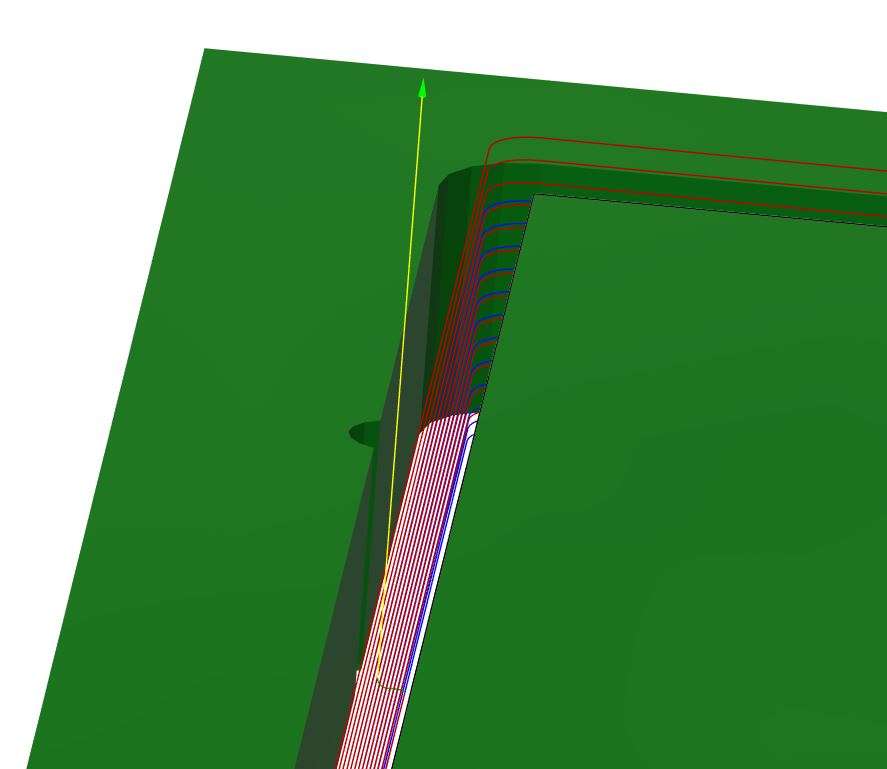
                      This is the simulation where the red is the tool ramping down and then at the end it moves away from the work before lifting up out of the cut so you get that full depth notch which will quite probably damage the tool. Green is the job, purple the waste stock around it.

                      lead out 1

                      Looking at the path with the tabs removed you can see more clearly how the tool moves out ( little squiggle) then up (yellow)

                      lead out 2

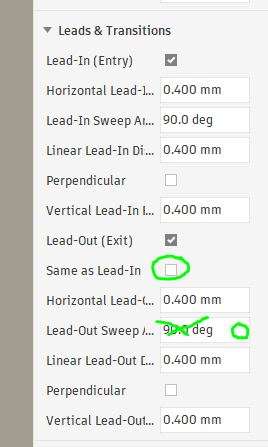
                      So to cure that go into Linking and untick the box so lead out is not teh same as lead in. Change the default 90deg to zero.

                      lead in 3

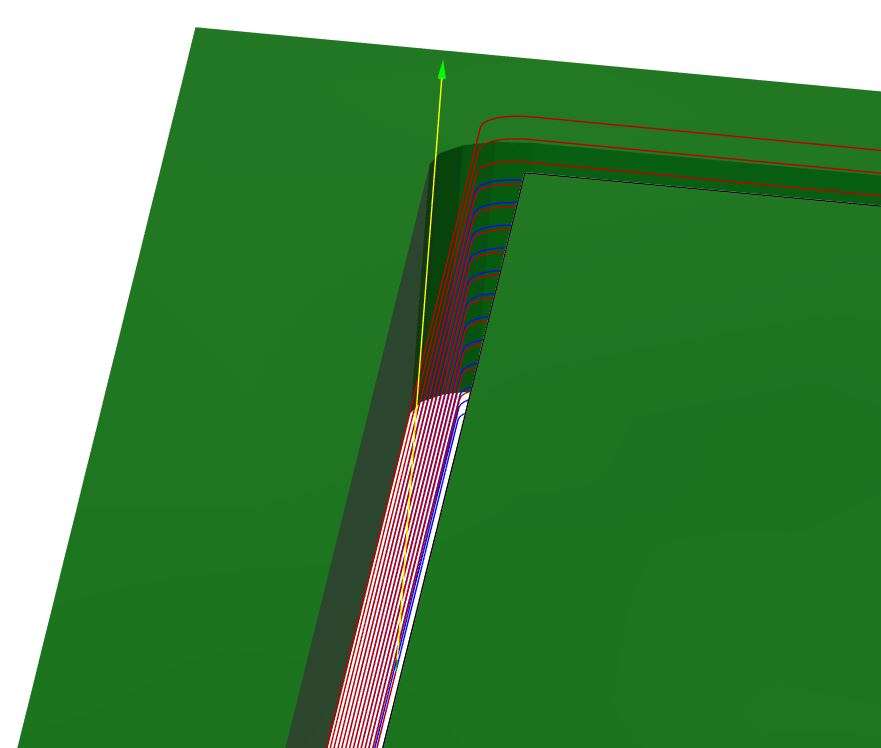
                      Then when you look at the tool path again teh cutter just curves up in the same directon it has been cutting before lifting vertically.

                      lead out 4


                      #845911
                      John Hinkley
                      Participant
                        @johnhinkley26699

                        Wow! That’s a lengthy and detailed explanation, Jason. I really appreciate you taking the time to do that for me.  A bit beyond where I am at the moment, but very useful reference material when I get to that stage.

                        I didn’t get around to starting the design in Fusion today.  Hopefully tomorrow.

                        John


                        #845950
                        JasonB
                        Moderator
                          @jasonb

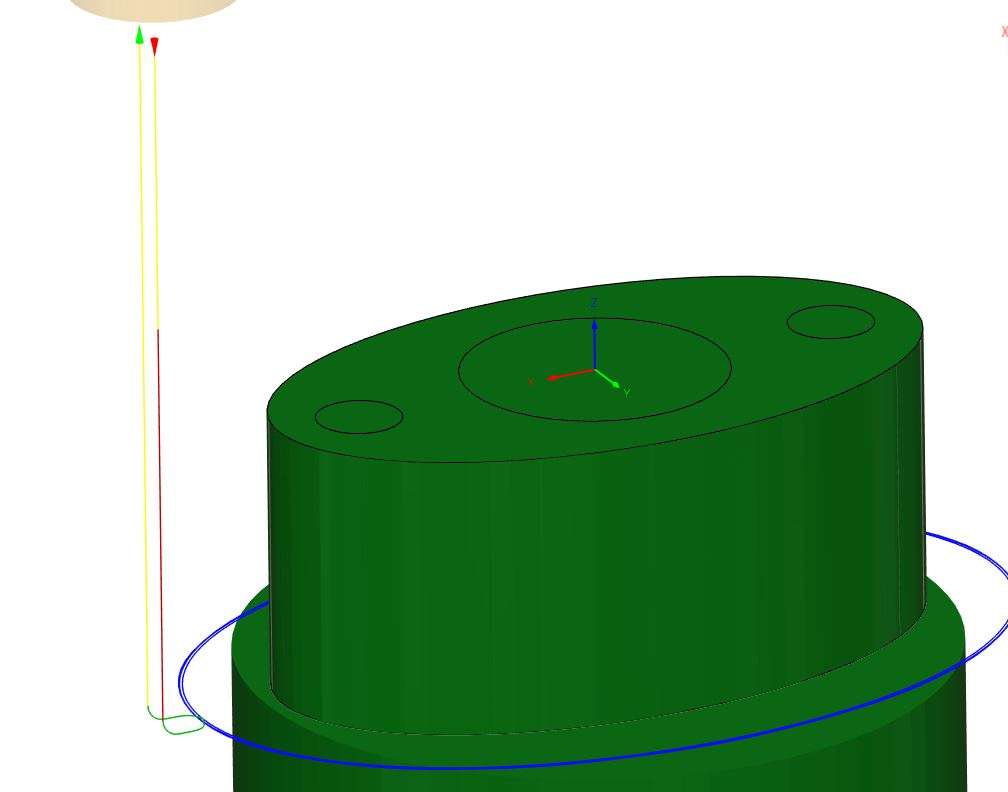
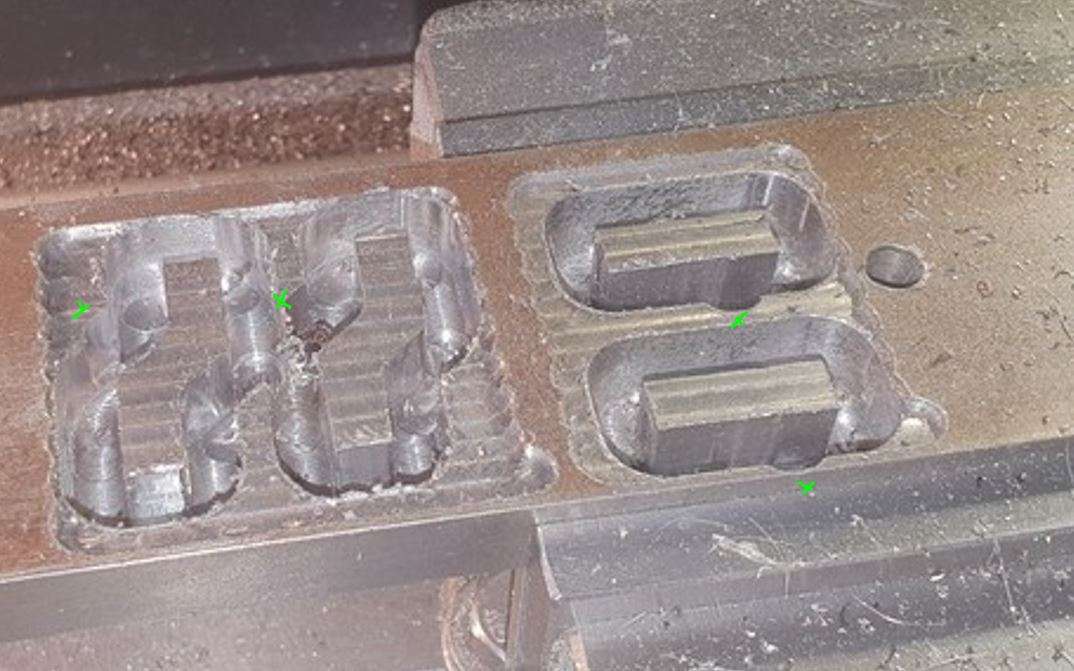
                          I found a part that better shows how the cutter moves with the default settings. This flange was roughed out with an adaptive to leave 0.3mm axial. I then did the contour shown, one roughing pass of 0.2mm and a final of 0.1mm. You can see how the tool moves out and up in a curve before retracting vertically. OK on a job like this where there is no material for it to move into but in a case like that shown in teh video you will get a nick.

                          lead out 7

                          I also snipped this image from another forum which shows a similar nick a sthe tool has retracted and in the case of the one in the foreground almost cut into the vice jaws.

                          nicks

                          #846027
                          John Hinkley
                          Participant
                            @johnhinkley26699

                            Two days ago I rashly said that I would draw out the design in Fusion from square one.  That didn’t happen.  I can’t seem to “get” how the drawing tools work.  So, back to Alibre Atom and knocked it up in pretty short order.  Exported in STEP format as Fusion can’t read Alibre format, only to find the axes all over the place and not at all where I wanted them,  Persevering, I thought I might be able to fix it in in the Manufacture workspace but when I ran a simulation of the long recess 2D contour cut, it started inside the stock and worked its way out – quite the reverse of what was intended!  Flipping the Z-axis didn’t solve the problem so I’ve left it for now to have a cup of tea, a biscuit and a long think, aided by Google, probably.  I just don’t get it. I did it before when doing NC files for the router, but then I wasn’t starting with STEP files.  Perhaps I ought to persevere with drawing in Fusion.  I’ve tried watching YouTube videos but they are mostly so poorly produced, I can’t follow the mouse movements even slowing the replay to ½ or ¼ speed and rarely understand the spoken word. Ah well, time will tell I suppose.  And patience …..   Something I’m fast running out of!

                            John


                            #846030
                            JasonB
                            Moderator
                              @jasonb

                              Alibre orientates X&Y as though you are looking at a vertical drawing board, F360 as though flat on a mill table.

                              I often have imported items on their side but as you need to enter the orientation of the part anyway it is not a problem and something that is worth learning if you need to use more than one setup to machine opposite faces, sides or ends.

                              Post a screen shot of how the part appears when you first open the step file in F360 and I’ll talk you through it. Both setup and tool paths. Also are you cutting both from a piece of 2″ wide stock like in the video?

                              I still like the videos by Lars Christianson, although a few names have changed he explains things quite well, it’s all I’ve watched. I don’t draw much in F360 but would not have a problem with those clamps.

                              #846039
                              John Hinkley
                              Participant
                                @johnhinkley26699

                                Jason,

                                That’s a very generous offer of assistance and one that I would be grateful to take up.  Perhaps it would be better to conduct the exchange by PM, rather than clutter this thread, unless you think others may benefit.

                                Here’s the screenshot requested.  I hope that the resolution is adequate.

                                Fusion screenshot

                                I will be using a piece of 12mm aluminium plate 100mm x 150mm.

                                John

                                #846050
                                JasonB
                                Moderator
                                  @jasonb

                                  If it is OK with you I’ll do it on the forum as it may be of use or just interest to others. If you want me to start a new thread then let me know otherwise I will post here. I will PM you shortly anyway.

                                  I did have a quick play with the downloadable STP file and apart from the parts being a bit too close together for my liking, managed to do the CAM ok, I did not do the thread milling. Quick idea of what I came up with from 1/2″ material.

                                  #846074
                                  Roderick Jenkins
                                  Participant
                                    @roderickjenkins93242


                                    Very interesting and informative.

                                    Thank you guys

                                    Rod

                                    #846088
                                    JasonB
                                    Moderator
                                      @jasonb

                                      I have started a new thread to show the F360 CAM etc for these edge clamps

                                      #846492
                                      John Hinkley
                                      Participant
                                        @johnhinkley26699

                                        A quick update on the whereabouts of my mill.  The 4th axis and laser module arrived by post this morning.  I think I’m getting a feel for the Makera method of delivery to the UK – it appears that they send a number of machines in a container, which is picked up by a freight forwarding company for onward distribution by pallet company.  Any extras, like the 4th axis and laser pack, are distributed by another (different) agent.  In my case, it seems to be a one man band in Birmingham.  No matter, they have arrived OK, so the system obviously works.  It would explain how I was notified that the machine was on a ship that departed port the day after the order was placed.

                                        I have received a message from a separate freight forwarders who inform me that the mill package is in their hands and is being prepared for delivery.

                                        I’ll update when it’s arrived.

                                        I hope you are all enjoying Jason’s very helpful and informative series detailing the CAM processes in a separate thread.

                                        John


                                        #846531
                                        Engine Builder
                                        Participant
                                          @enginebuilder

                                          Hi John,

                                          I had my Carvera Air since last June. I made a few videos and am happy with the performace.

                                          A lot can be done using just dxf files.

                                          I could leave the link here but Jason would just delete it.

                                          David

                                          #846554
                                          John Hinkley
                                          Participant
                                            @johnhinkley26699

                                            David,

                                            Did you buy direct from Makera or the UK supplier?

                                            Interesting that you say you can use dxf files.  How does that work?  Sledgehammer to crack eggs springs to mind.

                                            John


                                            #846562
                                            Engine Builder
                                            Participant
                                              @enginebuilder

                                              As a Youtube influencer I was lucky my Carvera was supplied free of charge in return for a video review.

                                              Mine came by air direct from Cina

                                              I can let you have some files of some things I have made if you want a proven CAM file to try.

                                              PM me.

                                              #846661
                                              John Hinkley
                                              Participant
                                                @johnhinkley26699

                                                Thank you, David, I have your PM and I’ll work my way through them. I have subscribed to your channel, too, having recognised your channel name.   Steam is not my thing, but the machining principles still apply

                                                John


                                                #846824
                                                John Hinkley
                                                Participant
                                                  @johnhinkley26699

                                                  Delighted to let you know that the mill has arrived.  The DPD man happily waltzed up the drive with it in his warm embrace and left it in front of the garage for me.  He was lucky to catch us in as we were about to depart on a Tesco raid and hadn’t received prior notification of its impending delivery.  A couple of heaves onto a trolley and my wife and I managed to get it safely tucked away inside the garage where it will reside until I get around to unwrapping it later.

                                                  Having read in the other thread that I’ll need “plenty of air” to clear the chips for a boring operation I’ve bought a small “silent” compressor to act as an air assist pump., doubling up as tyre inflator/general purpose air squirter.

                                                  Time to break out the video camera, charge it up and hit the editing suite, I feel

                                                  John


                                                  #846834
                                                  John Haine
                                                  Participant
                                                    @johnhaine32865

                                                    A small caution on blowing chips – you don’t necessarily use a large airflow as it can blow tiny sharp particles all round the shop.  I have an airbrush compressor with a modest reservoir and at least for brass and aluminium without coolant it does the job fine.  My mill is at least partially enclosed.

                                                    #846841
                                                    John Hinkley
                                                    Participant
                                                      @johnhinkley26699

                                                      John,

                                                      Thanks for the warning.  I had considered either an airbrush compressor or fish tank aerator.  I didn’t want to have an air assist system that was limited to just the mill so went with the cheap (£80) compressor option. Additionally, the Carvera Air is fully enclosed, so I hope not to spend hours clearing up.  Since I will be carrying out manual tool changes, I’m hoping to do some hoovering in the breaks in machining.

                                                      John


                                                    Viewing 25 posts - 1 through 25 (of 58 total)
                                                    • Please log in to reply to this topic. Registering is free and easy using the links on the menu at the top of this page.

                                                    Latest Replies

                                                    Viewing 25 topics - 1 through 25 (of 25 total)
                                                    Viewing 25 topics - 1 through 25 (of 25 total)

                                                    View full reply list.