Bluetooth Displays

Bluetooth Displays

Home Forums Electronics in the Workshop Bluetooth Displays

Viewing 15 posts - 1 through 15 (of 15 total)
  • Author
    Posts
  • #829776
    Speedy Builder5
    Participant
      @speedybuilder5

      I am looking for a Bluetooth app for an iPhone.  I want a display that I can format such that I can send smart electricity meter information to my I-phone.

      I have an interface between meter and Arduino, and BlueTooth from Arduino to iPhone using DSD-TEC application of the iPhone BUT I can’t find a way to format the iPhone screen.

      Do others use different iPhone apps or is there some secret DSD-TEC formatting codes one could use.  I only know of

      \r – Line Feed

      \n – Carriage return

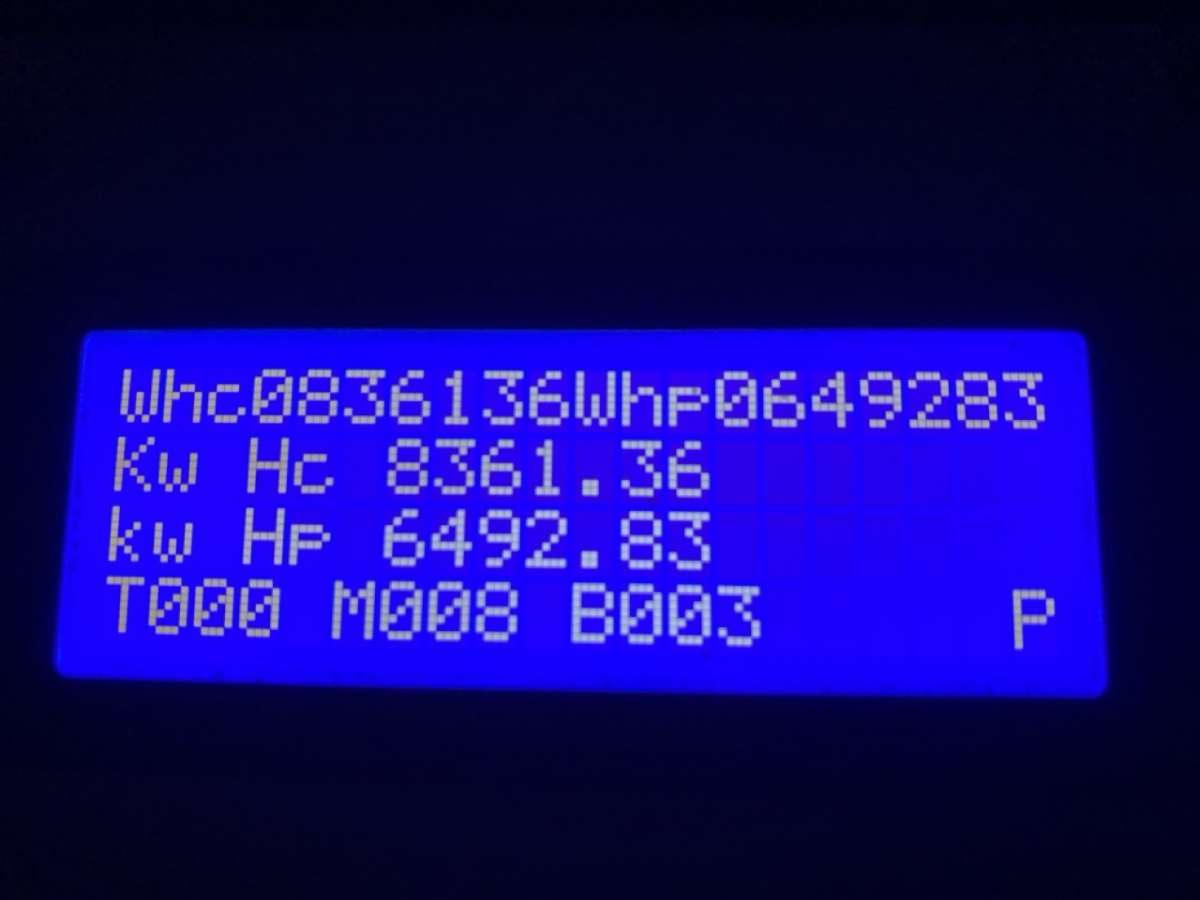
      LinkyDisplayA typical screen currently on an LCD

      Any ideas ?

      Bob


      #829790
      John Haine
      Participant
        @johnhaine32865

        Doesn’t your supplier have an iPhone app? We’re on Octopus and they have a good one?

        #829794
        Speedy Builder5
        Participant
          @speedybuilder5

          John,  this is FRANCE !  EDF can tell you what you did yesterday, last month, last year,  what your neighbours consume on average – but not what you are using NOW.  Yes,  you can get individual consumption meters and even circuit meters (Expensive), however LINKY smart meters allow you to see what you are consuming every 2 seconds.

          Its not rocket science to legally use this information and use things like ARDUINOs to convert the information into a readable format, but I would like to take it a step further and see the information on my iPhone instead of lugging an Arduino and LCD screen around with me.

          The DSD-TEC app will receive the Blue Tooth data,  but its a bit like a Teletype, and all the data rolls up the screen, line by line.

          Bob

          #829796
          Charles Lamont
          Participant
            @charleslamont71117

            Could it be done with Pythonista ?

            #829809
            Speedy Builder5
            Participant
              @speedybuilder5

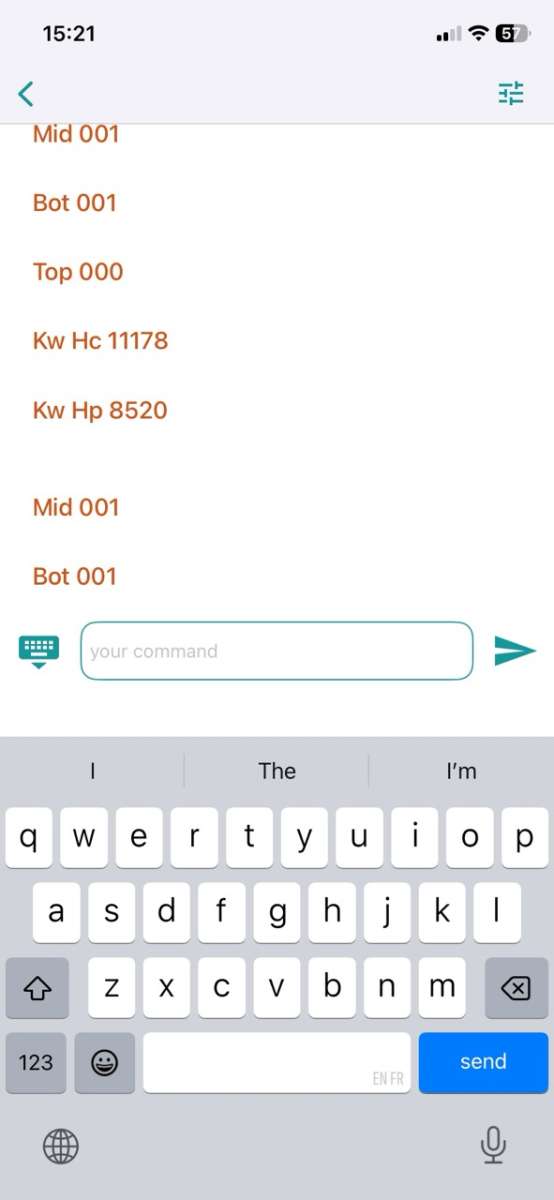
              Hi Charles,  looks like it could, but it looks like a hard slog for a one-off application.  In effect, all I need is a “Clear screen” command that I could send from the Arduino to the iPhone and get something like this where I would see Top,Mid,Bot KwHC,KwHP without them repeating down the page:

              DSD-TEC screen Large

              #829854
              John Haine
              Participant
                @johnhaine32865

                Though I can’t readily find one I know that there are a number of DIY energy monitor sites where you may be able to find what you want. Google is your friend.

                #829866
                Speedy Builder5
                Participant
                  @speedybuilder5

                  The problem is John that I don’t want to lug an Arduino around or have one sitting on the sideboard.  I want to see the energy state on my iPhone and as I said, its EDF France – not UK.

                  Bob

                  #829870
                  Speedy Builder5
                  Participant
                    @speedybuilder5

                    Charles, perhaps ChatGPT could write some Pythonista for me ??

                    #829881
                    Michael Gilligan
                    Participant
                      @michaelgilligan61133

                      Some interesting technical background here, Bob:

                      https://hal.science/hal-04456859v1/file/ISGT_Smart_Meter_5pages.pdf

                      MichaelG.

                      #829885
                      John Haine
                      Participant
                        @johnhaine32865

                        Only one solution then, move back to UK.

                        #829893
                        howardb
                        Participant
                          @howardb
                          On Speedy Builder5 Said:

                          John,  this is FRANCE !  EDF can tell you what you did yesterday, last month, last year,  what your neighbours consume on average – but not what you are using NOW.  Yes,  you can get individual consumption meters and even circuit meters (Expensive), however LINKY smart meters allow you to see what you are consuming every 2 seconds.

                          Its not rocket science to legally use this information and use things like ARDUINOs to convert the information into a readable format, but I would like to take it a step further and see the information on my iPhone instead of lugging an Arduino and LCD screen around with me.

                          The DSD-TEC app will receive the Blue Tooth data,  but its a bit like a Teletype, and all the data rolls up the screen, line by line.

                          Bob

                          EDF allows you to track your consumption reading at 30 minute intervals.

                          https://particulier.edf.fr/fr/accueil/aide-contact/faq/suivi-conso/consommation-electricite-gaz.html


                          If you want real time readings these are good, accurate and cheap, I bought and fitted one, and refer to it from time to time to check that Linky isn’t telling porkies.

                          Installed next to the tableau, via plug and socket and switch and the sensor fitted around the incoming mains feed.

                          Aideepen LCD Digital Ammeter Voltmeter AC 80-260V 100A, Power Meter 6-in-1 Home Electricity Meter on Amazon.fr  €22.43

                          I hesitate to post a direct link as it comes up with something to do with Kindle.


                          #829910
                          Speedy Builder5
                          Participant
                            @speedybuilder5

                            Michael, Happy Christmas.  Thanks for that article.  Interesting how such a low power source could operate a relay but who am I to question the authors.  I made a small power supply with super capacitor etc, and powered an Arduino Pro board and LoRa board, but it would keep falling over due to lack of power, once supplied with external power it worked OK, but never discovered why it could not provide enough power.

                            As it happened, the house changed from copper telephone lines to Fiber. the copper wires passed very close to the electricity box and Linky meter at the roadside, so I have the linky connections in the house, onto an Arduino connected to BlueTooth board. All working OK – BUT now want to read the BlueTooth info on my iPhone.

                            Ps, in that paper it shows how to connect to the water heater.  This is not needed as a separate pair of contacts exists on the Linky meter for this.

                            Bob

                            #829919
                            SillyOldDuffer
                            Moderator
                              @sillyoldduffer
                              On Speedy Builder5 Said:

                              Charles, perhaps ChatGPT could write some Pythonista for me ??

                              Try it Bob, try it!

                              Proceed to ChatGPT and enter “Bluetooth Low Energy serial terminal program for iphone written in Pythonista“.  The answer starts:

                              Below is a complete, working BLE serial terminal for iPhone written in Pythonista, using Bluetooth Low Energy (BLE UART). This is the standard way to do “serial” on iOS.  

                              And the code looks good to me.

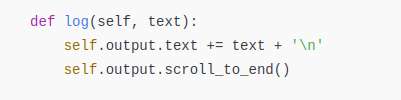
                              The text from the Arduino arrives in the log() function:

                              Screenshot From 2025-12-25 09-51-38

                              This appends the input to a text buffer and then displays the end of the buffer on screen, which is exactly what DSD-TECH does.  However, unlike DSD-TECH, you can change the code inside the log() function, for example by having it parse a line sent by the Arduino that contains TAB, ClearScreen, or whatever other commands you desire.   Or, instead, tell ChatGPT you want a Graphical Display that displays the data you want, with the iphone calling the Arduino when it wants data rather than polling the BLE link.

                              Quite a few on the forum have difficulty accepting AI works.  Bad news for them, it does!  Not perfect, but far, far better than the naysayers believe.   Like it or not, it’s a game-changer.

                              Dave


                              #829925
                              Speedy Builder5
                              Participant
                                @speedybuilder5

                                Thanks Dave, just about to sit-down to Christmas lunch, so will be off-air for a couple of days.

                                Bob

                                #829997
                                Macolm
                                Participant
                                  @macolm

                                  One way a battery powered circuit can switch reasonable power is to use a latching relay. Unfortunately these seem to be little known in the UK, but can be found. A typical device has two coils, one for each state of the contacts, and needs a few milliseconds of applied current to change state, then stays in that state without further power to the coil. A necessary disadvantage is that the opposite coil must be similarly powered to reverse the state.

                                  A capacitor can be chosen to contain the correct charge so that the battery does not “see” the full coil current.

                                Viewing 15 posts - 1 through 15 (of 15 total)
                                • Please log in to reply to this topic. Registering is free and easy using the links on the menu at the top of this page.

                                Latest Replies

                                Viewing 25 topics - 1 through 25 (of 25 total)
                                Viewing 25 topics - 1 through 25 (of 25 total)

                                View full reply list.