
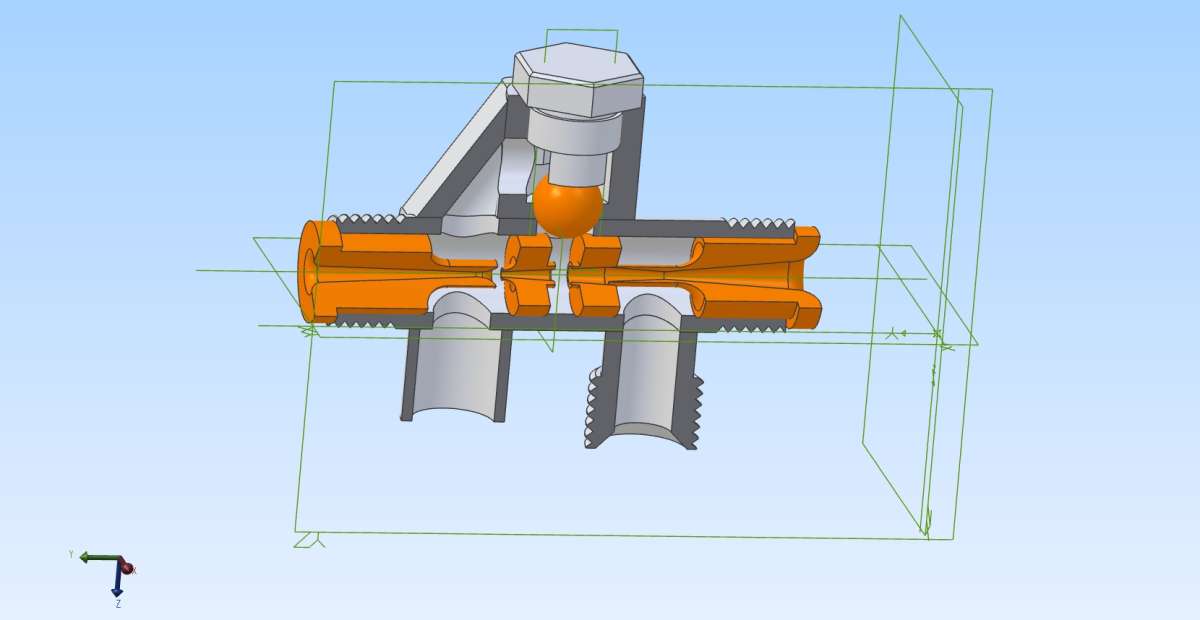
Re Inserting Angled Features – Completed The Alibre Model
Re Inserting Angled Features – Completed The Alibre Model
- This topic has 4 replies, 4 voices, and was last updated 23 October 2026 at 12:13 by
 Nigel Graham 2.
 Nigel Graham 2.
 Nigel Graham 2
 David Jupp
 blowlamp
 John Hinkley
- Please log in to reply to this topic. Registering is free and easy using the links on the menu at the top of this page.
Latest Replies
-
- Topic
- Voices
- Last Post
-
-
Myford
1
2
Started by:
Michael Gilligan
in: Manual machine tools
- 15
-
19 November 2026 at 16:00
jaCK Hobson
-
Brass bar
Started by:
Dalboy
in: Materials
- 6
-
19 November 2026 at 15:14
Speedy Builder5
-
problem with my warco wm250 not starting
Started by:
Geoff Byman
in: Manual machine tools
- 4
-
19 November 2026 at 15:11
Dave Halford
-
Open Source everything.
Started by:
blowlamp
in: CAD – Technical drawing & design
- 2
-
19 November 2026 at 14:52
Roderick Jenkins
-
We are only here to help!
Started by:
Geoff Dunsby
in: General Questions
- 4
-
19 November 2026 at 12:32
JA
-
DOL starter for 0.5 HP 3 phase motor.
Started by:
Andrew Tinsley
in: General Questions
- 8
-
19 November 2026 at 12:02
noel shelley
-
Swarf and scrap
Started by:
Geoff Dunsby
in: General Questions
- 14
-
19 November 2026 at 09:46
JA
-
Colchester Bantam Mk1
Started by:
Graeme Seed
in: Workshop Tools and Tooling
- 8
-
18 November 2026 at 21:02
Chris Gunn
-
Chuck Strip
Started by:
Speedy Builder5
in: Workshop Tools and Tooling
- 8
-
18 November 2026 at 20:22
Speedy Builder5
-
Emco Compact 5 Modifications
1
2
…
5
6
Started by:
Graham Meek
in: Manual machine tools
- 14
-
18 November 2026 at 17:05
Graham Meek
-
Adaptation of the Proxxon Milling machine
1
2
3
Started by:
Graham Meek
in: Manual machine tools
- 13
-
18 November 2026 at 17:01
Graham Meek
-
How do I create a new post
Started by:
Geoff Byman
in: Beginners questions
- 3
-
18 November 2026 at 17:00
Geoff Byman
-
Basic CAD software
Started by:
John MC
in: CAD – Technical drawing & design
- 13
-
18 November 2026 at 16:30
Roderick Jenkins
-
MMA/MIG Welder – Any recomendations
Started by:
IanT
in: Workshop Tools and Tooling
- 13
-
18 November 2026 at 14:02
Geoff Dunsby
-
Replace power saw gear
Started by:
David George 1
in: Workshop Tools and Tooling
- 5
-
18 November 2026 at 12:08
Dave Halford
-
Vintage instructions wanted
Started by:
Chris Kirby 1
in: Help and Assistance! (Offered or Wanted)
- 6
-
18 November 2026 at 10:33
Chris Kirby 1
-
opposed twin i/c engine
Started by:
bricky
in: Help and Assistance! (Offered or Wanted)
- 3
-
18 November 2026 at 00:36
Graeme Seed
-
Drill grinding for drilling copper?
Started by:
Andrew Tinsley
in: General Questions
- 9
-
17 November 2026 at 18:48
Julie Ann
-
Steam Models in the Museum in Lauf near Nuremberg
Started by:
Werner Schleidt
in: Exhibitions, Shows and Club Events
- 6
-
17 November 2026 at 17:47
Werner Schleidt
-
SolidCraft Features.
Started by:
blowlamp
in: CAD – Technical drawing & design
- 6
-
17 November 2026 at 14:51
Bazyle
-
Mist coolant
Started by:
Geoff Dunsby
in: Workshop Tools and Tooling
- 6
-
17 November 2026 at 13:55
Geoff Dunsby
-
Parting off
1
2
3
Started by:
Peter Simpson 3
in: Beginners questions
- 25
-
16 November 2026 at 22:57
duncan webster 1
-
Bassett Lowke 2 1/2″ A1 progress report
Started by:
AJBAJB
in: Locomotives
- 2
-
16 November 2026 at 15:24
AJBAJB
-
What Did You Do Today 2026
1
2
…
10
11
Started by:
JasonB
in: The Tea Room
- 56
-
16 November 2026 at 05:59
Speedy Builder5
-
Help needed (measurements for power feed build FB-2 clone)
Started by:
engineeredbyhansson
in: Manual machine tools
- 1
-
15 November 2026 at 18:47
engineeredbyhansson
-
Myford
1
2
 Michael Gilligan
 jaCK Hobson
 Dalboy
 Speedy Builder5
 Geoff Byman
 Dave Halford
 blowlamp
 Roderick Jenkins
 Geoff Dunsby
 JA
 Andrew Tinsley
 noel shelley
 Graeme Seed
 Chris Gunn
 Graham Meek
 John MC
 IanT
 David George 1
 Chris Kirby 1
 bricky
 Julie Ann
 Werner Schleidt
 Bazyle
 Peter Simpson 3
 duncan webster 1
 AJBAJB
 JasonB
 engineeredbyhansson