Formatting Forum Posts

Formatting Forum Posts

Home Forums General Questions Formatting Forum Posts

Viewing 15 posts - 1 through 15 (of 15 total)
  • Author
    Posts
  • #298228
    Speedy Builder5
    Participant
      @speedybuilder5

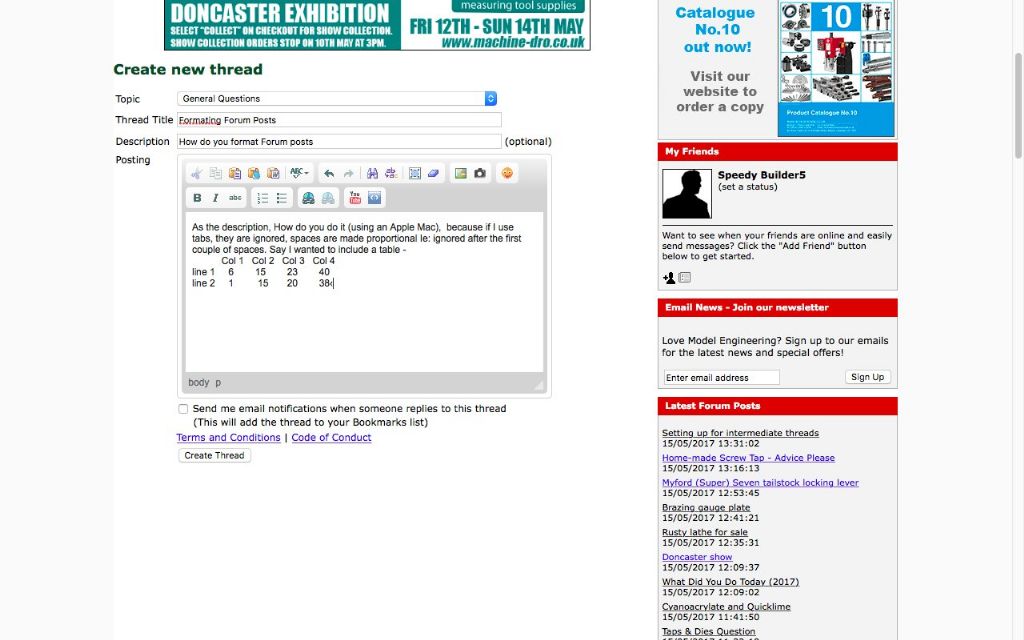
      As the description, How do you do it (using an Apple Mac), because if I use tabs, they are ignored, spaces are made proportional Ie: ignored after the first couple of spaces. Say I wanted to include a table –

      Col 1 Col 2 Col 3 Col 4
      line 1 6 15 23 40
      line 2 1 15 20 38

      Now look at the attached photo, the text isn't like the photo (is it ?).  Sorry, screen shot is a .png file and can't be attached.  I will see if I can convert to .JCB format !!

      Edited By Speedy Builder5 on 15/05/2017 13:51:13

      Ahah!  The screen shot is what I entered and as you see, bears little resemblance to what you read in my post.

      screen_shot_2017-05-15_at_14_40_50.jpg

      Edited By Speedy Builder5 on 15/05/2017 13:59:27

      #25236
      Speedy Builder5
      Participant
        @speedybuilder5

        How do you format Forum posts

        #298233
        Russ B
        Participant
          @russb

          I've had success just copying and pasting straight from a spreadsheet (excel)

          Col 1 Col 2 Col 2 Col 4
          Line 1 6 15 23 40
          Line 2 1 15 20 38

          #298236
          Speedy Builder5
          Participant
            @speedybuilder5

            Is there a Null Posting area where you could play around with post formatting, photos, links etc without them being visible (Ie getting mixed up with 'Live' posts).
            BobH

            #298237
            SillyOldDuffer
            Moderator
              @sillyoldduffer

              Col 1 Col 2 Col 3 Col 4

              5 15 23 40

              1 15 20 38

              This was done by inserting hard-spaces (Unicode 0x00A0) rather than using the space bar or tab.

              It's HORRIBLE and I'm not even sure it will work.

              Edit:  And it didn't.  0 out of ten. 


              Edited By SillyOldDuffer on 15/05/2017 14:06:52

              #298255
              Thor 🇳🇴
              Participant
                @thor

                If I need formatting in my post I do as Russ, and use a word processor – like Microsoft Word – and just Paste and Copy. Here is a table:

                Col. 1

                Col. 2

                Col. 3

                Col. 4


                Thor

                Edit: Table too wide unfortunately.

                Edited By Thor on 15/05/2017 16:32:09

                #298270
                Michael Gilligan
                Participant
                  @michaelgilligan61133
                  Posted by Speedy Builder5 on 15/05/2017 14:01:45:

                  Is there a Null Posting area where you could play around with post formatting, photos, links etc without them being visible (Ie getting mixed up with 'Live' posts).
                  BobH

                  .

                  In a word … Yes

                  **LINK**

                  http://www.model-engineer.co.uk/forums/postings.asp?th=99158

                  MichaelG.

                  #298285
                  Speedy Builder5
                  Participant
                    @speedybuilder5

                    Michael – your link adds the posting to the TEST THREAD which is 'public' in the Latest Forum Posts column which is definitely not 'NullPosting'
                    BobH

                    #298288
                    Michael Gilligan
                    Participant
                      @michaelgilligan61133
                      Posted by Speedy Builder5 on 15/05/2017 18:51:10:

                      Michael – your link adds the posting to the TEST THREAD which is 'public' in the Latest Forum Posts column which is definitely not 'NullPosting'
                      BobH

                      .

                      Forgive my lack of understanding, Bob

                      I thought you just wanted a place to test post without prompting a discussion.

                      MichaelG.

                      #298303
                      Neil Wyatt
                      Moderator
                        @neilwyatt
                        Posted by Michael Gilligan on 15/05/2017 17:59:47:

                        Posted by Speedy Builder5 on 15/05/2017 14:01:45:

                        Is there a Null Posting area where you could play around with post formatting, photos, links etc without them being visible (Ie getting mixed up with 'Live' posts).
                        BobH

                        .

                        In a word … Yes

                        **LINK**

                        http://www.model-engineer.co.uk/forums/postings.asp?th=99158

                        MichaelG.

                        Thanks Michael :-

                        Tables – post from spreadsheet, then right click and properties and be prepared to experiment…

                        Right click also allows you to rotate images.

                        Neil

                        #298304
                        Neil Wyatt
                        Moderator
                          @neilwyatt

                          Sorry- routine is left click on table, then right click and choose edit table, then set column width – try 30.

                            Col 1 Col 2 Col 2 Col 4
                          Line 1 6 15 23 40
                          Line 2 1 15 20 38

                          Edited By Neil Wyatt on 15/05/2017 20:18:49

                          #298339
                          peak4
                          Participant
                            @peak4
                            Posted by Neil Wyatt on 15/05/2017 20:17:09:

                            Sorry- routine is left click on table, then right click and choose edit table, then set column width – try 30.

                              Col 1 Col 2 Col 2 Col 4
                            Line 1 6 15 23 40
                            Line 2 1 15 20 38

                            Edited By Neil Wyatt on 15/05/2017 20:18:49


                            Neil, been having a play with that on the test thread, before I saw your answer.

                            I think the forum software bases the size display on the contents of the table.

                            I found specifying column width caused a problem, but specifying Table width seems to work OK

                            14cm seems to fit in the display box on the forum OK; well that's using Opera as the browser anyway.


                            Well that's weird. my first version of this reply wrapped my text to the right of your table, so I added 3 line feeds, only to find my text a mile below your table. I then deleted the 3 line feeds in "Edit Post", just like when I added them, only now it displays reasonably.

                            It would seem that What You See in preview, or Edit Post isn't what you get when you submit post or save changes.

                            Well that's even weirder, I haven't changed the text size.

                            Edited By peak4 on 15/05/2017 22:11:13

                            Edited By peak4 on 15/05/2017 22:12:03

                            #298348
                            Neil Wyatt
                            Moderator
                              @neilwyatt

                              The forum editor is God-Like.

                              It moves text in mysterious ways.

                              #298361
                              Ed Duffner
                              Participant
                                @edduffner79357

                                Testing 1 2 3

                                Testing 1 2 3

                                Just checking something. The two lines above were typed into Textpad using Courier font, complete with tabs. Then copied to the clipboard and pasted using 'Paste as plain text' and 'Paste' from the menu buttons . The forum editor converts tabs to spaces for both instances. Perhaps it's configurable in the editor on the server side as to how plain text is pasted?

                                Ed.

                                Edited By Ed Duffner on 16/05/2017 01:44:47

                                #298364
                                Thor 🇳🇴
                                Participant
                                  @thor

                                  Test – forum formatting

                                  Col 1

                                  Col 2

                                  Col 3

                                  Col 4

                                  Line 1


                                  Line 2


                                  Let us try superscript: x2

                                  And subscript: H2O


                                  Thor

                                  Edit: Thanks Neil, this test is from LibreOffice

                                  Edited By Thor on 16/05/2017 05:39:22

                                Viewing 15 posts - 1 through 15 (of 15 total)
                                • Please log in to reply to this topic. Registering is free and easy using the links on the menu at the top of this page.

                                Latest Replies

                                Home Forums General Questions Topics

                                Viewing 25 topics - 1 through 25 (of 25 total)
                                Viewing 25 topics - 1 through 25 (of 25 total)

                                View full reply list.