scanner problems

scanner problems

Viewing 25 posts - 1 through 25 (of 25 total)
  • Author
    Posts
  • #841338
    duncan webster 1
    Participant
      @duncanwebster1

      I have a Canon LIDE220 scanner. It worked perfectly until I got a new PC. Old one ran W10, this is W11. Sometimes it says something about releasing the carriage lock (which isn’t on, I’ve tried lock and unlock) sometimes it scans but produces a black image. This happened exactly when got new PC, could be coincidence I suppose. I’ve tried deleting and reinstalling the scanner, and once when I tried this it worked, but not next time I tried to use it. I’ve tried updating the driver.


      Anyone got any good ideas?

      #841340
      David Jupp
      Participant
        @davidjupp51506

        A lot of hardware becomes useless because the manufacturer doesn’t provide drivers for newer operating systems.

        Software such as VueScan may get around that for you (but check the compatibility before spending any money).

        #841341
        David Jupp
        Participant
          @davidjupp51506

          A lot of hardware becomes useless because the manufacturer doesn’t provide drivers for newer operating systems.

          Software such as VueScan may get around that for you (but check the compatibility before spending any money).

          #841348
          Nicholas Farr
          Participant
            @nicholasfarr14254

            Hi Duncan, I had similar problems when my scanners worked on XP and Vista, while they still work on XP and Vista, they just refused to work on W10 or W11, whatever I tried. At first I thought the scanners were at fault, but as they still work on my Visa and its predecessors, it’s obviously the scanners are not at fault at all.

            Regards Nick.

            #841353
            Fulmen
            Participant
              @fulmen

              I managed to keep my old scanner running with VMWare and a suitable vintage OS. Kept offline of course. Should still work, although I haven’t tried it for ages.

              #841354
              Peter Cook 6
              Participant
                @petercook6

                If you are brave enough, I would open up the scanner and try cleaning the guide rails. The symptoms you describe suggest the scanning carriage is sticking.

                When you got the new computer, did you move the scanner to a new place? Is it possible that it is slightly twisted, which could cause the sticking.

                #841362
                Michael Gilligan
                Participant
                  @michaelgilligan61133

                  Vue Scan looks the best hope to me … there is a ‘try before you buy’ option.

                  https://www.hamrick.com/about-vuescan.html

                  MichaelG.

                  #841364
                  peak4
                  Participant
                    @peak4

                    Are you using Windows Update to search for the best driver, using your existing W10 one, or have you downloaded the driver from Canon, specifically for W11?
                    http://www.canon.co.uk/support/consumer/products/scanners/canoscan/lide-series/canoscan-lide-220.html

                    Bill

                    #841365
                    Grindstone Cowboy
                    Participant
                      @grindstonecowboy

                      Canon have a Windows 11 compatible driver (1.04) for this scanner

                      https://www.canon.co.uk/support/consumer/products/scanners/canoscan/lide-series/canoscan-lide-220.html

                      If that doesn’t work after installing it properly according to their instructions, then it’s likely you have a mechanical problem as Peter suggests above – the fact that it sometimes gives a message and sometimes doesn’t would seem to confirm this.

                      Rob

                      Edit – Bill got there first!

                      #841371
                      duncan webster 1
                      Participant
                        @duncanwebster1

                        Thanks I’ll have a go and report back

                        #841444
                        Peter Cook 6
                        Participant
                          @petercook6

                          Duncan, Open the lid and ask the scanner to scan. Does the scanning carriage move?

                          My memory of the one I had a few years ago was that the carriage lock was just that a physical latch that prevented the scanning bar from moving. Hence my suggestions about cleaning the bars.

                          #841455
                          Dick H
                          Participant
                            @dickh

                            Try the NAPS2 program  (Not  Another pdf Scanner 2) from the Microsoft Store.

                            #841471
                            Vic
                            Participant
                              @vic

                              I have an old Canon Scanner. As mentioned, manufacturers don’t seem to keep up with the software for them. I did manage to continue using it with some third party software, not sure of the type. Not used now though as I bought an Epson printer with built in scanner. It’s often asking if it can download updates so I’m hopeful it will keep itself up to date.

                              A similar issue seems to happen with TV apps. A friend of mine can’t watch iPlayer because his app is out of date. The answer seems to be something like Amazon Fire TV but he won’t spend the £23.99 for it.

                              #841571
                              duncan webster 1
                              Participant
                                @duncanwebster1

                                I updated the driver as above. Now it reliably moves the scan head out and back, but doesn’t turn the LEDs on. Next move is to try the NAPS2 driver, but decorating keeps getting in the way. Jobs that used to take a couple of hours now take a couple of days.

                                I’ll keep you posted, but thanks for the suggestions so far

                                #841585
                                Vic
                                Participant
                                  @vic

                                  I remember now, it was this software I used on my CanoScan LiDE 500F.

                                  https://www.hamrick.com

                                  #841604
                                  Packmule
                                  Participant
                                    @packmule

                                    On windows 10 there was a compatibility that you could use for programs from previous versions of windows .

                                    To run a program in compatibility mode on Windows 11, right-click its shortcut/file, select Properties, go to the Compatibility tab, and check “Run this program in compatibility mode for,” then select a previous Windows version. This allows older software to run by simulating older Windows environments.

                                    Hope it works

                                    #841609
                                    Alan Jackson
                                    Participant
                                      @alanjackson47790

                                      I have just spent all day trying to get my Canon Eid 300 to work on win 11. It worked perfectly on Win 10. I tried all the sugested ideas from wonderfully helpful Microsoft – not. In the end I went to the Canon site and where it gave me the option for win 10 or win 11 operating details I just copied the U scan utility for win 10 and saved on my task bar at the bottom of the screen and it works as it used to. I also had a trouble finding the scanned pictures they are now located here C:\Users\Pictures.

                                      If there is any requirements for help & assitance the last organisation to ask is Microsoft in my opinion.

                                      Alan

                                      #841652
                                      HOWARDT
                                      Participant
                                        @howardt

                                        I use Silverfast scanner software currently on my desktop Mac Studio but have used it for years starting probably with Windows 7 and the same scanner.  Over the years I have gone from Windows to Mac OS and updated the software, including paid for upgrades.  The  software is not cheap but of you do a lot of scanning it is worthwhile, I mainly scan old documents and photos.

                                        Seems to me that you have a compatability problem and software driver is the only solution.  As has been said check the compatability chart for your actual scanner and Windows version.  Vuescan and Hemrick will continue to work once bought for your scanner, but it is tied to your specific model.

                                        #841667
                                        Frances IoM
                                        Participant
                                          @francesiom58905

                                          vuescan, at least the version I bought, has worked for every scanner I’ve tried (on a different point logging into this site gets worse – my guess is that the owners are maximising funds received by selling users info)

                                          #841756
                                          duncan webster 1
                                          Participant
                                            @duncanwebster1

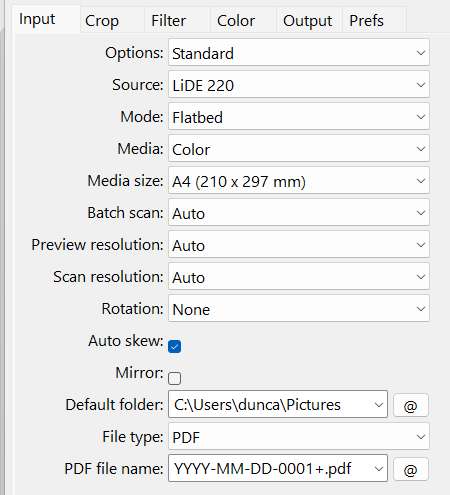
                                            Downloaded VueScan, and it makes the scanner do sensible looking things, the carriage moves, the LED bar is on, and I get an image on the computer screen of what is on the scanner. When it opens I just close the window which is asking me to pay. However, the saved fie appears to be 2 files of text, a .cal file and a spreadsheet, no pdf. I’m sure it is a setup issue, but it has me baffled. This is what I get if I click the output tab. Can anyone help?

                                            Screenshot 2026-03-20 204607


                                            #841758
                                            duncan webster 1
                                            Participant
                                              @duncanwebster1

                                              Decorating nearly finished, at least until SWMBO decides what colour to paint the walls in the new bit. I’m keeping a low profile!

                                              #841775
                                              Nicholas Farr
                                              Participant
                                                @nicholasfarr14254

                                                Hi Duncan, I had much the same thing, and it was asking me to pay on what was supposed to be a free trial, although it did scan, but nothing was saved, and so I deleted the app, and what they where going to charge annually, wasn’t worth the value, and I rather buy a new scanner, meanwhile it still work happily on my old Desktop. I guess the free trial is just to show that it works.

                                                Regards Nick.

                                                #842473
                                                duncan webster 1
                                                Participant
                                                  @duncanwebster1

                                                  Just tried te NAPS2 driver, it moves the scanner bar, but doesn’t turn on the LEDs, so black image. Tried the VueScan again, this time it too produced a black image. I think it’s time to call it a day and buy a new scanner

                                                  #842475
                                                  Grindstone Cowboy
                                                  Participant
                                                    @grindstonecowboy

                                                    If scrapping it, don’t forget the handy ground bars and stepper motor that can be salvaged. Or is it just me that does that, and then throws the bits away, untouched, twenty years later? 🙂

                                                    Rob

                                                    #842476
                                                    Fulmen
                                                    Participant
                                                      @fulmen

                                                      *cough*

                                                      I have no idea what you’re talking about.

                                                      *cough*

                                                    Viewing 25 posts - 1 through 25 (of 25 total)
                                                    • Please log in to reply to this topic. Registering is free and easy using the links on the menu at the top of this page.

                                                    Latest Replies

                                                    Viewing 25 topics - 1 through 25 (of 25 total)
                                                    Viewing 25 topics - 1 through 25 (of 25 total)

                                                    View full reply list.