
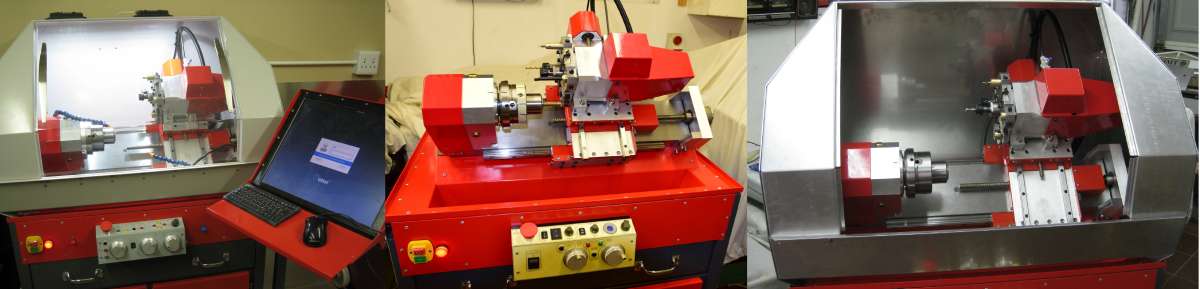
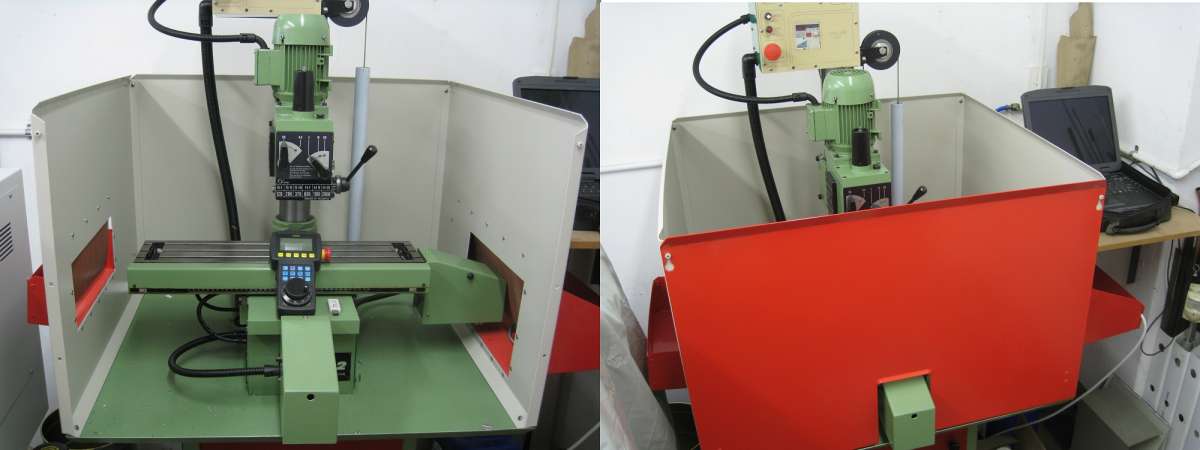
Trying a new controller
Trying a new controller
- This topic has 6 replies, 5 voices, and was last updated 9 November 2026 at 19:45 by
 Geoff Dunsby.
 Geoff Dunsby.
 John Haine
 Huub
 Roderick Jenkins
 Joseph Noci 1
 Geoff Dunsby
- Please log in to reply to this topic. Registering is free and easy using the links on the menu at the top of this page.
Latest Replies
-
- Topic
- Voices
- Last Post
-
-
Hello! …and help
Started by:
sbruce886
in: Introduce Yourself – New members start here!
- 1
-
9 November 2026 at 19:51
sbruce886
-
Annoying advert
Started by:
Dalboy
in: The Tea Room
- 9
-
9 November 2026 at 19:51
Dalboy
-
Trying a new controller
Started by:
John Haine
in: CNC machines, Home builds, Conversions, ELS, automation, software, etc tools
- 5
-
9 November 2026 at 19:45
Geoff Dunsby
-
Pendulum Rod Weight Tray
Started by:
John Purdy
in: Clocks and Scientific Instruments
- 4
-
9 November 2026 at 19:27
Joseph Noci 1
-
3d Printed Carriage Stop for Warco WM180
Started by:
James A
in: Workshop Tools and Tooling
- 12
-
9 November 2026 at 19:19
John MC
-
Richard Simmonds’ “How To Make A Weight Driven Clock”
1
2
Started by:
iacooper
in: Clocks and Scientific Instruments
- 13
-
9 November 2026 at 19:11
John Purdy
-
hello!
Started by:
poli2
in: Introduce Yourself – New members start here!
- 3
-
9 November 2026 at 18:01
noel shelley
-
The NCSC warns that …
Started by:
Michael Gilligan
in: The Tea Room
- 13
-
9 November 2026 at 17:50
noel shelley
-
Physcad
1
2
Started by:
Ron Colvin
in: CAD – Technical drawing & design
- 11
-
9 November 2026 at 17:18
Fulmen
-
New Mystery Lathe
Started by:
mart7mcfl7
in: Manual machine tools
- 8
-
9 November 2026 at 15:11
JasonB
-
Tiny Heliocentric Orrery
Started by:
Michael Gilligan
in: Clocks and Scientific Instruments
- 2
-
9 November 2026 at 09:42
Ches Green UK
-
Stepper Motor for Leadscrew
1
2
Started by:
James A
in: Workshop Tools and Tooling
- 13
-
9 November 2026 at 09:04
Nick Wheeler
-
2inch Fowler plans
Started by:
bob53page
in: Traction engines
- 7
-
9 November 2026 at 05:35
Walt Nehse
-
Searching for “The Pennsylvania A3 Switcher” by Kozo Hiraoka
Started by:
timdotd
in: Books
- 7
-
8 November 2026 at 22:51
Grindstone Cowboy
-
Mitutoyo Dial Calliper dial?
Started by:
Bo’sun
in: Workshop Tools and Tooling
- 4
-
8 November 2026 at 17:42
Martin Johnson 1
-
Lubricating a high helix worm in a Mercer indicator
Started by:
Mark Davison 1
in: Clocks and Scientific Instruments
- 7
-
8 November 2026 at 17:15
Bo’sun
-
New Guy
Started by:
mart7mcfl7
in: Introduce Yourself – New members start here!
- 3
-
8 November 2026 at 11:24
Howard Lewis
-
My week this week! My workshop videos
1
2
…
13
14
Started by:
Phil Whitley
in: The Tea Room
- 16
-
7 November 2026 at 15:52
Phil Whitley
-
* machiens listed on Ebay at silly start prices to clear due to house sale
Started by:
frippy
in: Workshop Tools and Tooling
- 2
-
7 November 2026 at 11:31
Michael Gilligan
-
Micrometer ratchets
Started by:
Graeme Seed
in: Workshop Tools and Tooling
- 13
-
7 November 2026 at 11:06
Andrew Crow
-
SolidCraft Features.
Started by:
blowlamp
in: CAD – Technical drawing & design
- 5
-
7 November 2026 at 10:44
blowlamp
-
WAR FINISH
Started by:
Speedy Builder5
in: The Tea Room
- 14
-
7 November 2026 at 09:52
noel shelley
-
Stronger Filament
1
2
Started by:
BOB BLACKSHAW 1
in: 3D Printers and 3D Printing
- 13
-
7 November 2026 at 07:30
BOB BLACKSHAW 1
-
Inserts type for old milling cutter
Started by:
Sonic Escape
in: General Questions
- 7
-
6 November 2026 at 19:06
Phil Cox
-
Mitotoyo dial caliper battery or innards.
Started by:
Clive Farrar
in: General Questions
- 12
-
6 November 2026 at 18:12
bernard towers
-
Hello! …and help
 sbruce886
 Dalboy
 John Haine
 John Purdy
 Joseph Noci 1
 James A
 John MC
 iacooper
 poli2
 noel shelley
 Michael Gilligan
 Ron Colvin
 Fulmen
 mart7mcfl7
 JasonB
 Ches Green UK
 Nick Wheeler
 bob53page
 Walt Nehse
 timdotd
 Grindstone Cowboy
 Bo’sun
 Martin Johnson 1
 Mark Davison 1
 Howard Lewis
 Phil Whitley
 frippy
 Graeme Seed
 Andrew Crow
 blowlamp
 Speedy Builder5
 BOB BLACKSHAW 1
 Sonic Escape
 Phil Cox
 Clive Farrar
 bernard towers